cancel
Showing results for 
Show  only  | Search instead for 
Did you mean: 

Image Capture - what am I looking at?

toothfairy
Contributor

Screenshot 2023-11-28 at 9.44.58 AM.png

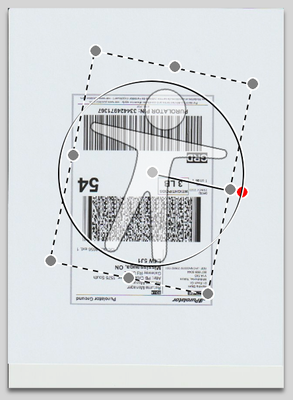
 This is a screenshot from Image Capture. I understand that the large rectangle is the size of the area that is going to be scanned - but  what is the short horizontal line for?

2 REPLIES 2

kvbarkley
VIP
VIP

If I remember right, that is what it determines as another place you might want to scan as a crop.

Thank you for answering KV. I'm not sure exactly what the line function is meant to be used for - I wish the documentation on Image Capture was more thorough. I played a bit with the line and both ends of the line are "live" meaning that they turn red and can then be moved with the trackpad. From what I can ascertain, the handle on the line inside the rectangle is simply used to move the selection rectangle around. The handle on the outside of the line though, seems to be for rotating the selection area as shown in the screenshot.

Screenshot 2023-11-28 at 6.40.44 PM.png

Holiday
Announcements

12/18/2025: New firmware updates are available.

EOS C400 - Version 1.0.4.1

EOS C80 - Version 1.0.4.1

XF605 - Version 1.0.7.1


12/15/2025: New firmware update available for EOS C50 - Version 1.0.1.1

11/20/2025: New firmware updates are available.

EOS R6 Mark III - Version 1.0.1

EOS R3 - Version 2.0.0

EOS R1 - Version 1.2.0

EOS R5 Mark II - Version 1.2.0

EOS R5 - Version 2.2.1

PowerShot G7 X Mark III - Version 1.4.0

PowerShot SX740 HS - Version 1.0.2


10/21/2025: Service Notice: To Users of the Compact Digital Camera PowerShot V1

10/15/2025: New firmware updates are available.

Speedlite EL-5 - Version 1.2.0

Speedlite EL-1 - Version 1.1.0

Speedlite Transmitter ST-E10 - Version 1.2.0


07/28/2025: Notice of Free Repair Service for the Mirrorless Camera EOS R50 (Black)

7/17/2025: New firmware updates are available.

EOS R7 - Version 1.7.1

EOS R10 - Version 1.7.0

EOS R8 - Version 1.5.0

EOS R50 - Version 1.4.0

Powershot V10 - Version 1.4.0

Powershot V1 - Version 1.1.0

EOS R50V - Version 1.1.1


05/21/2025: New firmware update available for EOS C500 Mark II - Version 1.1.5.1

02/20/2025: New firmware updates are available.

RF70-200mm F2.8 L IS USM Z - Version 1.0.6

RF24-105mm F2.8 L IS USM Z - Version 1.0.9

RF100-300mm F2.8 L IS USM - Version 1.0.8

RF50mm F1.4 L VCM - Version 1.0.2

RF24mm F1.4 L VCM - Version 1.0.3


01/22/2024: Canon Supports Disaster Relief Efforts in California
01/14/2025: Steps to resolve still image problem when using certain SanDisk SD cards with the Canon EOS R5 Mark II
