Turn on suggestions
Auto-suggest helps you quickly narrow down your search results by suggesting possible matches as you type.
- Canon Community
- Discussions & Help
- Printer
- Printer Software & Networking
- Canon MG3550 won't print images.
Options
- Subscribe to RSS Feed
- Mark Topic as New
- Mark Topic as Read
- Float this Topic for Current User
- Bookmark
- Subscribe
- Mute
- Printer Friendly Page
Canon MG3550 won't print images.

Options
- Mark as New
- Bookmark
- Subscribe
- Mute
- Subscribe to RSS Feed
- Permalink
- Report Inappropriate Content
10-09-2018 02:25 PM
After I had to change hard drive on my PC and reinstall Windows (now Windos 10 Pro version 1803) the printer won't print images (doesn't matter if it's jpeg, png or bmp). It takes paper and makes noise as if it was printing but the page comes out blank.
I am able to print txt or docx files normally and also pictures in the document or when I print them from Painting or GIMP, but not direcly from the folder or from any image viewer (I tried two different).
Removing the driver and installing it again didn't help.
2 REPLIES 2


Options
- Mark as New
- Bookmark
- Subscribe
- Mute
- Subscribe to RSS Feed
- Permalink
- Report Inappropriate Content
10-09-2018 02:48 PM
Hi va333,
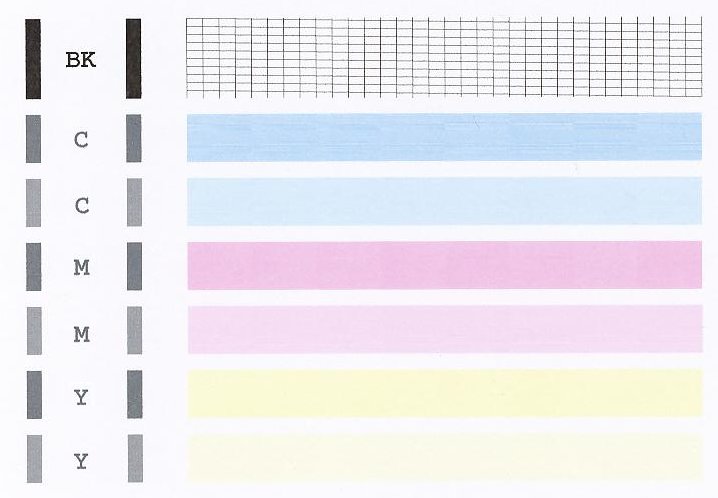
A test page should be printed. The nozzle check pattern shows if each print head nozzle is operating properly. To do this, please follow these steps:
1. Make sure that your PIXMA MG3550 is turned on.
2. Load a sheet of Letter-sized plain paper in the front tray.
3. Open the output tray extension, open the paper output tray, then extend the paper output support.
4. Hold down the Stop button until the Alarm lamp flashes orange once, then release it immediately.
5. The nozzle check pattern will be printed. Please compare the test page that you printed with the one that has been attached to the bottom of this post.
If the test page does not match the example attached to this email, printhead cleanings should be performed. To do this, please follow these steps:
1. Hold down the Stop button until the Alarm lamp flashes orange twice, then release it immediately.
2. The machine starts cleaning the print head. The cleaning will be complete when the ON lamp lights green after flashing.
Do not perform any other operations until the machine completes the cleaning of the print head. This takes about 1 to 2 minutes.
After performing a few cleanings, please print another test page.
Does the test page print correctly? If not, please contact our support group using the following link:
http://Canon.us/ContactLI
Options
- Mark as New
- Bookmark
- Subscribe
- Mute
- Subscribe to RSS Feed
- Permalink
- Report Inappropriate Content
10-09-2018 03:14 PM - edited 10-09-2018 03:17 PM
There was no problem with the test page, however the printer won't print images from the computer.
But I see now that I likely posted in wrong subforum.

Announcements
07/22/2026: New firmware updates are available.
EOS R6 Mark III - Version 1.1.0
05/13/2026: New firmware updates are available.
EOS R5 Mark II - Version 1.3.0
EOS R6 Mark II - Version 1.7.0
04/28/2026: Service Notice: Caution Concerning use of Lithium Batteries
03/17/2026: New firmware updates are available.
SELPHY CP1500 - Version 1.0.7.0
02/23/2026: New firmware update is available for EOS C50- Version 1.0.3.1
01/23/2026: New firmware update is available for RF 24-105mm F4 IS USM- Version 2.0.7
01/20/2026: New firmware updates are available.
10/21/2025: Service Notice: To Users of the Compact Digital Camera PowerShot V1
10/15/2025: New firmware updates are available.
Speedlite EL-5 - Version 1.2.0
Speedlite EL-1 - Version 1.1.0
Speedlite Transmitter ST-E10 - Version 1.2.0
07/28/2025: Notice of Free Repair Service for the Mirrorless Camera EOS R50 (Black)
05/21/2025: New firmware update available for EOS C500 Mark II - Version 1.1.5.1
Related Content
- MF753Cdw Color Adjustment, difficulty adjusting the color for graphics output in Office Printers
- PIXMA iP8750 won't print via mobile hotspot connection in Printer Software & Networking
- Professional Print & Layout: How to print borderless at 11" x 17" in Printer Software & Networking
- PIXMA PRO-100 prints in sepia when I print in black and white in Professional Photo Printers
- Canon Pixma TR4722 won't print yellow in Desktop Inkjet Printers

Ⓒ 2026
Canon U.S.A Inc. All Rights Reserved. Reproduction in whole or part without permission is prohibited.
