12-22-2022 12:40 PM
My 2017 MacBook has always worked wirelessly with my MF4890dw printer. The computer recently updated to Ventura 13.1 and it no longer connects to this printer. I tried to make it the default printer but the printer is no longer listed on the printer set up on the computer. Apple folks told me to contact Canon. I checked Canon for a new printer driver and found that this printer is now retired. Is there any way I can still connect this printer? Thanks for any information you might be able to provide.
12-22-2022 12:52 PM
Greetings,
I'm not sure where you information came from?
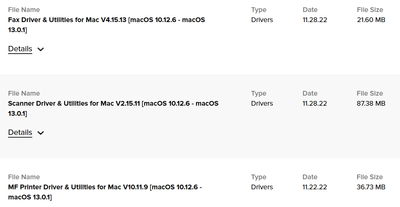
The MF4890dw is supported under OS Ventura. Drivers for it are available here:
Canon Support for imageCLASS MF4890dw | Canon U.S.A., Inc.
~Rick
Bay Area - CA
~R5 C (1.1.2.1), ~RF Trinity, ~RF 100 Macro, ~RF 100~400, ~RF 100~500, ~RF 200-800, ~RF 1.4x TC, BG-R10, 430EX III-RT ~DxO PhotoLab Elite ~DaVinci Resolve Studio ~ImageClass MF644Cdw MF656Cdw ~Pixel 10 ~CarePaks Are Worth It

05/13/2026: New firmware updates are available.
EOS R5 Mark II - Version 1.3.0
EOS R6 Mark II - Version 1.7.0
03/17/2026: New firmware updates are available.
SELPHY CP1500 - Version 1.0.7.0
01/20/2026: New firmware updates are available.
10/15/2025: New firmware updates are available.
Speedlite EL-5 - Version 1.2.0
Speedlite EL-1 - Version 1.1.0
Speedlite Transmitter ST-E10 - Version 1.2.0
Canon U.S.A Inc. All Rights Reserved. Reproduction in whole or part without permission is prohibited.

