cancel
Showing results for 
Show  only  | Search instead for 
Did you mean: 

Accounting manager does not calculate costs

jecruz
Apprentice

Printer: PRO-1000

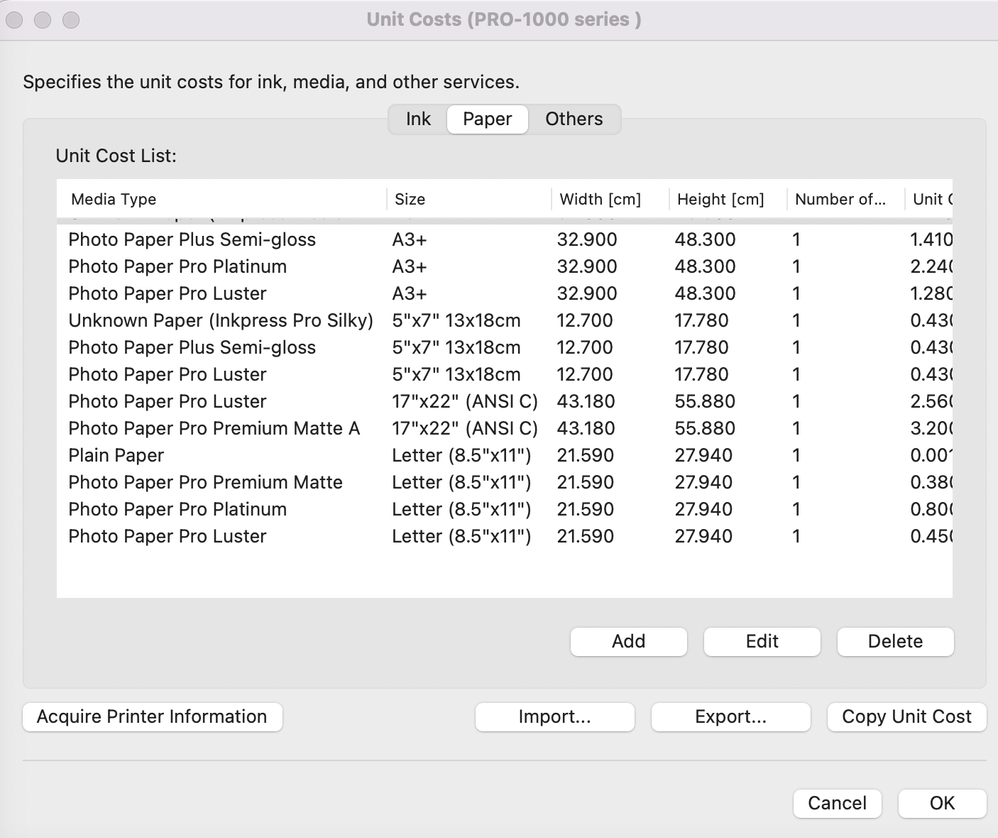
The accounting manager does not calculate costs when using a custom media type. The only way to get it to calculate costs is to create a duplicate and change the media type to one of the Canon media types. This causes the actual paper type not to be tracked. For example, I created an entry for Inkpress Pro Silky, but the cost isn't calculated, and the media type appears as "Unknown". Once I duplicate it and use "Photo Paper Plus Semi-gloss" the accounting manager calculates the cost.

I am not sure if this media type is connected to the ICC profile used during the print job, as the Inkpress Pro Silky paper uses the "Photo Paper Plus Semi-gloss". If this is the case, then the software should have a section for the paper/product name to keep track of the costs of non-Canon paper.
jecruz_0-1703307464619.png


0 REPLIES 0
Holiday
Announcements

12/18/2025: New firmware updates are available.

EOS C400 - Version 1.0.4.1

EOS C80 - Version 1.0.4.1

XF605 - Version 1.0.7.1


12/15/2025: New firmware update available for EOS C50 - Version 1.0.1.1

11/20/2025: New firmware updates are available.

EOS R6 Mark III - Version 1.0.1

EOS R3 - Version 2.0.0

EOS R1 - Version 1.2.0

EOS R5 Mark II - Version 1.2.0

EOS R5 - Version 2.2.1

PowerShot G7 X Mark III - Version 1.4.0

PowerShot SX740 HS - Version 1.0.2


10/21/2025: Service Notice: To Users of the Compact Digital Camera PowerShot V1

10/15/2025: New firmware updates are available.

Speedlite EL-5 - Version 1.2.0

Speedlite EL-1 - Version 1.1.0

Speedlite Transmitter ST-E10 - Version 1.2.0


07/28/2025: Notice of Free Repair Service for the Mirrorless Camera EOS R50 (Black)

7/17/2025: New firmware updates are available.

EOS R7 - Version 1.7.1

EOS R10 - Version 1.7.0

EOS R8 - Version 1.5.0

EOS R50 - Version 1.4.0

Powershot V10 - Version 1.4.0

Powershot V1 - Version 1.1.0

EOS R50V - Version 1.1.1


05/21/2025: New firmware update available for EOS C500 Mark II - Version 1.1.5.1

02/20/2025: New firmware updates are available.

RF70-200mm F2.8 L IS USM Z - Version 1.0.6

RF24-105mm F2.8 L IS USM Z - Version 1.0.9

RF100-300mm F2.8 L IS USM - Version 1.0.8

RF50mm F1.4 L VCM - Version 1.0.2

RF24mm F1.4 L VCM - Version 1.0.3


01/22/2024: Canon Supports Disaster Relief Efforts in California
01/14/2025: Steps to resolve still image problem when using certain SanDisk SD cards with the Canon EOS R5 Mark II

