Turn on suggestions
Auto-suggest helps you quickly narrow down your search results by suggesting possible matches as you type.
- Canon Community
- Discussions & Help
- Printer
- Desktop Inkjet Printers
- HELP! My Pixma mx490 keeps wanting to print in fax...
Options
- Subscribe to RSS Feed
- Mark Topic as New
- Mark Topic as Read
- Float this Topic for Current User
- Bookmark
- Subscribe
- Mute
- Printer Friendly Page
HELP! My Pixma mx490 keeps wanting to print in fax mode

Options
- Mark as New
- Bookmark
- Subscribe
- Mute
- Subscribe to RSS Feed
- Permalink
- Report Inappropriate Content
07-02-2016 09:56 AM
Ok, so I have a Canon Pixma MX490; it keeps wanting to print as fax for some reason and this is the first time this has happened, So I uninstalled software and reinstalled but the issue still occurs... can anyone help me with this situation ? I am getting no errors....
5 REPLIES 5

Options
- Mark as New
- Bookmark
- Subscribe
- Mute
- Subscribe to RSS Feed
- Permalink
- Report Inappropriate Content
07-05-2016 05:17 PM
Hi igecko21,
In order to better assist you, please allow me to ask a couple questions:
- Which version of Windows or Macintosh are you using?
- Are you connecting wirelessly or with USB?
I look forward to your reply.
Options
- Mark as New
- Bookmark
- Subscribe
- Mute
- Subscribe to RSS Feed
- Permalink
- Report Inappropriate Content
07-06-2016 07:47 AM
Windows 7 (PC) and its connected via USB.


Options
- Mark as New
- Bookmark
- Subscribe
- Mute
- Subscribe to RSS Feed
- Permalink
- Report Inappropriate Content
07-06-2016 09:32 AM
Hi igecko21,
Please make sure that your PIXMA MX490 is set as the default printer. To do this, please follow these steps:
1. Click on Start and then Control Panel.
2. Click on Devices and Printers.
3. Right click the PIXMA MX490 series Printer and left click on "Set as default printer".
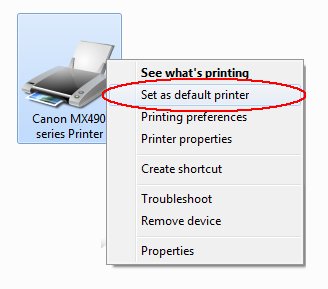
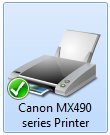
Once set, there will be a green check mark on the printer.
Please attempt to print.
If you continue to have difficulties, please contact our support group using the following link:
http://www.usa.canon.com/cusa/consumer/standard_display/contact_us_consumer
Options
- Mark as New
- Bookmark
- Subscribe
- Mute
- Subscribe to RSS Feed
- Permalink
- Report Inappropriate Content
12-26-2019 11:49 AM
I have windows 10 and my printer is connected via WIFI
Options
- Mark as New
- Bookmark
- Subscribe
- Mute
- Subscribe to RSS Feed
- Permalink
- Report Inappropriate Content
01-28-2021 12:12 PM
Did you every figure out how to fix this? I am having the same problem.


Announcements
12/15/2025: New firmware update available for EOS C50 - Version 1.0.1.1
10/21/2025: Service Notice: To Users of the Compact Digital Camera PowerShot V1
07/28/2025: Notice of Free Repair Service for the Mirrorless Camera EOS R50 (Black)
05/21/2025: New firmware update available for EOS C500 Mark II - Version 1.1.5.1
01/22/2024: Canon Supports Disaster Relief Efforts in California
01/14/2025: Steps to resolve still image problem when using certain SanDisk SD cards with the Canon EOS R5 Mark II
11/20/2025: New firmware updates are available.
EOS R6 Mark III - Version 1.0.1
EOS R5 Mark II - Version 1.2.0
PowerShot G7 X Mark III - Version 1.4.0
PowerShot SX740 HS - Version 1.0.2
10/21/2025: Service Notice: To Users of the Compact Digital Camera PowerShot V1
10/15/2025: New firmware updates are available.
Speedlite EL-5 - Version 1.2.0
Speedlite EL-1 - Version 1.1.0
Speedlite Transmitter ST-E10 - Version 1.2.0
07/28/2025: Notice of Free Repair Service for the Mirrorless Camera EOS R50 (Black)
07/24/2025: New firmware updates are available.
07/23/2025: New firmware updates are available.
7/17/2025: New firmware updates are available.
05/21/2025: New firmware update available for EOS C500 Mark II - Version 1.1.5.1
02/20/2025: New firmware updates are available.
RF70-200mm F2.8 L IS USM Z - Version 1.0.6
RF24-105mm F2.8 L IS USM Z - Version 1.0.9
RF100-300mm F2.8 L IS USM - Version 1.0.8
RF50mm F1.4 L VCM - Version 1.0.2
RF24mm F1.4 L VCM - Version 1.0.3
01/22/2024: Canon Supports Disaster Relief Efforts in California
01/14/2025: Steps to resolve still image problem when using certain SanDisk SD cards with the Canon EOS R5 Mark II
Related Content
- PIXMA G7020 paper comes out blank, error code 5200 in Desktop Inkjet Printers
- PIXMA TR8620s won't print astrology symbols in Desktop Inkjet Printers
- imageCLASS MF3010 driver says scanner cannot be located in Printer Software & Networking
- PIXMA TS9521c Printer Won't Print Color in Professional Photo Printers
- DPP and PSP not seeing my new TR4775i printer. in Desktop Inkjet Printers

Ⓒ 2025
Canon U.S.A Inc. All Rights Reserved. Reproduction in whole or part without permission is prohibited.
