Turn on suggestions
Auto-suggest helps you quickly narrow down your search results by suggesting possible matches as you type.
- Canon Community
- Discussions & Help
- Camera
- Point & Shoot Digital Cameras
- Re: PowerShot SX620 HS can't connect to desktop co...
Options
- Subscribe to RSS Feed
- Mark Topic as New
- Mark Topic as Read
- Float this Topic for Current User
- Bookmark
- Subscribe
- Mute
- Printer Friendly Page
PowerShot SX620 HS can't connect to desktop computer

Options
- Mark as New
- Bookmark
- Subscribe
- Mute
- Subscribe to RSS Feed
- Permalink
- Report Inappropriate Content
02-19-2021 09:43 AM
I've been trying to pair my boss's PowerShot SX620 HS wirelessly with one of our computers, but it won't seem to find it as an access point. I have the Wifi information correctly entered into the camera, but when it tries to find the computer it says "no devices found". I've tried adding the camera as a new device for the computer, however it only show up when I connect it via USB. Is there a bluetooth step I'm missing in the setup? Or are there any other suggestions on how I can get the camera to wireless transfer photos?
2 REPLIES 2


Options
- Mark as New
- Bookmark
- Subscribe
- Mute
- Subscribe to RSS Feed
- Permalink
- Report Inappropriate Content
02-19-2021 11:35 AM
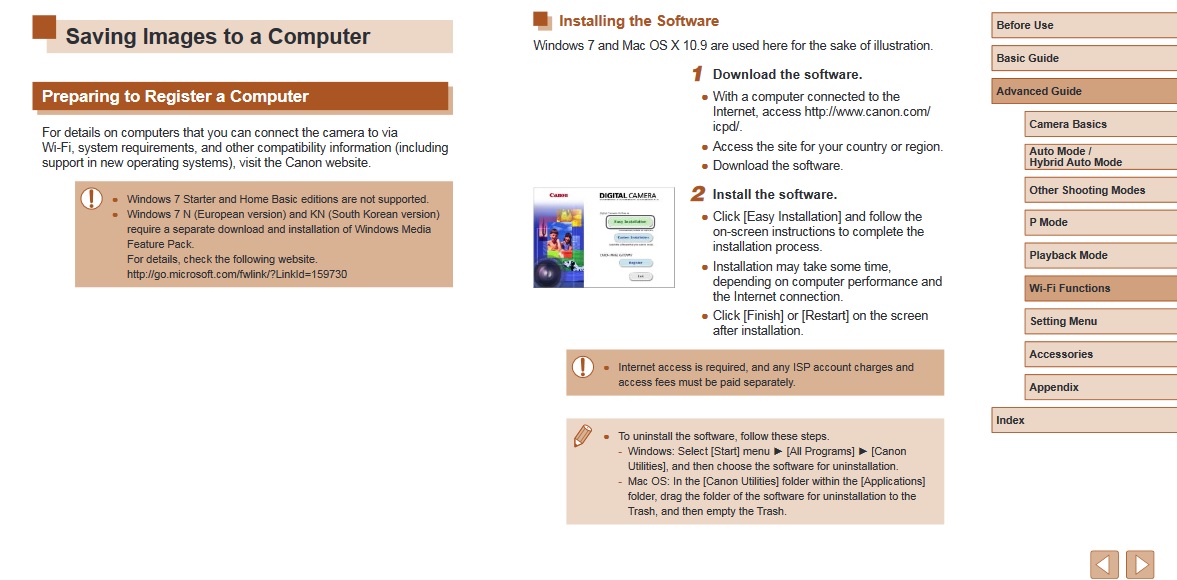
Bluetooth has nothing to do with it, it is WIFI. Did you install the software?
Options
- Mark as New
- Bookmark
- Subscribe
- Mute
- Subscribe to RSS Feed
- Permalink
- Report Inappropriate Content
02-19-2021 03:59 PM
I figured as much. No the software isn't downloading onto our desktop (Windows 10 OS); I've tried several times to download directly from Canon's site to no avail. Someone else on here had success not using Canon's image software, so I was asking to see if anyone had a suggestions regarding an alternative.

Announcements
07/22/2026: New firmware updates are available.
EOS R6 Mark III - Version 1.1.0
05/13/2026: New firmware updates are available.
EOS R5 Mark II - Version 1.3.0
EOS R6 Mark II - Version 1.7.0
04/28/2026: Service Notice: Caution Concerning use of Lithium Batteries
03/17/2026: New firmware updates are available.
SELPHY CP1500 - Version 1.0.7.0
02/23/2026: New firmware update is available for EOS C50- Version 1.0.3.1
01/23/2026: New firmware update is available for RF 24-105mm F4 IS USM- Version 2.0.7
01/20/2026: New firmware updates are available.
10/21/2025: Service Notice: To Users of the Compact Digital Camera PowerShot V1
10/15/2025: New firmware updates are available.
Speedlite EL-5 - Version 1.2.0
Speedlite EL-1 - Version 1.1.0
Speedlite Transmitter ST-E10 - Version 1.2.0
07/28/2025: Notice of Free Repair Service for the Mirrorless Camera EOS R50 (Black)
05/21/2025: New firmware update available for EOS C500 Mark II - Version 1.1.5.1
Related Content
- EOS Utility Launcher not detecting EOS R7 in Camera Software
- How to connect PowerShot SX530 HS to iMac Tahoe 26 via Wi-Fi in Point & Shoot Digital Cameras
- EOS Rebel and Product Advisory: Vulnerability Remediation for EOS Network Setting Tool in EOS DSLR & Mirrorless Cameras
- PowerShot V1 - Can't transfer images to Computer via USB in Point & Shoot Digital Cameras
- Computer no longer recognizing PowerShot SX160 IS in Camera Software

Ⓒ 2026
Canon U.S.A Inc. All Rights Reserved. Reproduction in whole or part without permission is prohibited.
