Turn on suggestions
Auto-suggest helps you quickly narrow down your search results by suggesting possible matches as you type.
- Canon Community
- Discussions & Help
- Camera
- Point & Shoot Digital Cameras
- Re: Buttons on G7X Mark III not working
Options
- Subscribe to RSS Feed
- Mark Topic as New
- Mark Topic as Read
- Float this Topic for Current User
- Bookmark
- Subscribe
- Mute
- Printer Friendly Page
Buttons on G7X Mark III not working

Options
- Mark as New
- Bookmark
- Subscribe
- Mute
- Subscribe to RSS Feed
- Permalink
- Report Inappropriate Content
03-30-2025 02:05 PM
Hi,
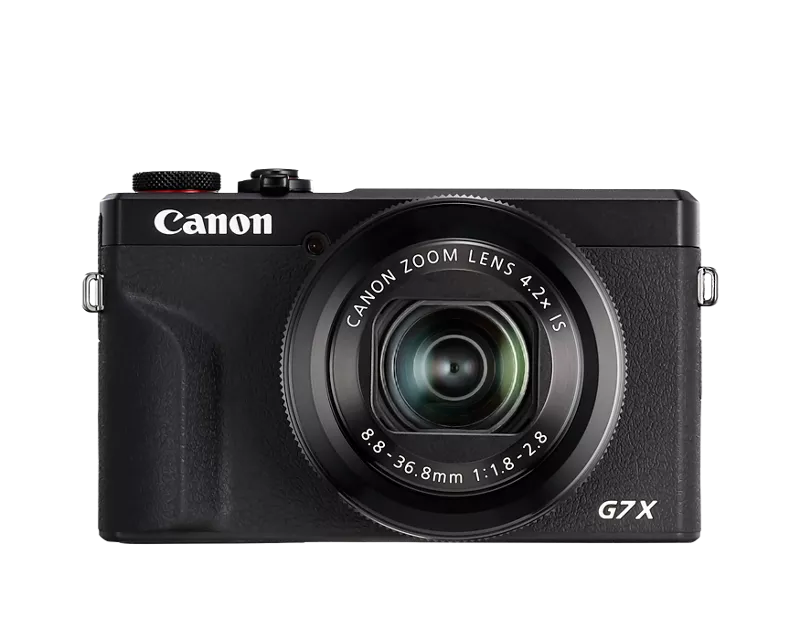
I have had my Canon G7X Mark III for 2 years now and I was shooting with it when all of a sudden the buttons next to the screen do not work. I have tried turning it off and taking out the battery but still nothing. Touch screen and zoom not working and those buttons to the right still not working. The dial on the top to pick modes is working though. Any idea this issue? PowerShot G7x Mark III
4 REPLIES 4
Options
- Mark as New
- Bookmark
- Subscribe
- Mute
- Subscribe to RSS Feed
- Permalink
- Report Inappropriate Content
04-01-2025
01:52 AM
- last edited on
04-15-2025
02:28 PM
by
 Danny
Danny
@aileenmcbride10 wrote:
Hi,
I have had my Canon G7X Mark III for 2 years now and I was shooting with it when all of a sudden the buttons next to the screen do not work. I have tried turning it off and taking out the battery but still nothing. Touch screen and zoom not working and those buttons to the right still not working. The dial on the top to pick modes is working though. Any idea this issue? PowerShot G7x Mark III
The sudden failure of multiple buttons and the touchscreen on your Canon G7X Mark III likely indicates a hardware issue, such as a loose internal connection or component failure. While you can try a firmware update or factory reset via the top dial, contacting Canon support or a camera repair shop is the most recommended course of action for diagnosis and repair.
Options
- Mark as New
- Bookmark
- Subscribe
- Mute
- Subscribe to RSS Feed
- Permalink
- Report Inappropriate Content
06-04-2025 11:59 AM
I had the same Problem and found a solution:
When pushing the "take photo button" the screen would show more options on the screen for like a half of a second. I tried multiple times to acsess the menu in this short time frame. After several times i got it right, went to the menu and did a camera reset to factory settings. This solved the problem for me. Hope this will help you, made an account just to give u this help. (sorry for bad english).
Options
- Mark as New
- Bookmark
- Subscribe
- Mute
- Subscribe to RSS Feed
- Permalink
- Report Inappropriate Content
09-11-2025 08:56 AM
Hi there Dudekas 616
I kinda have the same problem with my G7x Mk III. My menu and info button dont work. How does your solution work exactly? I´ve tried it now several times, but i dont know what to do exactly. Thank you already, best regards
Ben
Options
- Mark as New
- Bookmark
- Subscribe
- Mute
- Subscribe to RSS Feed
- Permalink
- Report Inappropriate Content
03-02-2026 09:28 AM
I’m experiencing a similar issue with my G7X Mark II. The Menu and Info buttons aren’t responding. Could you please explain how your solution works in more detail? Thank you in advance.


Announcements
07/22/2026: New firmware updates are available.
EOS R6 Mark III - Version 1.1.0
05/13/2026: New firmware updates are available.
EOS R5 Mark II - Version 1.3.0
EOS R6 Mark II - Version 1.7.0
04/28/2026: Service Notice: Caution Concerning use of Lithium Batteries
03/17/2026: New firmware updates are available.
SELPHY CP1500 - Version 1.0.7.0
02/23/2026: New firmware update is available for EOS C50- Version 1.0.3.1
01/23/2026: New firmware update is available for RF 24-105mm F4 IS USM- Version 2.0.7
01/20/2026: New firmware updates are available.
10/21/2025: Service Notice: To Users of the Compact Digital Camera PowerShot V1
10/15/2025: New firmware updates are available.
Speedlite EL-5 - Version 1.2.0
Speedlite EL-1 - Version 1.1.0
Speedlite Transmitter ST-E10 - Version 1.2.0
07/28/2025: Notice of Free Repair Service for the Mirrorless Camera EOS R50 (Black)
05/21/2025: New firmware update available for EOS C500 Mark II - Version 1.1.5.1
Related Content
- EOS R5 Mark II minor Firmware Update, Version 1.3.1 in Camera Software
- EOS R6 Mark II Exposure compensation not working with Remote Control BR-E2 in EOS DSLR & Mirrorless Cameras
- EOS R6 Mark II Back Button Focus, ONE SHOT vs Servo in EOS DSLR & Mirrorless Cameras
- Screen off function assigned to a button not working on R5m2 Firmware 1.3.1 in EOS DSLR & Mirrorless Cameras
- R5 Mark II Owners Update Your Firmware to Version 1.3.1 in EOS DSLR & Mirrorless Cameras

Ⓒ 2026
Canon U.S.A Inc. All Rights Reserved. Reproduction in whole or part without permission is prohibited.
