05-02-2021 02:12 AM
I got my first paper jam with this new printer and opened the toner cartidge drawer instead of the Multi Purpose drawer. But the cartridge drawer seems to have gone of its rails (Does it have rails?) or is caught on something and will not slide back in to the printer or pull out any more. I'm unable to close the front panel now either due to how the drawer is protruding. I don't want to force the drawer in or use force to pull it out either as I'm not sure what damage that will do. Any advice? I can't seem to find anything of use in the Canon support manuals.
01-08-2025 09:18 PM
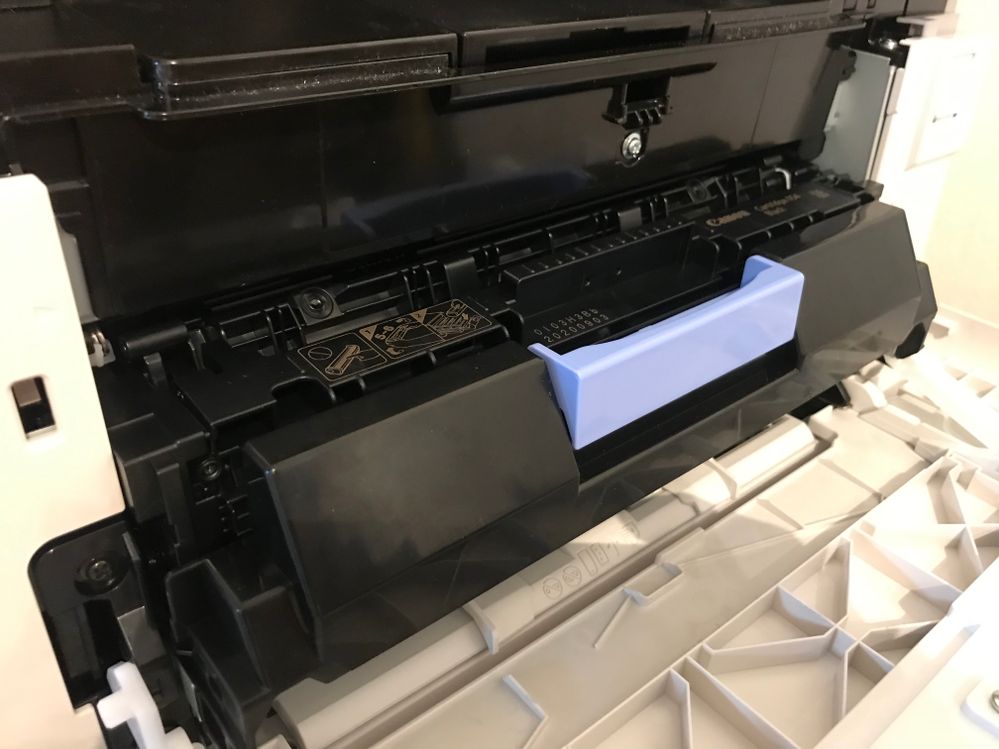
I am having the same issue with the toner tray stuck. I opened it for the first time to replace the black ink cartridge and tried to close it and it won't. It stuck on the left side (when you're facing the printer). I've owned this printer for 5 months.
01/20/2026: New firmware updates are available.
11/20/2025: New firmware updates are available.
EOS R5 Mark II - Version 1.2.0
PowerShot G7 X Mark III - Version 1.4.0
PowerShot SX740 HS - Version 1.0.2
10/15/2025: New firmware updates are available.
Speedlite EL-5 - Version 1.2.0
Speedlite EL-1 - Version 1.1.0
Speedlite Transmitter ST-E10 - Version 1.2.0
7/17/2025: New firmware updates are available.
02/20/2025: New firmware updates are available.
RF70-200mm F2.8 L IS USM Z - Version 1.0.6
RF24-105mm F2.8 L IS USM Z - Version 1.0.9
RF100-300mm F2.8 L IS USM - Version 1.0.8
Canon U.S.A Inc. All Rights Reserved. Reproduction in whole or part without permission is prohibited.


