Hi jloring!
I will be glad to assist you.
To turn off 2-sided printing, please follow the instructions below:
1. From the [File] menu of the application, select [Print].
2. Select the device you are using from [Printer].
To display all options:
In Mac OS X 10.7 or later, click [Show Details] at the bottom of the screen.
3. Select [Layout] from the pop-up menu.

4. Select [Off], [Long-edge binding] or [Short-edge binding] from [Two-Sided].
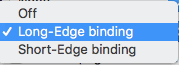
5. Click [Print].
Before you print the document, we recommend saving this option as a "Preset", so that you don't have to make these changes in every application that you print from. To save this setting as a preset, follow the steps below:
1. Click the "Presets" drop-down arrow and click "Save current setting as preset."
2. Name it "1-sided" or "Single-Sided" and verify that the imageCLASS MF820Cdn is the only printer selected.
3. Click "OK".
4. Print the document.
Did this answer your question? Please click the Accept as Solution button so that others may find the answer as well.




