Turn on suggestions
Auto-suggest helps you quickly narrow down your search results by suggesting possible matches as you type.
- Canon Community
- Discussions & Help
- General Discussion
- General Discussion
- What do you do when someone else uses your photo?
Options
- Subscribe to RSS Feed
- Mark Topic as New
- Mark Topic as Read
- Float this Topic for Current User
- Bookmark
- Subscribe
- Mute
- Printer Friendly Page
What do you do when someone else uses your photo?

Options
- Mark as New
- Bookmark
- Subscribe
- Mute
- Subscribe to RSS Feed
- Permalink
- Report Inappropriate Content
11-08-2016 03:53 PM
Hi:
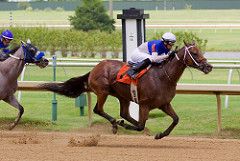
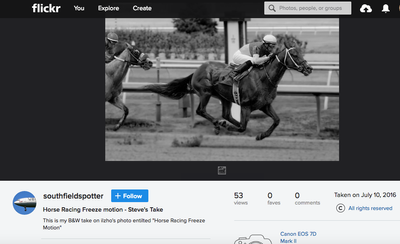
So I discovered that someone on Flickr took my photo, cropped my watermark off of it, put theirs on it, and made it black and white and blurred the background and called it theirs.
Now in his notes he states, "This is my B&W take on ilzho's photo entitled "Horse Racing Freeze Motion"".
Now I don't mind, since he gave me credit, but I have mixed feelings.....
Any thoughts?
Thanks,
David
5 REPLIES 5


Options
- Mark as New
- Bookmark
- Subscribe
- Mute
- Subscribe to RSS Feed
- Permalink
- Report Inappropriate Content
11-08-2016 04:12 PM
Is that prohibited by Flickr terms of service?
If not, is it something that many members do?
John Hoffman
Conway, NH
R6 Mark III, M200 (converted to infrared), RF lenses, Pixma PRO-100, Pixma TR8620a, Lr Classic
Conway, NH
R6 Mark III, M200 (converted to infrared), RF lenses, Pixma PRO-100, Pixma TR8620a, Lr Classic

Options
- Mark as New
- Bookmark
- Subscribe
- Mute
- Subscribe to RSS Feed
- Permalink
- Report Inappropriate Content
11-08-2016 04:28 PM - edited 11-08-2016 04:32 PM
Flickr allows you to set default settings for your uploads.
Go into your account settings, pick the "privacy & permissions" tab, then scroll down to the page to the section that reads "Defaults for new uploads".
There's a setting for "What license will your content have?"
You can set that to "none - all rights reserved" (nobody may use the work without your permission).
But you could ALSO have set that to settings such as "public domain work" (anyone can use it and they don't need your permissions... you've granted permission by putting the work into the public domain).
There are also a number of "creative commons" license choices.
Creative commons license commonly request "Attribution" (this other person gave you attribution by stating that it is based on your work); non-commercial (you grant permission to allow use of it for non-commercial reasons and those who don't plan to use it for commercial purposes do not need to contact you to ask for permission -- you've granted that permission by picking that license.); no-derives (users who have permission based on your license are NOT free to make derivitive works); share-and-share-alike (if someone does get permission to use the work because YOU shared it with them, they are REQUIRED to in-turn share it to others... meaning they must also implicitly allow others to use the derived work.) Creative Commons (often abbreviated "CC") will let you string all these together... so your license could be "Attribution-NonCommerical-NoDerives Creative Commons" license (that woudl translate to mean "anyone can use it as long as they attribute it to you AND they do not plan to use it for a commercial purpose AND they do not make a derivitive work based on your work." But if they agree to all of that... they can go ahead and use it and do not need to contact you.)
Anyway... I point this out because it's possible your "default" upload settings are allowing a more permissive use of your work -- even if you did not set that permission intentionally. Also, these are just 'default' settings... you can set a default to one thing but then set specific settings for an individual image (you could have a different setting for every image). The default only kicks in if you don't set any specific license (and most people don't set a specific license on every upload... so usually the default does kick in.)
Assuming you did have a restrictive license AND this person violated the license, then it's (a) minimally worth telling them that they violated the license. Even if you're cool about it now... they should at least be aware that it is NOT ok to do this in the future (e.g. no harm no foul this time... but don't keep doing this).
It does not sound like you were monetarily damaged by this violation... but it's still a violation. BTW, if what this person cropped out was a copyright notice (was it just your name or studio name... or was it a copyright notice) then that's a DMCA violation and can carry stiff fines. It is basically never ok to crop out a watermark without the permission of the owner of the work.
Tim Campbell
5D III, 5D IV, 60Da
5D III, 5D IV, 60Da
Options
- Mark as New
- Bookmark
- Subscribe
- Mute
- Subscribe to RSS Feed
- Permalink
- Report Inappropriate Content
11-08-2016 05:13 PM
Thanks for the information.
My pictures via Flickr settings are All Rights Reserved.
I do have to correct 2 things.
1) I did not put my watermarks on these photos.
2) He did not put his watermark on the photo.
With that said, he did not ask permission.
I realize photos are stolen and this is my first discovery.
Just pisses me off he didn't ask.
Here's my color pic and his B&W.
Options
- Mark as New
- Bookmark
- Subscribe
- Mute
- Subscribe to RSS Feed
- Permalink
- Report Inappropriate Content
11-08-2016 05:17 PM
Contact him and ask him to remove. If he doesn't report to Flickr.
John Hoffman
Conway, NH
R6 Mark III, M200 (converted to infrared), RF lenses, Pixma PRO-100, Pixma TR8620a, Lr Classic
Conway, NH
R6 Mark III, M200 (converted to infrared), RF lenses, Pixma PRO-100, Pixma TR8620a, Lr Classic

Options
- Mark as New
- Bookmark
- Subscribe
- Mute
- Subscribe to RSS Feed
- Permalink
- Report Inappropriate Content
11-10-2016 09:31 AM
Always watermark your shots. But the general policy of u/l to the ole inner web site just about releases your photos to anyone. It probably isn't illegal but it is certainly not ethical. You must suffer monetary damages to claim any relief. Because that is an expensive process.
"My pictures via Flickr settings are All Rights Reserved."
I don't use Flickr so I have no clue as to what to do there. I think in this case it is best to just move on and learn from it.
EB
EOS 1DX and many lenses.
EOS 1DX and many lenses.

Announcements
07/22/2026: New firmware updates are available.
EOS R6 Mark III - Version 1.1.0
05/13/2026: New firmware updates are available.
EOS R5 Mark II - Version 1.3.0
EOS R6 Mark II - Version 1.7.0
04/28/2026: Service Notice: Caution Concerning use of Lithium Batteries
03/17/2026: New firmware updates are available.
SELPHY CP1500 - Version 1.0.7.0
02/23/2026: New firmware update is available for EOS C50- Version 1.0.3.1
01/23/2026: New firmware update is available for RF 24-105mm F4 IS USM- Version 2.0.7
01/20/2026: New firmware updates are available.
10/21/2025: Service Notice: To Users of the Compact Digital Camera PowerShot V1
10/15/2025: New firmware updates are available.
Speedlite EL-5 - Version 1.2.0
Speedlite EL-1 - Version 1.1.0
Speedlite Transmitter ST-E10 - Version 1.2.0
07/28/2025: Notice of Free Repair Service for the Mirrorless Camera EOS R50 (Black)
05/21/2025: New firmware update available for EOS C500 Mark II - Version 1.1.5.1
Related Content
- Aperture recommendations for daytime city photos in General Discussion
- Focal Length Recommendations for Daytime City Street Photos in General Discussion
- High Dynamic Range and Tips for Bracketing Photos in General Discussion
- Please Share your Astrophotography Shooting Setup and Experience in General Discussion
- Ansel Adams, B&W photography and light meters. in General Discussion

Ⓒ 2026
Canon U.S.A Inc. All Rights Reserved. Reproduction in whole or part without permission is prohibited.
