cancel
Showing results for 
Show  only  | Search instead for 
Did you mean: 

Canoscan 9000F negative scan issue - please help

tijntijntijn
Apprentice

I am trying to scan medium format (6x9) negatives on my Canoscan 9000F but I have misplaced the film tray which came with it. I have one coming but it won't be here until next week.    


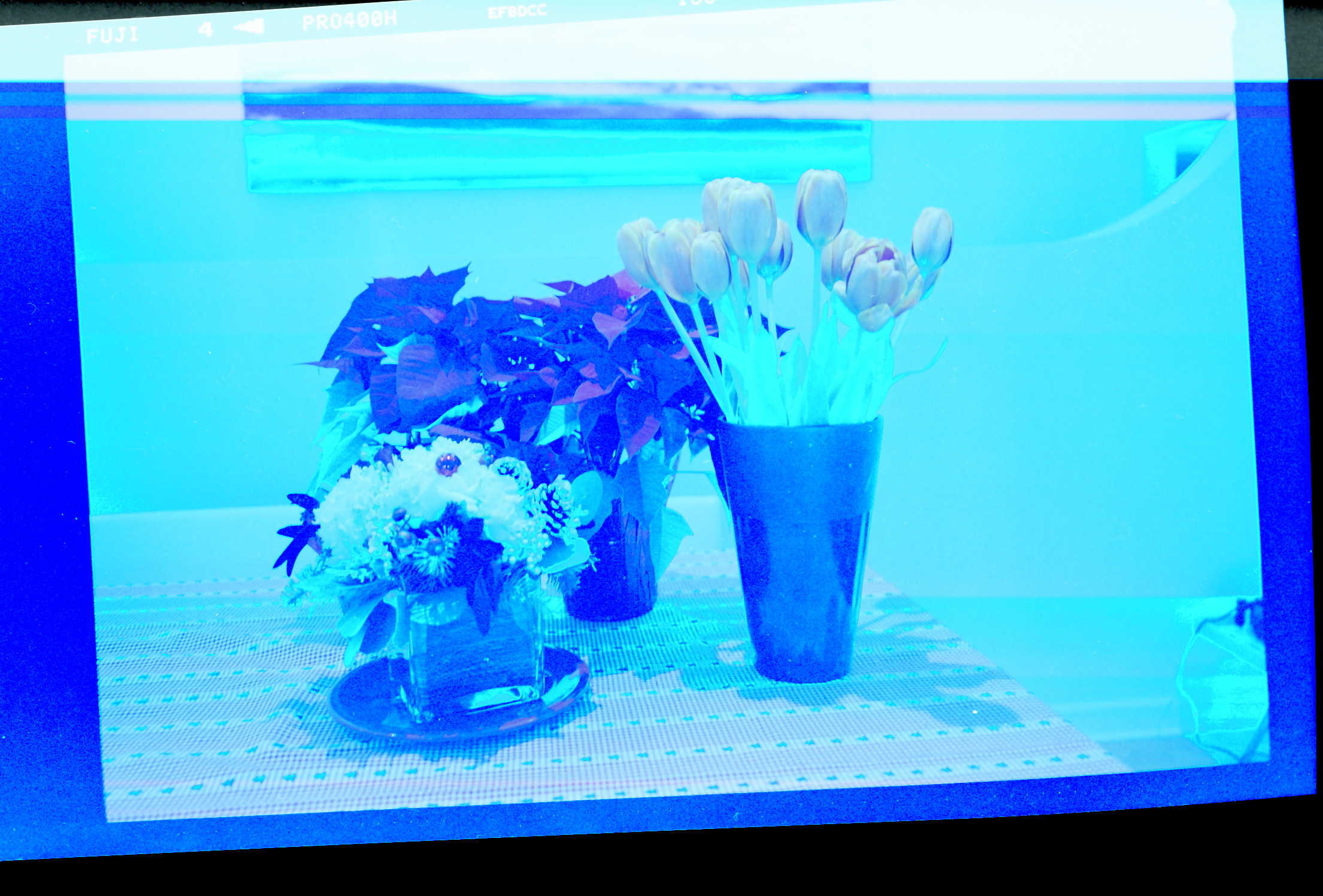
I have been able to scan negatives without the tray before. Only now when I do it manually by selecting the area on the negative, the scans are blue-and-white in tone.  If i take a picture of the negative on my iPhone on a lightbox and invert in photoshop, the negatives look correct.  Why is the Canoscan adjusting everything to look blue? Can I really not scan these negatives without the freaking tray? This is incredibly frustrating.


Please please please someone tell me why it's doing this? 


this is what the scanner gave me : 


Scanner result


and this is what I got from photographing the negative on the lightbox and inverting in photoshop : 


canon2.jpg

1 REPLY 1

Patrick
Product Expert
Product Expert

Hi tijntijntijn.


Please perform a fwe calibrations. To perform calibrations, please follow these steps:


 1.  Click Start, point to (All) Programs, Canon Utilities, then MP Navigator. Then click MP Navigator.


 2.  Click on Scan / Import.


 3.  Click on Photos / Documents (Platen).


 4.  Place a checkmark in the 'Use the Scanner Driver' box.


 5.  Click Open Scanner Driver.


 6.  When Scangear opens, click on the Advanced Mode tab.


 7.  Click on the Preferences button at the bottom.


 8.  On the Scanner tab, choose ON next to Execute at every scan.


Perform 3 or 4 scans.


Does the image quality improve?



Holiday
Announcements

12/18/2025: New firmware updates are available.

EOS C400 - Version 1.0.4.1

EOS C80 - Version 1.0.4.1

XF605 - Version 1.0.7.1


12/15/2025: New firmware update available for EOS C50 - Version 1.0.1.1

11/20/2025: New firmware updates are available.

EOS R6 Mark III - Version 1.0.1

EOS R3 - Version 2.0.0

EOS R1 - Version 1.2.0

EOS R5 Mark II - Version 1.2.0

EOS R5 - Version 2.2.1

PowerShot G7 X Mark III - Version 1.4.0

PowerShot SX740 HS - Version 1.0.2


10/21/2025: Service Notice: To Users of the Compact Digital Camera PowerShot V1

10/15/2025: New firmware updates are available.

Speedlite EL-5 - Version 1.2.0

Speedlite EL-1 - Version 1.1.0

Speedlite Transmitter ST-E10 - Version 1.2.0


07/28/2025: Notice of Free Repair Service for the Mirrorless Camera EOS R50 (Black)

7/17/2025: New firmware updates are available.

EOS R7 - Version 1.7.1

EOS R10 - Version 1.7.0

EOS R8 - Version 1.5.0

EOS R50 - Version 1.4.0

Powershot V10 - Version 1.4.0

Powershot V1 - Version 1.1.0

EOS R50V - Version 1.1.1


05/21/2025: New firmware update available for EOS C500 Mark II - Version 1.1.5.1

02/20/2025: New firmware updates are available.

RF70-200mm F2.8 L IS USM Z - Version 1.0.6

RF24-105mm F2.8 L IS USM Z - Version 1.0.9

RF100-300mm F2.8 L IS USM - Version 1.0.8

RF50mm F1.4 L VCM - Version 1.0.2

RF24mm F1.4 L VCM - Version 1.0.3


01/22/2024: Canon Supports Disaster Relief Efforts in California
01/14/2025: Steps to resolve still image problem when using certain SanDisk SD cards with the Canon EOS R5 Mark II