Turn on suggestions
Auto-suggest helps you quickly narrow down your search results by suggesting possible matches as you type.
- Canon Community
- Discussions & Help
- Camera
- EOS DSLR & Mirrorless Cameras
- Re: T6 won't connect to phone, but will to tablet
Options
- Subscribe to RSS Feed
- Mark Topic as New
- Mark Topic as Read
- Float this Topic for Current User
- Bookmark
- Subscribe
- Mute
- Printer Friendly Page
T6 won't connect to phone, but will to tablet

Options
- Mark as New
- Bookmark
- Subscribe
- Mute
- Subscribe to RSS Feed
- Permalink
- Report Inappropriate Content
03-15-2020 06:17 PM
It did work with my Samsung phone and Camera will connect to my Samsung tablet. When I try it with the phone I get he error message that it will connect after the quality of my net connection improves. It is listed on the Wi-Fi list.
Pardon me however, it has been along time but, it kicks my Wi-Fi off and puts my phone onto my data, is this normal? I never noticed that before.
I have tried to reset the Wi-Fi connection and reinstalled the app.
Thanks
2 REPLIES 2
Options
- Mark as New
- Bookmark
- Subscribe
- Mute
- Subscribe to RSS Feed
- Permalink
- Report Inappropriate Content
03-16-2020 06:45 PM
Don 6,
Set up: Install Camera Connect on a smartphone
To communicate with a smartphone, the dedicated smartphone application Camera Connect (free of charge) is necessary.
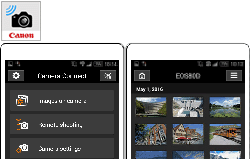
Step 1: Connect the camera and smartphone (basic setup)
1. Turn on the camera and the smartphone.
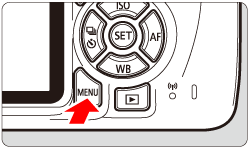
2. Press the camera's <MENU> button to display the menu.
3. Press the <  > <
> <  > keys to choose the [
  ] tab.
> < > keys to choose the [ ] tab.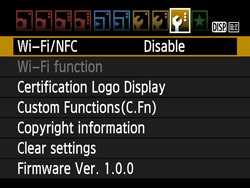
4. Press the <  > <
> <  > keys to select [Wi-Fi/NFC], then press <
  >.
>.
> < > keys to select [Wi-Fi/NFC], then press < >.
5. Press < > to select [Enable], then press < >.
> to select [Enable], then press < >.For an NFC-enabled smartphone, press the < DISP. > button to add [  ] to [Allow NFC connections].
] to [Allow NFC connections].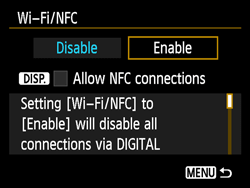
Â
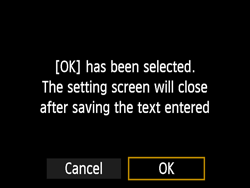
When you are finished, press the < MENU > button.Select [OK] on the confirmation dialog and press <
Step 2-A: Connect the camera and smartphone (Connect via NFC)
1. Touch a smartphone to the camera.
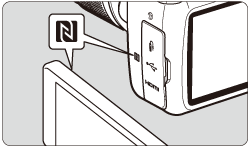
- Touch the
 mark on the smartphone to that on the camera.
 - If an image is being played back on the camera, press the <
 > button to end the playback.
Camera Connect starts on the smartphone and establishes a connection.
The camera's <  > lamp will blink.
> lamp will blink.When a message indicating the connection is displayed on the camera's LCD monitor, move the smartphone away from the camera.
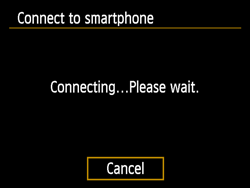
When a connection is established, the screen below will appear on the camera's LCD monitor.*
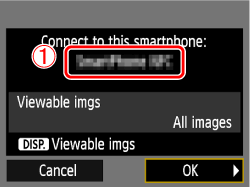
 The device name set on Camera Connect
The camera's < > lamp will light up in green.
> lamp will light up in green.* When connecting to the same smartphone, this screen will not appear again.
2. Save the connection settings.
Press < > to select [OK], then press < >.
> to select [OK], then press < >.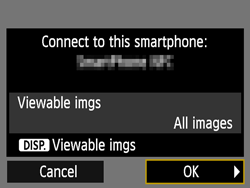
After a message is displayed, the camera's LCD monitor will turn off.
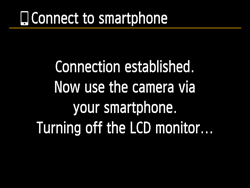
Step 2-B: Connect the camera and smartphone (Connect wirelessly)
1. Under the [ ] tab, select [Wi-Fi/NFC], then press < >.
] tab, select [Wi-Fi/NFC], then press < >.
2. Press <  > to select [Enable], then press < >.
> to select [Enable], then press < >.
3. Press the < > < > keys to select [Wi-Fi function], then press < >.
> < > keys to select [Wi-Fi function], then press < >.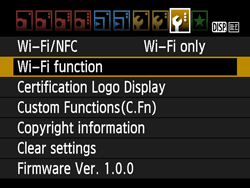
4. Press the < > < > keys to select [  ] (Connect to smartphone), then press < >.
> < > keys to select [ ] (Connect to smartphone), then press < >.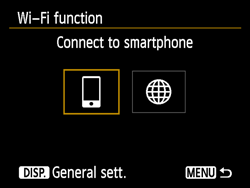
The camera's < > lamp will blink.
> lamp will blink.
5. Press the < > < > keys to select [Easy connection], then press < >.
> < > keys to select [Easy connection], then press < >.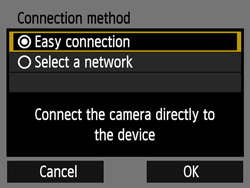
Select [OK] and press < > to go to the next screen.
> to go to the next screen.
6. Operate the smartphone and connect it to the camera.
- Activate the smartphone's Wi-Fi function, then select the SSID (network name) (
 ) displayed on the camera's LCD monitor.
 - For the password, enter the encryption key (
 ) displayed on the camera's LCD monitor.
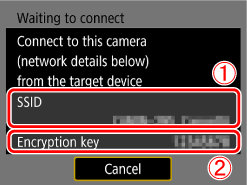
NOTEWhen connecting by selecting [Easy connection], "_Canon0A" is displayed at the end of the SSID.
7. When the screen below is displayed, start Camera Connect on the smartphone.
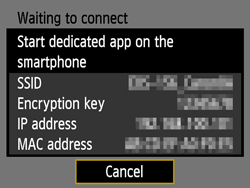
8. Select and touch the camera to connect to from [Cameras] on Camera Connect.
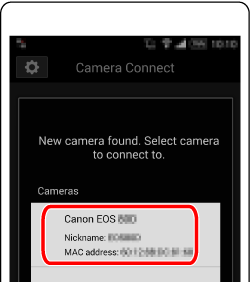
When a connection is established, the screen below will appear on the camera's LCD monitor.
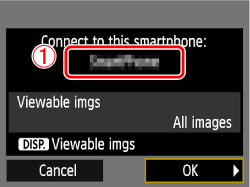 The device name set on Camera Connect
9. Press < > to select [OK], then press < >.
> to select [OK], then press < >.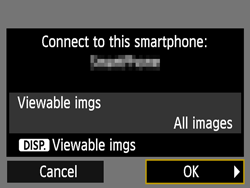
The camera's < > lamp will light up in green.
> lamp will light up in green.
After a message is displayed, the camera's LCD monitor will turn off.
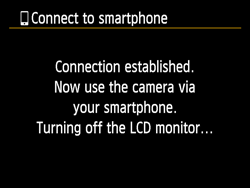
After the camera operation is complete, the main window of Camera Connect will be displayed on the smartphone.
10. Operate the camera using Camera Connect.
The setup for connecting to the smartphone is now completed." Step 3: View and save images on the smartphone ".
Step 3: View and save images on the smartphone
1. On the Camera Connect menu screen on the smartphone, choose [Images on camera].
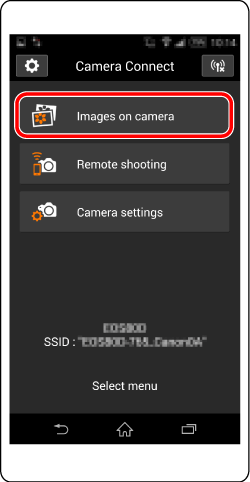
2. Use your smartphone to save images from the camera to the smartphone.
When the camera and smartphone are connected, a list of images in the camera appears in "Camera Connect".Tap the [  ] button at the bottom of the screen.
] button at the bottom of the screen.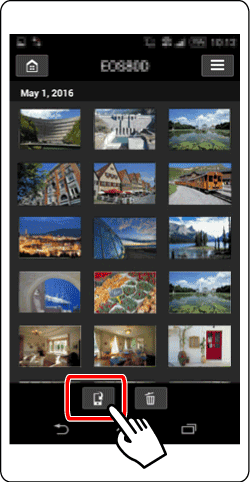
3. When the selection screen appears, select the images you wish to save (  ) and then tap [Save] (
  ) on the bottom right side of the screen.
) and then tap [Save] ( ) on the bottom right side of the screen.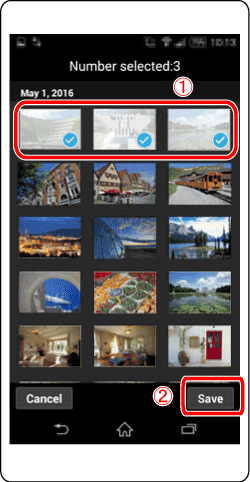
The selected images are saved to the smartphone.
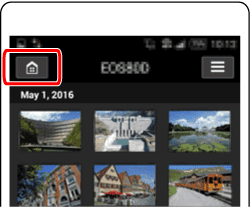
4. When the images have been saved, tap the home button on the top left to return to the menu screen.
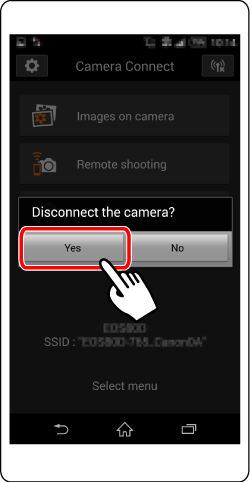
5. To end the connection, tap the [  ] icon on the top right, and then tap [Yes] on the confirmation screen.
] icon on the top right, and then tap [Yes] on the confirmation screen.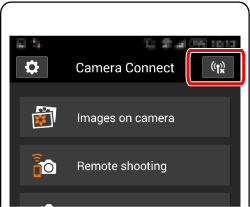
Did this answer your question? Please click the Accept as Solution button so that others may find the answer as well.
Options
- Mark as New
- Bookmark
- Subscribe
- Mute
- Subscribe to RSS Feed
- Permalink
- Report Inappropriate Content
03-23-2020 05:18 PM
Thanks for the great reply, you sound like you know what you re about.
The camera is connected to my Samsung tablet and I love it but, there is always a but, when I try to connect the Samsung phone, as a second device - the camera accomodates three devices - it refuses and tells me it is the internet connection that is bad.
The camera refuses to take in a second "SET" configuration. It will connect to either the phone, or, the tab. It will not allow a second connection, as either SET 2, or SET 3.
I have had this camera from new and love it.
Thanks


Announcements
05/13/2026: New firmware updates are available.
EOS R5 Mark II - Version 1.3.0
EOS R6 Mark II - Version 1.7.0
04/28/2026: Service Notice: Caution Concerning use of Lithium Batteries
03/17/2026: New firmware updates are available.
SELPHY CP1500 - Version 1.0.7.0
02/23/2026: New firmware update is available for EOS C50- Version 1.0.3.1
01/23/2026: New firmware update is available for RF 24-105mm F4 IS USM- Version 2.0.7
01/20/2026: New firmware updates are available.
12/22/2025: New firmware update is available for EOS R6 Mark III- Version 1.0.2
10/21/2025: Service Notice: To Users of the Compact Digital Camera PowerShot V1
10/15/2025: New firmware updates are available.
Speedlite EL-5 - Version 1.2.0
Speedlite EL-1 - Version 1.1.0
Speedlite Transmitter ST-E10 - Version 1.2.0
07/28/2025: Notice of Free Repair Service for the Mirrorless Camera EOS R50 (Black)
05/21/2025: New firmware update available for EOS C500 Mark II - Version 1.1.5.1
Related Content
- Trouble Transferring Firmware from Camera Connect to Camera in Camera Software
- What is 1100tom.to4 ??? Odd file found on EOS R5 Mark II card in EOS DSLR & Mirrorless Cameras
- Unable to Playback Video in the Camera Connect App in EOS DSLR & Mirrorless Cameras
- EOS 90D - Help using AF on the Canon Camera Connect Shoot menu in Camera Software
- EOS R7 and WiFi connection issues in EOS DSLR & Mirrorless Cameras

Ⓒ 2026
Canon U.S.A Inc. All Rights Reserved. Reproduction in whole or part without permission is prohibited.
