Turn on suggestions
Auto-suggest helps you quickly narrow down your search results by suggesting possible matches as you type.
- Canon Community
- Discussions & Help
- Camera
- EOS DSLR & Mirrorless Cameras
- Pairing an EOS R with a microscope
Options
- Subscribe to RSS Feed
- Mark Topic as New
- Mark Topic as Read
- Float this Topic for Current User
- Bookmark
- Subscribe
- Mute
- Printer Friendly Page
Pairing an EOS R with a microscope

Options
- Mark as New
- Bookmark
- Subscribe
- Mute
- Subscribe to RSS Feed
- Permalink
- Report Inappropriate Content
09-12-2023
10:02 AM
- last edited on
09-12-2023
10:08 AM
by
 Danny
Danny
Hello everyone!
My name is Kate, and I'm a microbiologist from Boston.
I have a question regarding the possibility of capturing extended video footage of microorganisms under a microscope using a Canon camera. Currently, I own a Canon EOS R camera and various microscopes from Carl Zeiss. From what I understand, I can attach the camera to the microscope using an adapter. Will the quality be good? What adapter is best to use? Which software should I choose for this purpose? I currently have EOS Utility for remote shooting.
Another question is, can I charge the camera directly via a cable without removing the battery, and how can I do that? Has anyone encountered similar challenges? There are different cameras designed specifically for microscopes, but I'm not satisfied with the image quality. I would greatly appreciate any advice!
4 REPLIES 4

Anonymous
Not applicable
Options
- Mark as New
- Bookmark
- Subscribe
- Mute
- Subscribe to RSS Feed
- Permalink
- Report Inappropriate Content
09-12-2023 10:56 AM - edited 09-12-2023 10:58 AM
There is a way to charge the battery while in the camera. See this from the camera manual:
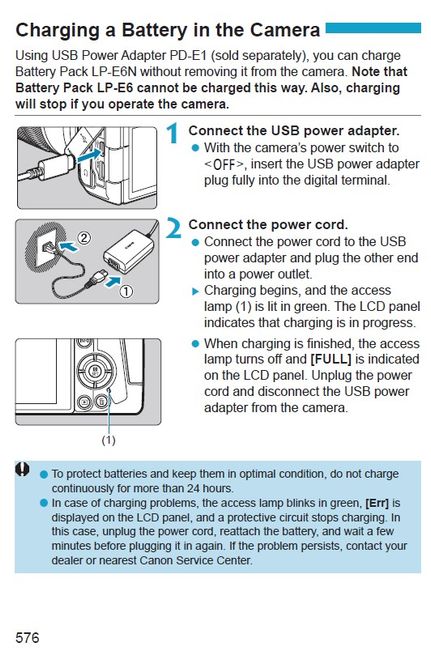
If the EOS Utility is working ok with your lens now, it should work with the camera on the microscope.
As far as the other questions, I have no experience with adapting a camera to a microscope.


Options
- Mark as New
- Bookmark
- Subscribe
- Mute
- Subscribe to RSS Feed
- Permalink
- Report Inappropriate Content
09-12-2023 10:58 AM
Lots of questions and hope you find an answer here.
Back just after the earth cooled, a friend took film photos of algae in a hanging drop slide. Came out beautiful. Should have kept the prints.
John
Canon EOS T7; EF-S 18-55mm IS; EF 28-135mm IS; EF 75-300mm; Sigma 150-600mm DG
Canon EOS T7; EF-S 18-55mm IS; EF 28-135mm IS; EF 75-300mm; Sigma 150-600mm DG
Options
- Mark as New
- Bookmark
- Subscribe
- Mute
- Subscribe to RSS Feed
- Permalink
- Report Inappropriate Content
09-12-2023 02:44 PM
Thank you so much! Very detailed and helpful instruction!

Options
- Mark as New
- Bookmark
- Subscribe
- Mute
- Subscribe to RSS Feed
- Permalink
- Report Inappropriate Content
09-12-2023 02:55 PM
I suggest you contact Zeiss about your particular 'scopes. Some stereo scopes have a central lens for attaching a camera, some want to attach it to the eyepiece. You will probably need a "T" mount.


Announcements
07/22/2026: New firmware updates are available.
EOS R6 Mark III - Version 1.1.0
05/13/2026: New firmware updates are available.
EOS R5 Mark II - Version 1.3.0
EOS R6 Mark II - Version 1.7.0
04/28/2026: Service Notice: Caution Concerning use of Lithium Batteries
03/17/2026: New firmware updates are available.
SELPHY CP1500 - Version 1.0.7.0
02/23/2026: New firmware update is available for EOS C50- Version 1.0.3.1
01/23/2026: New firmware update is available for RF 24-105mm F4 IS USM- Version 2.0.7
01/20/2026: New firmware updates are available.
10/21/2025: Service Notice: To Users of the Compact Digital Camera PowerShot V1
10/15/2025: New firmware updates are available.
Speedlite EL-5 - Version 1.2.0
Speedlite EL-1 - Version 1.1.0
Speedlite Transmitter ST-E10 - Version 1.2.0
07/28/2025: Notice of Free Repair Service for the Mirrorless Camera EOS R50 (Black)
05/21/2025: New firmware update available for EOS C500 Mark II - Version 1.1.5.1
Related Content
- EOS R50 Failed Bluetooth Connection in EOS DSLR & Mirrorless Cameras
- EOS M100 Error E60 When Enabling Wi-Fi in EOS DSLR & Mirrorless Cameras
- EOS M50 - cant connect to Wi-Fi & Bluetooth in EOS DSLR & Mirrorless Cameras
- EOS R5 Mark II firmware 1.30 notes in Camera Software
- R3 cannot wirelessly connect to EOS Utilty in Camera Software

Ⓒ 2026
Canon U.S.A Inc. All Rights Reserved. Reproduction in whole or part without permission is prohibited.
