Turn on suggestions
Auto-suggest helps you quickly narrow down your search results by suggesting possible matches as you type.
- Canon Community
- Discussions & Help
- Camera
- EOS DSLR & Mirrorless Cameras
- M50 constantly freezing on movie mode
Options
- Subscribe to RSS Feed
- Mark Topic as New
- Mark Topic as Read
- Float this Topic for Current User
- Bookmark
- Subscribe
- Mute
- Printer Friendly Page
M50 constantly freezing on movie mode

Options
- Mark as New
- Bookmark
- Subscribe
- Mute
- Subscribe to RSS Feed
- Permalink
- Report Inappropriate Content
12-15-2020 11:51 PM - edited 12-16-2020 11:56 AM
Well this is... interesting. I've had my M50 for maybe four months and never shot video with it.
I tried tonight for the first time and I'm finding that almost immediately upon entering movie mode, the camera freezes. The image will freeze on the preview and even if I shut it off, the image will remain. I usually have to wait awhile or pop the battery out for it to truly turn off.
Even if I turn the camera back on when it's in movie mode, it freezes up and then switching to different modes (Av, etc.) does nothing. It just either freezes or doesn't change the modes, just goes into some weird semi-state where the viewfinder works but no information shows up on-screen.
I've tried swapping lenses.
I've tried updating to the latest firmware (1.10).
I'm about to try changing the movie settings but as it stands this sucks. As of last check, I'm in movie manual, 1080px29.97.
UPDATE II- No idea if this is anecdotal, but I tried bumping it down to 720p and it lasted a lot longer. Mind you almost none of this is being done while actually recording video. Literally just having the thing on is causing this!
UPDATE- Doing it on movie automatic as well.
Your help is greatly appreciated!
11 REPLIES 11


Options
- Mark as New
- Bookmark
- Subscribe
- Mute
- Subscribe to RSS Feed
- Permalink
- Report Inappropriate Content
12-16-2020 10:15 AM
Updating the firmware is very risky to do with a malfunctioning camera. The malfunction could tank the update, and turn the camera into a paperweight.
What type of memory card are you using? If you are using a micro-SD card with an adapter, stop using. Only use full size SD memory cards, and be sure to format them in the camera prior to first use.
--------------------------------------------------------
"Enjoying photography since 1972."
"Enjoying photography since 1972."
Options
- Mark as New
- Bookmark
- Subscribe
- Mute
- Subscribe to RSS Feed
- Permalink
- Report Inappropriate Content
12-16-2020
11:54 AM
- last edited on
12-16-2020
01:57 PM
by
 Danny
Danny
It's this card here:
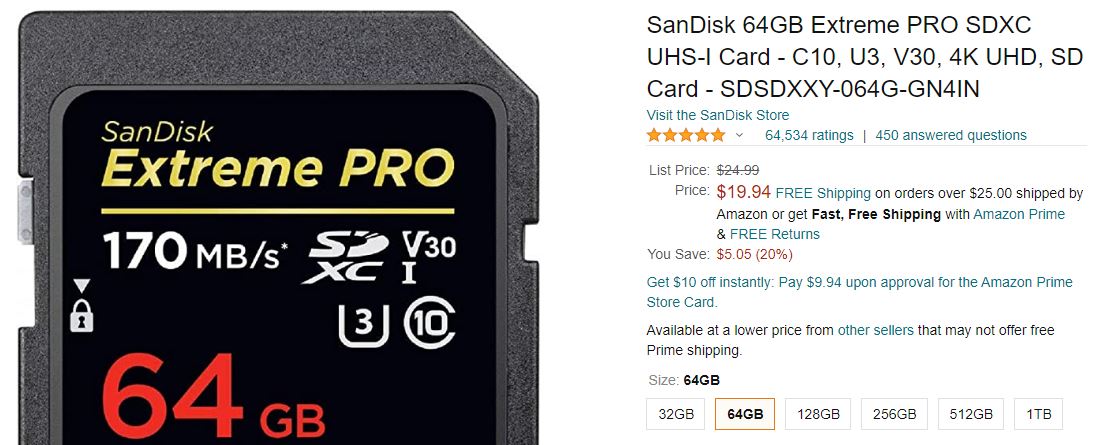
Also the firmware update succeeded without a hitch. That's odd though, I've never heard of a hardware device not using a firmware update as a first course of action when a bug appears. Usually seems to be one of the manufacture's first suggestions.

Options
- Mark as New
- Bookmark
- Subscribe
- Mute
- Subscribe to RSS Feed
- Permalink
- Report Inappropriate Content
12-16-2020 01:24 PM - edited 12-16-2020 01:30 PM
Do you have another full size SD card you can try in the camera? Maybe a smaller 16gb or 32gb capacity?
Also make sure you haven't set the camera to shoot in Hybrid Auto Mode.
Options
- Mark as New
- Bookmark
- Subscribe
- Mute
- Subscribe to RSS Feed
- Permalink
- Report Inappropriate Content
12-16-2020 01:27 PM
@bigbrother wrote:... That's odd though, I've never heard of a hardware device not using a firmware update as a first course of action when a bug appears. Usually seems to be one of the manufacture's first suggestions.
Did the information for the updated firmware indicate that it contained a fix for your specific problem?
Options
- Mark as New
- Bookmark
- Subscribe
- Mute
- Subscribe to RSS Feed
- Permalink
- Report Inappropriate Content
12-16-2020 01:53 PM
@bigbrother wrote:It's this card here:
[ DELETED LINK ]
Also the firmware update succeeded without a hitch. That's odd though, I've never heard of a hardware device not using a firmware update as a first course of action when a bug appears. Usually seems to be one of the manufacture's first suggestions.
You got lucky. You reported that your camera keeps freezing up. What if it froze in the middle of the update?
Like I said, updating firmware can fix software issues. Updating firmware does not repair broken hardware.
BTW, what type of card you using? I have no plans to click on the link, which are not allowed in the forum, anyway.
--------------------------------------------------------
"Enjoying photography since 1972."
"Enjoying photography since 1972."
Options
- Mark as New
- Bookmark
- Subscribe
- Mute
- Subscribe to RSS Feed
- Permalink
- Report Inappropriate Content
12-17-2020 04:39 AM
Well, I had a chance to try different memory cards today (albeit somewhat briefly) and I think that solved the problem! This leaves me a bit befuddled though. The original card was:
SanDisk 32GB Extreme PRO SDXC UHS-I Card - C10, U3, V30, 4K UHD, SD Card
I was of the understanding that these were pretty much the gold standard. What card should I be getting then? (Assuming that was the problem).
Options
- Mark as New
- Bookmark
- Subscribe
- Mute
- Subscribe to RSS Feed
- Permalink
- Report Inappropriate Content
12-17-2020 08:17 AM
@bigbrother wrote:Well, I had a chance to try different memory cards today (albeit somewhat briefly) and I think that solved the problem! This leaves me a bit befuddled though. The original card was:
SanDisk 32GB Extreme PRO SDXC UHS-I Card - C10, U3, V30, 4K UHD, SD Card
I was of the understanding that these were pretty much the gold standard. What card should I be getting then? (Assuming that was the problem).
....not when you buy them through Amazon.
--------------------------------------------------------
"Enjoying photography since 1972."
"Enjoying photography since 1972."
Options
- Mark as New
- Bookmark
- Subscribe
- Mute
- Subscribe to RSS Feed
- Permalink
- Report Inappropriate Content
12-17-2020 10:58 AM - edited 12-17-2020 02:05 PM
Apparently it's not uncommon to find counterfeit memory cards being sold by unscrupulous vendors on Amazon and Ebay. It's best to buy from a local camera shop if possible or one of the big-box electronics stores, like Best Buy. Buying online from B+H Photo should be a safe bet as well.
Not that this is what your card looks like inside but this is what forum member Ray-UK found inside a knock-off generic SD card from one of his old cameras.
Options
- Mark as New
- Bookmark
- Subscribe
- Mute
- Subscribe to RSS Feed
- Permalink
- Report Inappropriate Content
12-18-2020 07:40 PM
Just a quick update, I'm nearly certain it was the card. As mentioned, I tried other ones and no freezing, plus going into playback mode on the camera with the questionable card now sees it freezing for a sec or two till it shows me the images. I don't know if it's because the card is much fuller than before (and so it has to read more data) or what. I do know we bought it from Amazon direct from Amazon so I don't think it would be counterfeit. I'm guessing I'll just buy another one like this but have no clue...


Announcements
12/15/2025: New firmware update available for EOS C50 - Version 1.0.1.1
10/21/2025: Service Notice: To Users of the Compact Digital Camera PowerShot V1
07/28/2025: Notice of Free Repair Service for the Mirrorless Camera EOS R50 (Black)
05/21/2025: New firmware update available for EOS C500 Mark II - Version 1.1.5.1
01/22/2024: Canon Supports Disaster Relief Efforts in California
01/14/2025: Steps to resolve still image problem when using certain SanDisk SD cards with the Canon EOS R5 Mark II
11/20/2025: New firmware updates are available.
EOS R6 Mark III - Version 1.0.1
EOS R5 Mark II - Version 1.2.0
PowerShot G7 X Mark III - Version 1.4.0
PowerShot SX740 HS - Version 1.0.2
10/21/2025: Service Notice: To Users of the Compact Digital Camera PowerShot V1
10/15/2025: New firmware updates are available.
Speedlite EL-5 - Version 1.2.0
Speedlite EL-1 - Version 1.1.0
Speedlite Transmitter ST-E10 - Version 1.2.0
07/28/2025: Notice of Free Repair Service for the Mirrorless Camera EOS R50 (Black)
07/24/2025: New firmware updates are available.
07/23/2025: New firmware updates are available.
7/17/2025: New firmware updates are available.
05/21/2025: New firmware update available for EOS C500 Mark II - Version 1.1.5.1
02/20/2025: New firmware updates are available.
RF70-200mm F2.8 L IS USM Z - Version 1.0.6
RF24-105mm F2.8 L IS USM Z - Version 1.0.9
RF100-300mm F2.8 L IS USM - Version 1.0.8
RF50mm F1.4 L VCM - Version 1.0.2
RF24mm F1.4 L VCM - Version 1.0.3
01/22/2024: Canon Supports Disaster Relief Efforts in California
01/14/2025: Steps to resolve still image problem when using certain SanDisk SD cards with the Canon EOS R5 Mark II
Related Content
- EOS R5 Mark II freezing with all Angelbird CF-Express Type B cards in EOS DSLR & Mirrorless Cameras
- EOS R6 Constantly Freezes in EOS DSLR & Mirrorless Cameras
- EOS 70D No live view in photo modes, OK in movie mode in EOS DSLR & Mirrorless Cameras
- How to set 2 priorities aperture & shutter-speed on Rebel T6 ? in EOS DSLR & Mirrorless Cameras

Ⓒ 2025
Canon U.S.A Inc. All Rights Reserved. Reproduction in whole or part without permission is prohibited.
