Turn on suggestions
Auto-suggest helps you quickly narrow down your search results by suggesting possible matches as you type.
- Canon Community
- Discussions & Help
- Camera
- EOS DSLR & Mirrorless Cameras
- Re: Exposure simulation and lines on Live View
Options
- Subscribe to RSS Feed
- Mark Topic as New
- Mark Topic as Read
- Float this Topic for Current User
- Bookmark
- Subscribe
- Mute
- Printer Friendly Page
Exposure simulation and lines on Live View


Options
- Mark as New
- Bookmark
- Subscribe
- Mute
- Subscribe to RSS Feed
- Permalink
- Report Inappropriate Content
09-13-2021 12:00 PM
Looked through the PDF manual but couldn't zero in on anything specific. Two items here.
1. I was taking some shots of the moon last night. Camera was set on Av- 2/5 sec., f/5, 110mm, ISO 3200 (Auto). The Exposure Simulation icon was flashing. Found this in the manual but nothing why it was flashing. Did I over look something?
2. The Live View showed two vertical lines on it but they aren't on the photo in File Explorer.
As always, your help is most appreciated.
Two months ago, I couldn't spell Fotografter. Now I are one! 
John
Canon EOS T7; EF-S 18-55mm IS; EF 28-135mm IS; EF 75-300mm; Sigma 150-600mm DG
Canon EOS T7; EF-S 18-55mm IS; EF 28-135mm IS; EF 75-300mm; Sigma 150-600mm DG
11 REPLIES 11

Options
- Mark as New
- Bookmark
- Subscribe
- Mute
- Subscribe to RSS Feed
- Permalink
- Report Inappropriate Content
09-15-2021 01:56 PM
@Tintype_18 wrote:The moon photo was taken with a Canon EOS Rebel T7 1500D. Settings are: Av, 2/5 sec., f/5, 110mm, ISO 3200. Unedited photo attached.

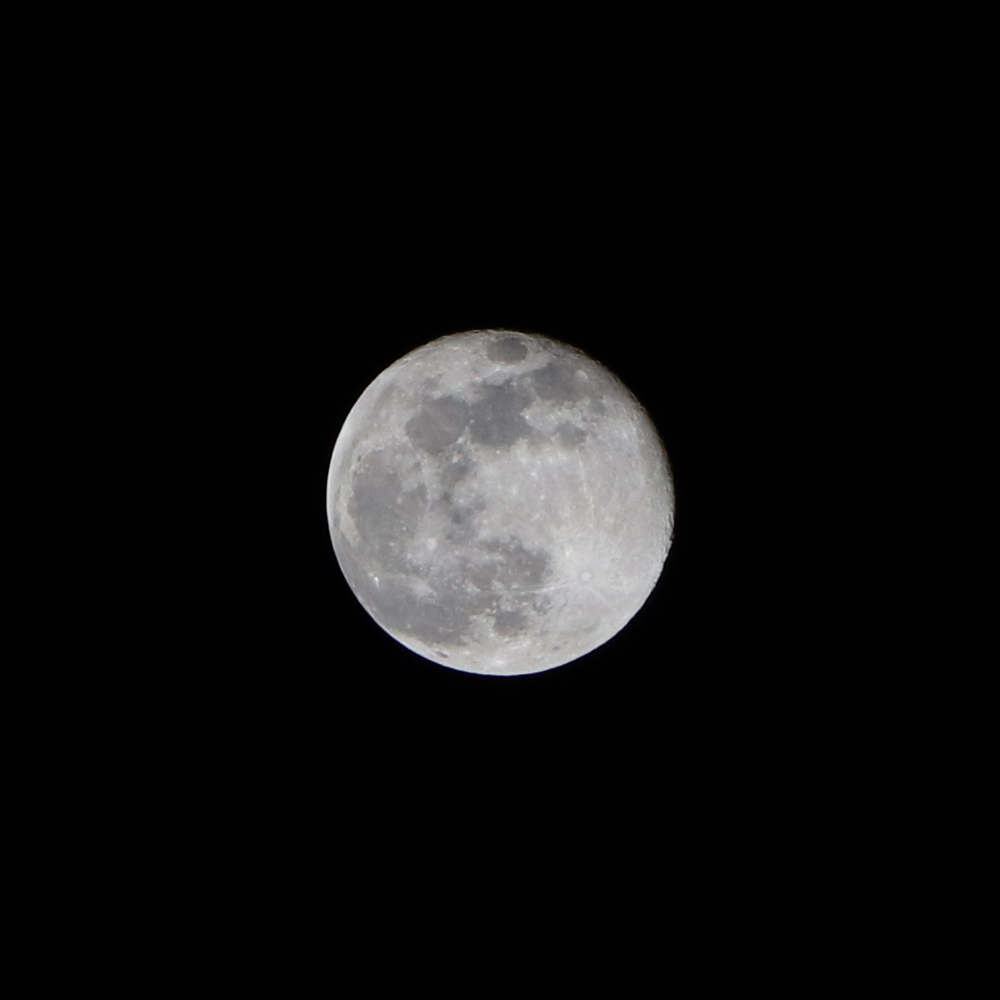
Hi Tintype_18, It took me several trial sessions to get my settings right for "Moon Shots". I am very inexperienced but finally, get some decent "Moon Shots". Listen to the expert advice here and keep trying.
This attached Moon Shot was taken with my EOS Rebel SL2 / EF-S18-135mm f3.5-5.6 IS STM lens at 135mm, Tv mode @ 1/1000s, f5.6, ISO 400. That seems to be my "sweet spot" for a Moon Shot" on a clear night with my 18-135 mm zoom lens. My camera was mounted on a tripod and I use a BR-E1 Bluetooth remote shutter control. This unedited image has only been cropped in Photoshop Elements to 1000px x 1000px.
--
Walter
in Davie, FL
Walter
in Davie, FL
Options
- Mark as New
- Bookmark
- Subscribe
- Mute
- Subscribe to RSS Feed
- Permalink
- Report Inappropriate Content
09-15-2021 03:42 PM
Thanks. I have a corded remote. Would have an advantage.
John
Canon EOS T7; EF-S 18-55mm IS; EF 28-135mm IS; EF 75-300mm; Sigma 150-600mm DG
Canon EOS T7; EF-S 18-55mm IS; EF 28-135mm IS; EF 75-300mm; Sigma 150-600mm DG

- « Previous
-
- 1
- 2
- Next »
- « Previous
-
- 1
- 2
- Next »
Announcements
07/22/2026: New firmware updates are available.
EOS R6 Mark III - Version 1.1.0
05/13/2026: New firmware updates are available.
EOS R5 Mark II - Version 1.3.0
EOS R6 Mark II - Version 1.7.0
04/28/2026: Service Notice: Caution Concerning use of Lithium Batteries
03/17/2026: New firmware updates are available.
SELPHY CP1500 - Version 1.0.7.0
02/23/2026: New firmware update is available for EOS C50- Version 1.0.3.1
01/23/2026: New firmware update is available for RF 24-105mm F4 IS USM- Version 2.0.7
01/20/2026: New firmware updates are available.
10/21/2025: Service Notice: To Users of the Compact Digital Camera PowerShot V1
10/15/2025: New firmware updates are available.
Speedlite EL-5 - Version 1.2.0
Speedlite EL-1 - Version 1.1.0
Speedlite Transmitter ST-E10 - Version 1.2.0
07/28/2025: Notice of Free Repair Service for the Mirrorless Camera EOS R50 (Black)
05/21/2025: New firmware update available for EOS C500 Mark II - Version 1.1.5.1
Related Content
- EOS R1 Change in display brightness in EOS DSLR & Mirrorless Cameras
- EOS R7 (and possibly other cameras) Display Simulation: Exposure+DOF to help AF? in EOS DSLR & Mirrorless Cameras
- EOS 90D How to use Depth of Field preview button in EOS DSLR & Mirrorless Cameras
- EOS R6 Mark II Screen Flashing/Flickering on Focus in EOS DSLR & Mirrorless Cameras
- Where is ‘exposure simulation’ on R5ii? in EOS DSLR & Mirrorless Cameras

Ⓒ 2026
Canon U.S.A Inc. All Rights Reserved. Reproduction in whole or part without permission is prohibited.
