Turn on suggestions
Auto-suggest helps you quickly narrow down your search results by suggesting possible matches as you type.
- Canon Community
- Discussions & Help
- Camera
- EOS DSLR & Mirrorless Cameras
- EOS R8 - Freezing after recording 1-2 seconds, fir...
Options
- Subscribe to RSS Feed
- Mark Topic as New
- Mark Topic as Read
- Float this Topic for Current User
- Bookmark
- Subscribe
- Mute
- Printer Friendly Page
EOS R8 - Freezing after recording 1-2 seconds, firmware update made lcd screen glitch

Options
- Mark as New
- Bookmark
- Subscribe
- Mute
- Subscribe to RSS Feed
- Permalink
- Report Inappropriate Content
06-10-2026
04:42 PM
- last edited on
06-10-2026
04:56 PM
by
 SamanthaW
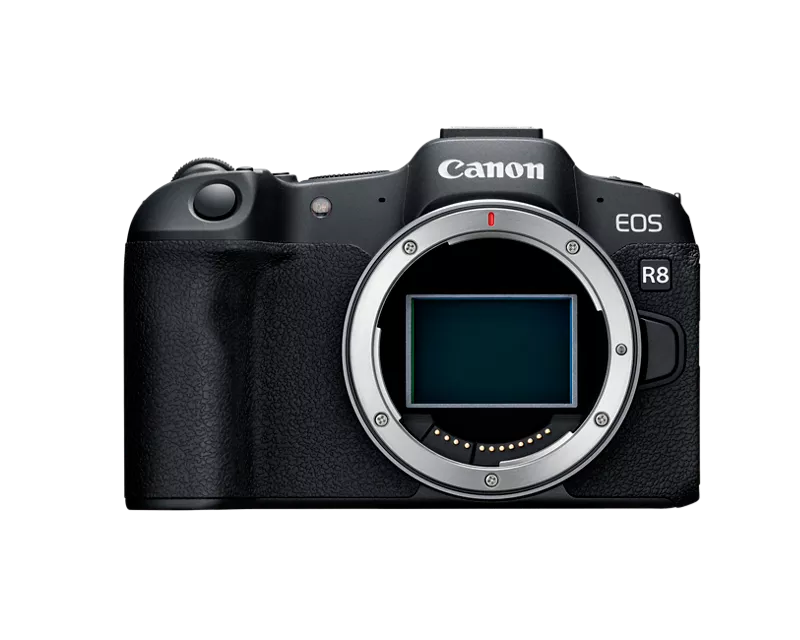
After years working perfectly, my camera suddenly gave glitches and froze when recording after 1-2 seconds.
I updated the firmware in hopes to fix the problem but now the lcd screen appears glitched even when not recording.
I bought this camera when it was released, and I have take extreme care of it, never dropped, and never got water on it.
I am pretty disappointed that Canon does not want to be responsible for what clearly is a factory defect that has affected a lot of R8 and more R cameras.
But if someone in the community have the knowledge to fix the issue I´ll deeply appreciate it.
Even thought the visor and hdmi out work properly, whenever I try to record, the camera freezes again, and after half pressing the shutter button a couple times, it reboots. But can not be used for anything really. I was hoping to film a shortfilm with this camera but is literally impossible. I want to bring visibility to this problem, and clarify that I am from Mexico, Puebla.

19 REPLIES 19
Options
- Mark as New
- Bookmark
- Subscribe
- Mute
- Subscribe to RSS Feed
- Permalink
- Report Inappropriate Content
06-11-2026 08:28 PM
It works through HDMI but the glitch after recording a few seconds comes again, with hdmi or the viewfinder, is impossible to record!
Options
- Mark as New
- Bookmark
- Subscribe
- Mute
- Subscribe to RSS Feed
- Permalink
- Report Inappropriate Content
06-11-2026 08:32 PM
It is really sad, and totally destroys my confidence in R line cameras, specially since the glitch happen from nowhere, and with just a few years of casual use. I loved the specs of the r8, and the rf lenses, but even if i get to repair it I don't know if I can trust it again.


Options
- Mark as New
- Bookmark
- Subscribe
- Mute
- Subscribe to RSS Feed
- Permalink
- Report Inappropriate Content
06-11-2026 08:52 PM
I also have an R100 and it operates flawlessly. The "trust" issue is one I share with you vis a vis the R8. With luck this will be resolved positively.
-----
Digital via Canon R100 and R8. Analog via Pentax, Nikon, and Minolta 35mm SLRs and via Mamiya RB67 and 645, not to mention the persnickety Pentax 17.

Options
- Mark as New
- Bookmark
- Subscribe
- Mute
- Subscribe to RSS Feed
- Permalink
- Report Inappropriate Content
06-11-2026 10:13 PM - edited 06-11-2026 10:14 PM
Will the camera turn on and sit idle without the LCD screen malfunctioning?
Have you tested with a different freshly formatted full size memory card in the camera?
I didn't see any mention of this in the thread.
~Rick
Bay Area - CA
~R5 C (1.1.3.1), ~RF Trinity, ~RF 100 Macro, ~RF 100~400, ~RF 100~500, ~RF 200-800, ~RF 1.4x TC, BG-R10, 430EX III-RT ~DxO PhotoLab Elite ~DaVinci Resolve Studio ~ImageClass MF644Cdw MF656Cdw ~Pixel 10 ~CarePaks Are Worth It

Options
- Mark as New
- Bookmark
- Subscribe
- Mute
- Subscribe to RSS Feed
- Permalink
- Report Inappropriate Content
06-12-2026 10:10 AM
""never do a FW update on a malfunctioning camera"
*Unless* the firmware update specifically says that it addresses the issue. After all, that is often what firmware updates are *for*."
There is a huge difference between a malfunctioning camera and a FW update to camera ability (languages) or new lenses, features, etc. It surprises me that you do not realize that.
EB
EOS 1DX and many lenses.
EOS 1DX and many lenses.
Options
- Mark as New
- Bookmark
- Subscribe
- Mute
- Subscribe to RSS Feed
- Permalink
- Report Inappropriate Content
06-12-2026 10:14 AM
"^^THIS^^"
Not just bad advice THIS time but horrible advice.
EB
EOS 1DX and many lenses.
EOS 1DX and many lenses.
Options
- Mark as New
- Bookmark
- Subscribe
- Mute
- Subscribe to RSS Feed
- Permalink
- Report Inappropriate Content
06-12-2026 10:29 AM
Say what??
-----
Digital via Canon R100 and R8. Analog via Pentax, Nikon, and Minolta 35mm SLRs and via Mamiya RB67 and 645, not to mention the persnickety Pentax 17.
Options
- Mark as New
- Bookmark
- Subscribe
- Mute
- Subscribe to RSS Feed
- Permalink
- Report Inappropriate Content
06-12-2026 06:42 PM
The camera turns on and the lcd dims when idle, but even with the viewfinder, after recording a couple seconds the glitch stop the record and crashes the camera. Yes I´ve tested multiple cards no luck.
Options
- Mark as New
- Bookmark
- Subscribe
- Mute
- Subscribe to RSS Feed
- Permalink
- Report Inappropriate Content
06-12-2026 07:09 PM
Roger on that. It's either going to be the LCD or the main board, probably the LCD <<<<
~Rick
Bay Area - CA
~R5 C (1.1.3.1), ~RF Trinity, ~RF 100 Macro, ~RF 100~400, ~RF 100~500, ~RF 200-800, ~RF 1.4x TC, BG-R10, 430EX III-RT ~DxO PhotoLab Elite ~DaVinci Resolve Studio ~ImageClass MF644Cdw MF656Cdw ~Pixel 10 ~CarePaks Are Worth It
Options
- Mark as New
- Bookmark
- Subscribe
- Mute
- Subscribe to RSS Feed
- Permalink
- Report Inappropriate Content
06-23-2026 02:50 PM
I´ve taken my camera to the authorized center in my city "FOTO PLAZA CANON" in Puebla, Mexico, as I said before I am afraid they will take months into the repair as seen in their reviews. I'll document here and on video the progress.

- « Previous
-
- 1
- 2
- Next »
- « Previous
-
- 1
- 2
- Next »
Announcements
07/22/2026: New firmware updates are available.
EOS R6 Mark III - Version 1.1.0
05/13/2026: New firmware updates are available.
EOS R5 Mark II - Version 1.3.0
EOS R6 Mark II - Version 1.7.0
04/28/2026: Service Notice: Caution Concerning use of Lithium Batteries
03/17/2026: New firmware updates are available.
SELPHY CP1500 - Version 1.0.7.0
02/23/2026: New firmware update is available for EOS C50- Version 1.0.3.1
01/23/2026: New firmware update is available for RF 24-105mm F4 IS USM- Version 2.0.7
01/20/2026: New firmware updates are available.
10/21/2025: Service Notice: To Users of the Compact Digital Camera PowerShot V1
10/15/2025: New firmware updates are available.
Speedlite EL-5 - Version 1.2.0
Speedlite EL-1 - Version 1.1.0
Speedlite Transmitter ST-E10 - Version 1.2.0
07/28/2025: Notice of Free Repair Service for the Mirrorless Camera EOS R50 (Black)
05/21/2025: New firmware update available for EOS C500 Mark II - Version 1.1.5.1
Related Content
- EOS R6 Mark III Firmware Version 1.1.0 available for download in Camera Software
- CFexpress 128GB capacity error on Canon R6 V – Shows "Full" but only 6GB are used in EOS DSLR & Mirrorless Cameras
- EOS R5 Mark II minor Firmware Update, Version 1.3.1 in Camera Software
- EOS R5 Mark II - 4K60 “Fine” upgrade request in EOS DSLR & Mirrorless Cameras

Ⓒ 2026
Canon U.S.A Inc. All Rights Reserved. Reproduction in whole or part without permission is prohibited.
