Turn on suggestions
Auto-suggest helps you quickly narrow down your search results by suggesting possible matches as you type.
- Canon Community
- Discussions & Help
- Camera
- EOS DSLR & Mirrorless Cameras
- Re: EOS R7 - Cannot select Continuous High+ or Con...
Options
- Subscribe to RSS Feed
- Mark Topic as New
- Mark Topic as Read
- Float this Topic for Current User
- Bookmark
- Subscribe
- Mute
- Printer Friendly Page

Options
- Mark as New
- Bookmark
- Subscribe
- Mute
- Subscribe to RSS Feed
- Permalink
- Report Inappropriate Content
10-25-2022 12:03 AM
I bought R7 recently but it won't allow me to select either "Continuous High" or "Continuous High+". These two options are grayed out. The only option is "low speed continuous". I found some previous tread on similar issues but the "solution" provided there does not apply to my case, as Dual Pixel RAW is disable on my R7 already. Did I miss some settings?
Solved! Go to Solution.
2 ACCEPTED SOLUTIONS
Accepted Solutions


Options
- Mark as New
- Bookmark
- Subscribe
- Mute
- Subscribe to RSS Feed
- Permalink
- Report Inappropriate Content
10-25-2022 12:14 AM - edited 10-25-2022 12:15 AM
Hi and welcome to the forum:
I'm not sure to what thread you are referring but you cannot use these features when you have auto level to enable, as per this on P293 of the Advanced User Guide
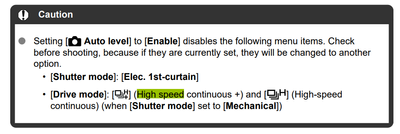
cheers, TREVOR
The mark of good photographer is less what they hold in their hand, it's more what they hold in their head;
"All the variety, all the charm, all the beauty of life is made up of light and shadow", Leo Tolstoy;
"Skill in photography is acquired by practice and not by purchase" Percy W. Harris

Options
- Mark as New
- Bookmark
- Subscribe
- Mute
- Subscribe to RSS Feed
- Permalink
- Report Inappropriate Content
09-23-2025 07:01 PM
Press the menu button and find the auto leveling setting. Set it to disable.
7 REPLIES 7
Options
- Mark as New
- Bookmark
- Subscribe
- Mute
- Subscribe to RSS Feed
- Permalink
- Report Inappropriate Content
10-25-2022 12:14 AM - edited 10-25-2022 12:15 AM
Hi and welcome to the forum:
I'm not sure to what thread you are referring but you cannot use these features when you have auto level to enable, as per this on P293 of the Advanced User Guide
cheers, TREVOR
The mark of good photographer is less what they hold in their hand, it's more what they hold in their head;
"All the variety, all the charm, all the beauty of life is made up of light and shadow", Leo Tolstoy;
"Skill in photography is acquired by practice and not by purchase" Percy W. Harris
Options
- Mark as New
- Bookmark
- Subscribe
- Mute
- Subscribe to RSS Feed
- Permalink
- Report Inappropriate Content
10-25-2022 01:45 AM
Thanks, Trevor, for your advice! I changed "AUTO LEVEL" from "enable" to disable" and now both "Continuous High" and "Continuous High+" are available in my R7. By the way, I did check the manual and the support site but couldn't find a solution to my issue. Thanks again for your help!
Options
- Mark as New
- Bookmark
- Subscribe
- Mute
- Subscribe to RSS Feed
- Permalink
- Report Inappropriate Content
10-25-2022 01:49 AM
Glad to be of assistance. If you can mark the post that sorted this as a resolution, you won't keep getting posts from folks still trying to solve it.
FWIW, I suggest downloading the PDF version of the Advanced User Guide, as one can do a search for key words in the body of the text, which is how I found what you were looking for.
Enjoy your new camera!
cheers, TREVOR
The mark of good photographer is less what they hold in their hand, it's more what they hold in their head;
"All the variety, all the charm, all the beauty of life is made up of light and shadow", Leo Tolstoy;
"Skill in photography is acquired by practice and not by purchase" Percy W. Harris
Options
- Mark as New
- Bookmark
- Subscribe
- Mute
- Subscribe to RSS Feed
- Permalink
- Report Inappropriate Content
10-25-2022 01:55 AM
Thanks, Trevor, for your advice. I've downloaded a copy of Advanced User Guide and will search by keywords in future. Best regards!

Options
- Mark as New
- Bookmark
- Subscribe
- Mute
- Subscribe to RSS Feed
- Permalink
- Report Inappropriate Content
09-23-2025 05:50 PM
Hi Trevor
i have the same problem but I do not understand you fix?
please could you describe it more
many thanks Tom
Options
- Mark as New
- Bookmark
- Subscribe
- Mute
- Subscribe to RSS Feed
- Permalink
- Report Inappropriate Content
09-23-2025 07:01 PM
Press the menu button and find the auto leveling setting. Set it to disable.
Options
- Mark as New
- Bookmark
- Subscribe
- Mute
- Subscribe to RSS Feed
- Permalink
- Report Inappropriate Content
09-24-2025 03:00 AM
Thank you, you have solved it!!!
I knew it was going to be simple.
many thanks Tom

Announcements
07/22/2026: New firmware updates are available.
EOS R6 Mark III - Version 1.1.0
05/13/2026: New firmware updates are available.
EOS R5 Mark II - Version 1.3.0
EOS R6 Mark II - Version 1.7.0
04/28/2026: Service Notice: Caution Concerning use of Lithium Batteries
03/17/2026: New firmware updates are available.
SELPHY CP1500 - Version 1.0.7.0
02/23/2026: New firmware update is available for EOS C50- Version 1.0.3.1
01/23/2026: New firmware update is available for RF 24-105mm F4 IS USM- Version 2.0.7
01/20/2026: New firmware updates are available.
10/21/2025: Service Notice: To Users of the Compact Digital Camera PowerShot V1
10/15/2025: New firmware updates are available.
Speedlite EL-5 - Version 1.2.0
Speedlite EL-1 - Version 1.1.0
Speedlite Transmitter ST-E10 - Version 1.2.0
07/28/2025: Notice of Free Repair Service for the Mirrorless Camera EOS R50 (Black)
05/21/2025: New firmware update available for EOS C500 Mark II - Version 1.1.5.1
Related Content
- CFexpress 128GB capacity error on Canon R6 V – Shows "Full" but only 6GB are used in EOS DSLR & Mirrorless Cameras
- EOS R5 Mark II minor Firmware Update, Version 1.3.1 in Camera Software
- A series of images not displaying in camera or when downloaded - EOS R5 Mk II in EOS DSLR & Mirrorless Cameras
- R5 Mark II Owners Update Your Firmware to Version 1.3.1 in EOS DSLR & Mirrorless Cameras
- R5 Mark II Shutter Continuously Firing in EOS DSLR & Mirrorless Cameras

Ⓒ 2026
Canon U.S.A Inc. All Rights Reserved. Reproduction in whole or part without permission is prohibited.
