Turn on suggestions
Auto-suggest helps you quickly narrow down your search results by suggesting possible matches as you type.
- Canon Community
- Discussions & Help
- Camera
- EOS DSLR & Mirrorless Cameras
- EOS R1 Why didn't Eye Detection and Focus work?
Options
- Subscribe to RSS Feed
- Mark Topic as New
- Mark Topic as Read
- Float this Topic for Current User
- Bookmark
- Subscribe
- Mute
- Printer Friendly Page
EOS R1 Why didn't Eye Detection and Focus work?

Options
- Mark as New
- Bookmark
- Subscribe
- Mute
- Subscribe to RSS Feed
- Permalink
- Report Inappropriate Content
10-20-2025
03:19 AM
- last edited on
10-21-2025
09:22 AM
by
 Danny
Danny
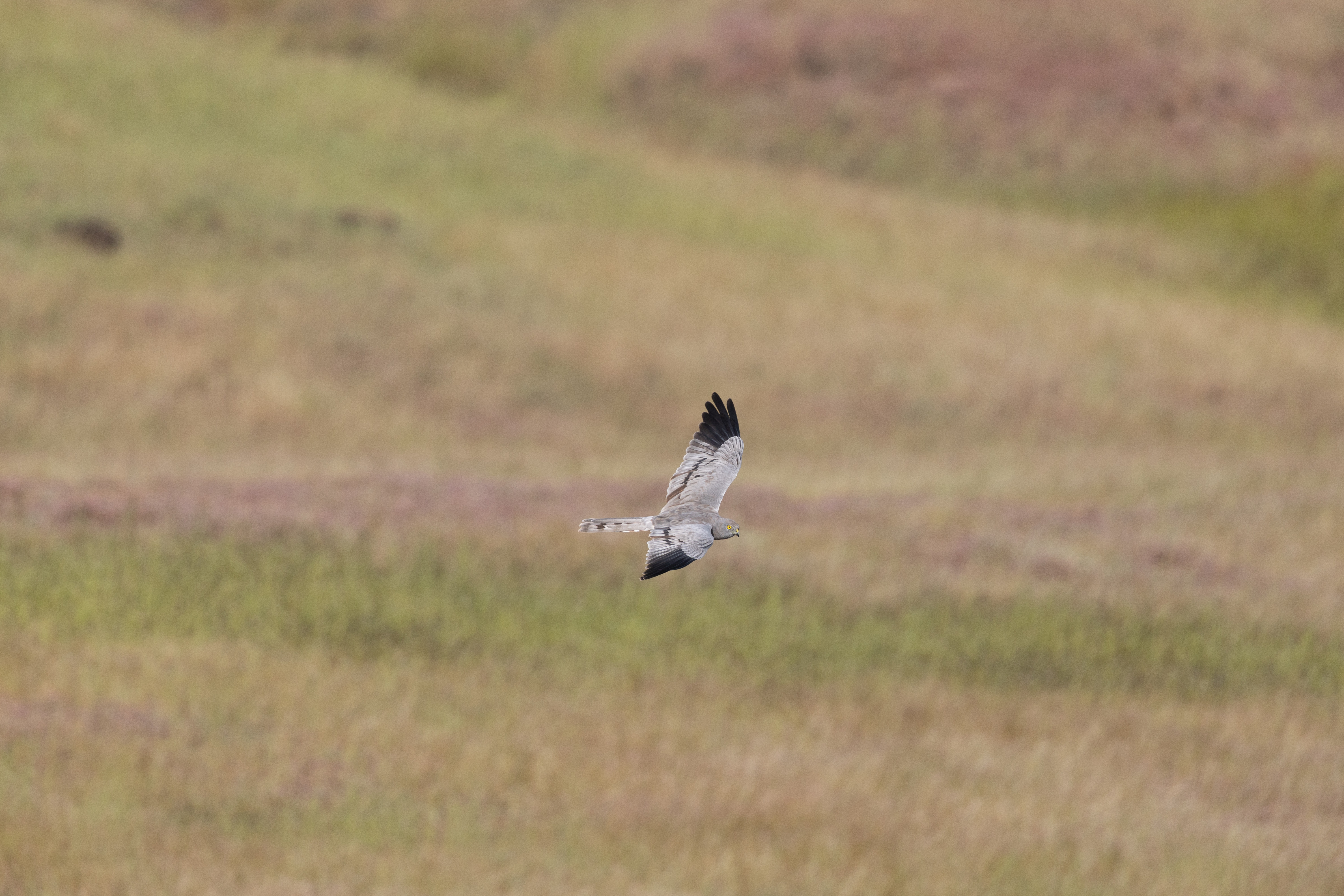
I am sharing a few of the images from a burst I took. The light is good, the flying bird is in front of the camera. However R1 (with EF 500 F4 IS ii with1.4 X IS iii) is unable to detect the eye and focus properly on the raptor. Some of the images show the focus obtained on the bird, but that too is not in focus.
What could be the issues here. I know the bird is not very big in the frame, However, I have seen the camera capture the eye at similar distances.
23 REPLIES 23

Anonymous
Not applicable
Options
- Mark as New
- Bookmark
- Subscribe
- Mute
- Subscribe to RSS Feed
- Permalink
- Report Inappropriate Content
10-20-2025 04:40 AM
Could you post these pictures here, I'm not downloading from unknown source.
I suspect too small and too little contrast but need to see the photo.
Options
- Mark as New
- Bookmark
- Subscribe
- Mute
- Subscribe to RSS Feed
- Permalink
- Report Inappropriate Content
10-20-2025
06:30 AM
- last edited on
10-21-2025
09:08 AM
by
Danny
This link has two images. Both have exactly focus locked on to the eye. But one image is focused while other is not.
What could be the reason for it?
Options
- Mark as New
- Bookmark
- Subscribe
- Mute
- Subscribe to RSS Feed
- Permalink
- Report Inappropriate Content
10-20-2025 08:38 AM
Neither link nor images visible
Options
- Mark as New
- Bookmark
- Subscribe
- Mute
- Subscribe to RSS Feed
- Permalink
- Report Inappropriate Content
10-20-2025 11:55 PM
The images have been shared from my personal NAS and are absolutely safe to download. I have shared RAW files. I will not be able to share them here because of the limitations.
Options
- Mark as New
- Bookmark
- Subscribe
- Mute
- Subscribe to RSS Feed
- Permalink
- Report Inappropriate Content
10-20-2025 11:58 PM
Opps, I forgot to put the share link. here it is:
https://www.myqnapcloud.com/smartshare/704ekjh1kol2998r21uuv721_ee1g9j4943682qq5rv081yza489cc661
This is my personal NAS (QNAP Hero) and perfectly safe to download.
Options
- Mark as New
- Bookmark
- Subscribe
- Mute
- Subscribe to RSS Feed
- Permalink
- Report Inappropriate Content
10-21-2025 06:19 AM - edited 10-21-2025 06:33 AM
That's what they all say😛
I probably would if I'd known you longer and needed the raw. But here I think a jpeg would suffice. You could easily post a (resized) jpeg with full exif so anybody could chip in.
I often shoot BIF with my R1 and R5II so maybe I could help you.
Testing upload: edit: these were around 3000px long side but auto reduced to 1000px by forum software.


Options
- Mark as New
- Bookmark
- Subscribe
- Mute
- Subscribe to RSS Feed
- Permalink
- Report Inappropriate Content
10-21-2025 05:52 PM - edited 10-21-2025 05:53 PM
“
This is my personal NAS (QNAP Hero) and perfectly safe to download. “
Links such as yours is a violation of forum rules. Please post your images on a public file sharing platform. Thanks, in advance.
--------------------------------------------------------
"Enjoying photography since 1972."
"Enjoying photography since 1972."
Options
- Mark as New
- Bookmark
- Subscribe
- Mute
- Subscribe to RSS Feed
- Permalink
- Report Inappropriate Content
10-22-2025 12:25 AM
Thanks for clarifying the rules.
I wanted to share RAW as that allows experts to open with DPP or PS or other software that gives the EXIF in full details. You can see the camera settings. Let me share the JPG now. I would love to understand what went wrong with the images I am talking about
Options
- Mark as New
- Bookmark
- Subscribe
- Mute
- Subscribe to RSS Feed
- Permalink
- Report Inappropriate Content
10-22-2025 12:33 AM


Announcements
07/22/2026: New firmware updates are available.
EOS R6 Mark III - Version 1.1.0
05/13/2026: New firmware updates are available.
EOS R5 Mark II - Version 1.3.0
EOS R6 Mark II - Version 1.7.0
04/28/2026: Service Notice: Caution Concerning use of Lithium Batteries
03/17/2026: New firmware updates are available.
SELPHY CP1500 - Version 1.0.7.0
02/23/2026: New firmware update is available for EOS C50- Version 1.0.3.1
01/23/2026: New firmware update is available for RF 24-105mm F4 IS USM- Version 2.0.7
01/20/2026: New firmware updates are available.
10/21/2025: Service Notice: To Users of the Compact Digital Camera PowerShot V1
10/15/2025: New firmware updates are available.
Speedlite EL-5 - Version 1.2.0
Speedlite EL-1 - Version 1.1.0
Speedlite Transmitter ST-E10 - Version 1.2.0
07/28/2025: Notice of Free Repair Service for the Mirrorless Camera EOS R50 (Black)
05/21/2025: New firmware update available for EOS C500 Mark II - Version 1.1.5.1
Related Content
- EOS R1 Eye Detection and Focus issues in EOS DSLR & Mirrorless Cameras
- EOS R5 Mark II custom button for Spot AF in EOS DSLR & Mirrorless Cameras
- EOS R5 Mark II firmware 1.30 notes in Camera Software
- Migrated from R6 mki to mkii - Help with tying eye detection to af point in EOS DSLR & Mirrorless Cameras
- EOS R6 Mark II keeps focusing on the wrong people in EOS DSLR & Mirrorless Cameras

Ⓒ 2026
Canon U.S.A Inc. All Rights Reserved. Reproduction in whole or part without permission is prohibited.
