Turn on suggestions
Auto-suggest helps you quickly narrow down your search results by suggesting possible matches as you type.
- Canon Community
- Discussions & Help
- Camera
- EOS DSLR & Mirrorless Cameras
- EOS Canon R6 mkIII Image write failure
Options
- Subscribe to RSS Feed
- Mark Topic as New
- Mark Topic as Read
- Float this Topic for Current User
- Bookmark
- Subscribe
- Mute
- Printer Friendly Page
EOS Canon R6 mkIII Image write failure

Options
- Mark as New
- Bookmark
- Subscribe
- Mute
- Subscribe to RSS Feed
- Permalink
- Report Inappropriate Content
09-07-2026 11:38 AM
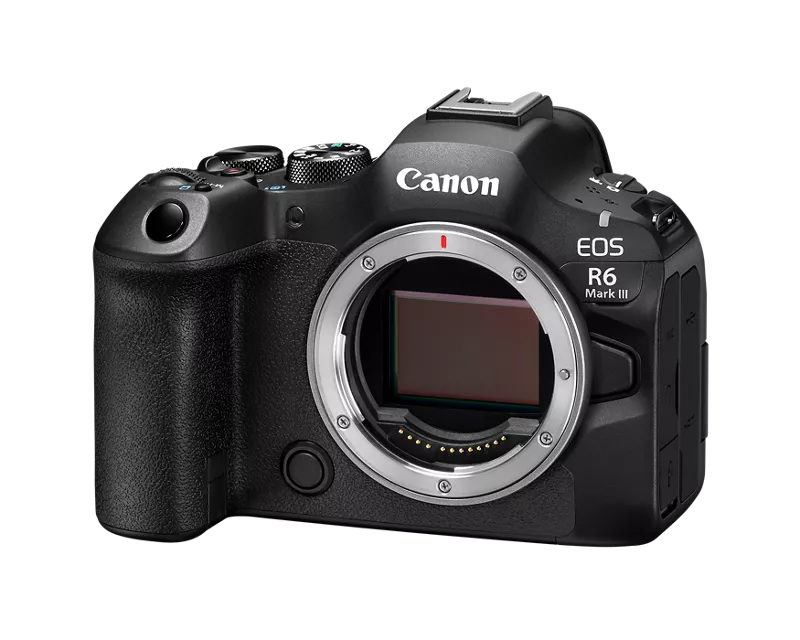
I was shooting a wedding yesterday on a new R6 mkIII which I've used for a few weddings with no issues. I updated the firmware to 1.1.0 and was using it for the first time since the updating the firmware.
I was about 30 shots into the day. I lifted my camera to find the viewfinder screen visible, showing what was through the lens but all the camera setting info and focus points weren't visible. I pressed the shutter button and nothing was working so I turned off the camera (did not remove the battery) and turned it back on and it was working as normally.
I continued to shoot and then decided to check my camera and review an image and all of the images I had shot since turning the camera off where not viewable in the camera. I then turned off the camera (did not remove battery) and the screen said 'saving' 132 images. I let the camera sit for 45 minutes and it still said 'saving' with no change.
I then removed the battery and checked the camera to find the images were still not showing on the memory card. I even checked the 101EOSR6 folder in both cards through the computer and no luck.
I'm using Sandisk extreme pro memory cards (both a few months old) and was shooting images only, not in burst mode so there shouldn't have been any buffering issues. My memory cards were freshly formatted in camera at the beginning of the shoot and the images were set to RAW + JPEG. The write data was set to 'Rec to Multiple' and both cards have no images.
I have yet to try any recovery software but I fear there was some sort of issue with the camera communicating with the memory cards.
Any one have any issues like this before? Any thoughts?
32 REPLIES 32
Options
- Mark as New
- Bookmark
- Subscribe
- Mute
- Subscribe to RSS Feed
- Permalink
- Report Inappropriate Content
09-17-2026 09:41 AM
Did you firmware upgrade because of an issue or just to get on the latest?? IMHO, I've been in I.T. for 40 yrs. if it isn't broken don't fix it, or at the very minimum, don't ever be anxious to update unless your trying to FIX an existing issue. No matter how much testing, especially with the complexity that exists in todays electronics, will there not be bugs. I learned this the hard way way back in the DOS 6.2 days..... and if your doing this for your living, the juice isn't worth the squeeze.
Options
- Mark as New
- Bookmark
- Subscribe
- Mute
- Subscribe to RSS Feed
- Permalink
- Report Inappropriate Content
09-17-2026 12:13 PM
I updated the firmware just because it was available. The camera was working perfectly before the update (which may be a coincidence). I estimate I took 30,000+ images since with no issues until the update.


Options
- Mark as New
- Bookmark
- Subscribe
- Mute
- Subscribe to RSS Feed
- Permalink
- Report Inappropriate Content
09-18-2026 04:02 AM
@McNulty211 wrote:
I brought the frezzing issue up to a Canon service tech a while back and he suggested getting new memory cards as they do have a lifespan. So far they R6 has been working well since getting new cards.
Some cards will show you its health data. This is from my Kingston MicroSD that I have used for one year.
I used sdmon to get the data from the card.


- « Previous
- Next »
- « Previous
- Next »

Announcements
07/22/2026: New firmware updates are available.
EOS R6 Mark III - Version 1.1.0
05/13/2026: New firmware updates are available.
EOS R5 Mark II - Version 1.3.0
EOS R6 Mark II - Version 1.7.0
04/28/2026: Service Notice: Caution Concerning use of Lithium Batteries
03/17/2026: New firmware updates are available.
SELPHY CP1500 - Version 1.0.7.0
02/23/2026: New firmware update is available for EOS C50- Version 1.0.3.1
01/23/2026: New firmware update is available for RF 24-105mm F4 IS USM- Version 2.0.7
01/20/2026: New firmware updates are available.
10/21/2025: Service Notice: To Users of the Compact Digital Camera PowerShot V1
10/15/2025: New firmware updates are available.
Speedlite EL-5 - Version 1.2.0
Speedlite EL-1 - Version 1.1.0
Speedlite Transmitter ST-E10 - Version 1.2.0
07/28/2025: Notice of Free Repair Service for the Mirrorless Camera EOS R50 (Black)
05/21/2025: New firmware update available for EOS C500 Mark II - Version 1.1.5.1

Ⓒ 2026
Canon U.S.A Inc. All Rights Reserved. Reproduction in whole or part without permission is prohibited.
