Turn on suggestions
Auto-suggest helps you quickly narrow down your search results by suggesting possible matches as you type.
- Canon Community
- Discussions & Help
- Camera
- EOS DSLR & Mirrorless Cameras
- Blue Hue when shooting video on Canon T3I
Options
- Subscribe to RSS Feed
- Mark Topic as New
- Mark Topic as Read
- Float this Topic for Current User
- Bookmark
- Subscribe
- Mute
- Printer Friendly Page
Blue Hue when shooting video on Canon T3I

Options
- Mark as New
- Bookmark
- Subscribe
- Mute
- Subscribe to RSS Feed
- Permalink
- Report Inappropriate Content
08-22-2016 04:03 PM
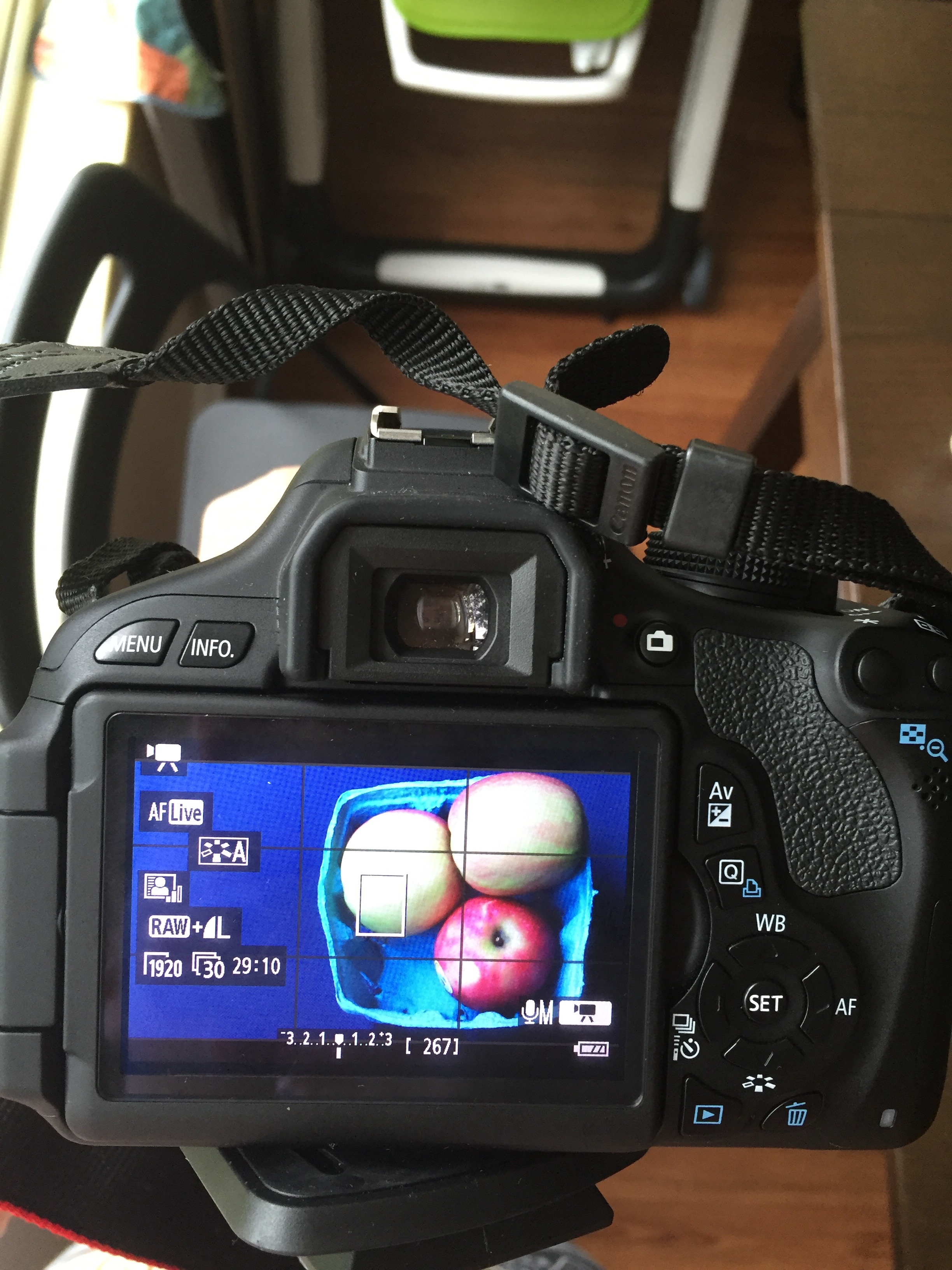
I recently purchased new Canon T3I. It works great except of the shooting video. Whenever I switch to vieo shooting mode, the picture comes out bluish. I tried switching bewteen different white balances, but it doesn't help.
I've also switched to picture style: auto, as one person recommended, but it didn't help either.
Is there a way I can make it work?
10 REPLIES 10


Options
- Mark as New
- Bookmark
- Subscribe
- Mute
- Subscribe to RSS Feed
- Permalink
- Report Inappropriate Content
08-22-2016 04:20 PM
If you understand how White Balance works, then I suspect you could have an issue. Do you still get the problem when shooting outdoors in sunshine? If so, then I suggest contacting Canon U.S. Support at 1-800-OK-CANON.
--------------------------------------------------------
"Enjoying photography since 1972."
"Enjoying photography since 1972."
Options
- Mark as New
- Bookmark
- Subscribe
- Mute
- Subscribe to RSS Feed
- Permalink
- Report Inappropriate Content
08-22-2016 07:47 PM
Thanks for your answer. Yes, outdoors is the same thing.

Options
- Mark as New
- Bookmark
- Subscribe
- Mute
- Subscribe to RSS Feed
- Permalink
- Report Inappropriate Content
08-22-2016 08:28 PM
Did you try setting the sunny-outdoors white balance?
Options
- Mark as New
- Bookmark
- Subscribe
- Mute
- Subscribe to RSS Feed
- Permalink
- Report Inappropriate Content
08-23-2016 06:00 AM
@Iryna_B wrote:Thanks for your answer. Yes, outdoors is the same thing.
What do see on the screen if you turn off Live View, or Movie Mode, and press the button on the pad labeled "WB"? Make sure it is set to automatic, "AWB", and try to take a picture outdoors in the sunshine.
--------------------------------------------------------
"Enjoying photography since 1972."
"Enjoying photography since 1972."
Options
- Mark as New
- Bookmark
- Subscribe
- Mute
- Subscribe to RSS Feed
- Permalink
- Report Inappropriate Content
08-23-2016 02:54 PM
Yes, i did. It didn't do anything.
Options
- Mark as New
- Bookmark
- Subscribe
- Mute
- Subscribe to RSS Feed
- Permalink
- Report Inappropriate Content
08-23-2016 02:57 PM
Yes, i set my WB to Auto and took pictures outdoor in the sunshine, but it is still blue.
Options
- Mark as New
- Bookmark
- Subscribe
- Mute
- Subscribe to RSS Feed
- Permalink
- Report Inappropriate Content
08-23-2016 03:00 PM
Time to call Canon. Sounds like a DIGIC issue.
Options
- Mark as New
- Bookmark
- Subscribe
- Mute
- Subscribe to RSS Feed
- Permalink
- Report Inappropriate Content
08-23-2016 03:08 PM
I've no idea what that is:) Anyways, I'll call Canon to figure it out. Thank you!
Options
- Mark as New
- Bookmark
- Subscribe
- Mute
- Subscribe to RSS Feed
- Permalink
- Report Inappropriate Content
08-23-2016 03:13 PM
The onboard Sensor->image processor, a Canon trademark. I doubt that the sensor has an issue with just the blue pixels, so I guess the fault is in the processing upstream of that.
I had a similar thing happen to a camera we found at a thrift store. It worked for a while, then the exposure seemed to drop about 5 stops.


Announcements
05/13/2026: New firmware updates are available.
EOS R5 Mark II - Version 1.3.0
EOS R6 Mark II - Version 1.7.0
04/28/2026: Service Notice: Caution Concerning use of Lithium Batteries
03/17/2026: New firmware updates are available.
SELPHY CP1500 - Version 1.0.7.0
02/23/2026: New firmware update is available for EOS C50- Version 1.0.3.1
01/23/2026: New firmware update is available for RF 24-105mm F4 IS USM- Version 2.0.7
01/20/2026: New firmware updates are available.
12/22/2025: New firmware update is available for EOS R6 Mark III- Version 1.0.2
10/21/2025: Service Notice: To Users of the Compact Digital Camera PowerShot V1
10/15/2025: New firmware updates are available.
Speedlite EL-5 - Version 1.2.0
Speedlite EL-1 - Version 1.1.0
Speedlite Transmitter ST-E10 - Version 1.2.0
07/28/2025: Notice of Free Repair Service for the Mirrorless Camera EOS R50 (Black)
05/21/2025: New firmware update available for EOS C500 Mark II - Version 1.1.5.1
Related Content
- Travel lens help! in EF & RF Lenses
- Realtime Exposure Zebras For Stills Photography in the Canon EOS R5 Mark II in EOS DSLR & Mirrorless Cameras
- Update Firmware on Powershot V1 with a blank screen? in Point & Shoot Digital Cameras
- EOS R8 Turns Off in EOS DSLR & Mirrorless Cameras
- EOS R5 Mark II firmware 1.30 notes in Camera Software

Ⓒ 2026
Canon U.S.A Inc. All Rights Reserved. Reproduction in whole or part without permission is prohibited.
