Turn on suggestions
Auto-suggest helps you quickly narrow down your search results by suggesting possible matches as you type.
- Canon Community
- Discussions & Help
- Camera
- EOS DSLR & Mirrorless Cameras
- 7D Internal Flash (sync?) Problem HELP.
Options
- Subscribe to RSS Feed
- Mark Topic as New
- Mark Topic as Read
- Float this Topic for Current User
- Bookmark
- Subscribe
- Mute
- Printer Friendly Page
7D Internal Flash (sync?) Problem HELP.

Options
- Mark as New
- Bookmark
- Subscribe
- Mute
- Subscribe to RSS Feed
- Permalink
- Report Inappropriate Content
11-19-2014 09:12 PM
I recently got my 7D back after it was being fixed for a broken cf pin.
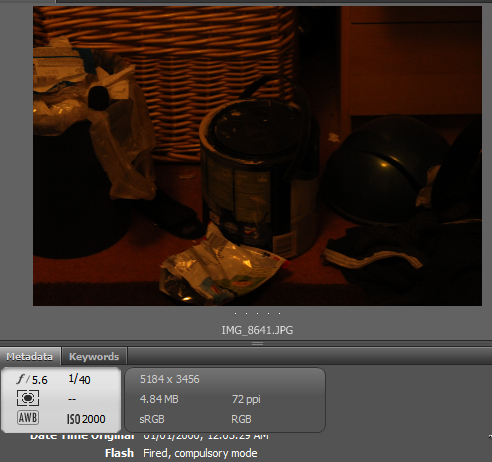
The problem now lies with the flash, the flash DOES pop and it does fire, but there's no flash effect on the photo sometimes. Heres 2 photos, same settings but 1 is iso 1600 and the second is iso 2000.
Both photos the flash did pop and did fire.

5 REPLIES 5

Options
- Mark as New
- Bookmark
- Subscribe
- Mute
- Subscribe to RSS Feed
- Permalink
- Report Inappropriate Content
11-19-2014 10:38 PM
Canon flashes using ETTL are extremely averse to overexposure and always favor the highlights. Which means that you normally have to expose for the scene and treat the flash as fill. Whether the difference in the ISO settings fully accounts for the difference in brightness is hard to say. One other possibility, I suppose, is that the ISO 2000 image (which, from its number, is the earlier one) was taken before the flash's capacitors had time to reach full power.
Bob
Philadelphia, Pennsylvania USA
Philadelphia, Pennsylvania USA

Options
- Mark as New
- Bookmark
- Subscribe
- Mute
- Subscribe to RSS Feed
- Permalink
- Report Inappropriate Content
11-20-2014 11:15 AM - edited 11-20-2014 11:16 AM
The flash didn't fire in that second shot; there's no specular highlight (from the flash) on the blue trashcan lid in the second shot. You can see it clearly in the first. All the shadows also indicate an overhead light source is dominant. Unless you were using a really long lens even a low powered flash would have done something. Is it possible that you managed to completely cover the flash with a hand or arm or something? It's hard to cover it completely, but it's possible.
I wonder if it was only a preflash, though I'd think the EXIF wouldn't report that the flash fired in that case. It's possible, I suppose, that it fired at the lowest power level, but at ISO 2000 and f/5.6 I'd think you'd see at least something from it.
Options
- Mark as New
- Bookmark
- Subscribe
- Mute
- Subscribe to RSS Feed
- Permalink
- Report Inappropriate Content
11-20-2014 11:37 AM
This is the problem, i can provide a few other examples where the flash did fire (Not only pre fire) and XIF data shows that the flash fired as proof, but isn't showing in the image. The flash was not covered.
Obviously i'm speculating but it is almost as if the flash fires too early or late so that it is not captured in the image? I can't think of why this happens, I never had this problem before the cf card reader replacment.
Options
- Mark as New
- Bookmark
- Subscribe
- Mute
- Subscribe to RSS Feed
- Permalink
- Report Inappropriate Content
11-20-2014 12:20 PM - edited 11-20-2014 12:21 PM
@creepyNick wrote:This is the problem, i can provide a few other examples where the flash did fire (Not only pre fire) and XIF data shows that the flash fired as proof, but isn't showing in the image. The flash was not covered.
Obviously i'm speculating but it is almost as if the flash fires too early or late so that it is not captured in the image? I can't think of why this happens, I never had this problem before the cf card reader replacment.
Firing too late is hard to envision, but firing too early (or appearing to) could result from a sticky first shutter curtain. Possibly the mechanism got damaged when they dismantled the camera to get at the CF socket.
If the problem is that closely tied to the repair, I'd be inclined to send the camera back to the shop. Even if the problem appeared to go away, how could you be sure, given that it's sporadic anyway?
Can you reproduce the problem with an external speedlight instead of the internal flash? If not, it suggests that the problem may be electrical rather than mechanical.
I assume that you've ruled out sluggishness in the pop-up mechanism. That should affect only the first shot in a sequence, since I believe the flash will stay up until it's pushed back down.
Bob
Philadelphia, Pennsylvania USA
Philadelphia, Pennsylvania USA
Options
- Mark as New
- Bookmark
- Subscribe
- Mute
- Subscribe to RSS Feed
- Permalink
- Report Inappropriate Content
11-20-2014 12:29 PM
I don't want to say that the flash IS firing too early, because it's to hard to tell. All i meant was thats what it looks like on the final image, that the flash isn't even there, when i know that it did indeed fire.
Unfortunately i dont have access to a speedlight or flash. And yes the images shown above were taken seconds apart with the flash already popped up.
It's a really odd problem that I haven't seen anyone else complain about online. I'm not sire whats causing it, or how to fix it. Any help is appreciated.
Unfortunately i dont have access to a speedlight or flash. And yes the images shown above were taken seconds apart with the flash already popped up.
It's a really odd problem that I haven't seen anyone else complain about online. I'm not sire whats causing it, or how to fix it. Any help is appreciated.

Announcements
07/22/2026: New firmware updates are available.
EOS R6 Mark III - Version 1.1.0
05/13/2026: New firmware updates are available.
EOS R5 Mark II - Version 1.3.0
EOS R6 Mark II - Version 1.7.0
04/28/2026: Service Notice: Caution Concerning use of Lithium Batteries
03/17/2026: New firmware updates are available.
SELPHY CP1500 - Version 1.0.7.0
02/23/2026: New firmware update is available for EOS C50- Version 1.0.3.1
01/23/2026: New firmware update is available for RF 24-105mm F4 IS USM- Version 2.0.7
01/20/2026: New firmware updates are available.
10/21/2025: Service Notice: To Users of the Compact Digital Camera PowerShot V1
10/15/2025: New firmware updates are available.
Speedlite EL-5 - Version 1.2.0
Speedlite EL-1 - Version 1.1.0
Speedlite Transmitter ST-E10 - Version 1.2.0
07/28/2025: Notice of Free Repair Service for the Mirrorless Camera EOS R50 (Black)
05/21/2025: New firmware update available for EOS C500 Mark II - Version 1.1.5.1
Related Content
- Canon AF35M II/Autoboy 2 flash not working in Point & Shoot Digital Cameras
- EOS R6 II won't capture photos in Lightroom Classic's tether capture or EOS utilites in Camera Software
- Power shot Canon sx740hs Error 70 “An error prevented shooting." in Point & Shoot Digital Cameras
- Inconsistent Exposure with Canon R8 and flash photography in EOS DSLR & Mirrorless Cameras
- Powershot SX420 Is water damage? in Point & Shoot Digital Cameras

Ⓒ 2026
Canon U.S.A Inc. All Rights Reserved. Reproduction in whole or part without permission is prohibited.
