Turn on suggestions
Auto-suggest helps you quickly narrow down your search results by suggesting possible matches as you type.
- Canon Community
- Discussions & Help
- Camera
- EF & RF Lenses
- Is the Canon RF 24-70mm f2.8 L IS Zoom ring a bit ...
Options
- Subscribe to RSS Feed
- Mark Topic as New
- Mark Topic as Read
- Float this Topic for Current User
- Bookmark
- Subscribe
- Mute
- Printer Friendly Page
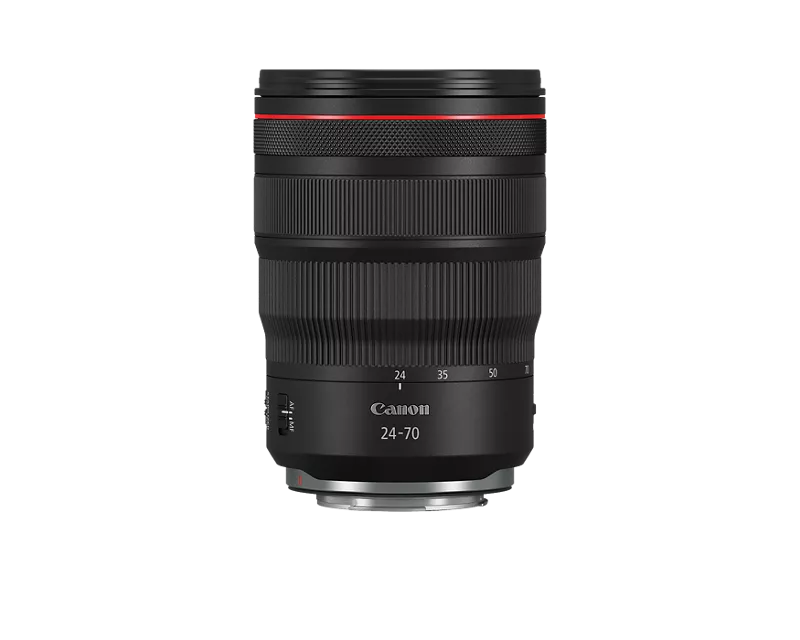
Is the Canon RF 24-70mm f2.8 L IS Zoom ring a bit stiff?

Options
- Mark as New
- Bookmark
- Subscribe
- Mute
- Subscribe to RSS Feed
- Permalink
- Report Inappropriate Content
01-18-2025 02:38 PM
Had a question regarding the Canon RF 24-70mm f2.8 L IS. I'm new to this lens and somewhat new to Canon coming from Sony, Nikon and Fujifilm. Is the zoom ring on this lens a little tighter than the average zoom lens? I know with all lenses with different manufacturers, there will be some slight design differences, but just curious if this lens tends to have a stiffer action to the zoom. With other zoom lenses, I've usually been able to move the zoom ring with one finger, but with this lens, I tend to have to move the zoom lens with my whole hand. If that's the design, I'll adjust but just making sure there's nothing wrong with my copy. Thoughts?
4 REPLIES 4


Options
- Mark as New
- Bookmark
- Subscribe
- Mute
- Subscribe to RSS Feed
- Permalink
- Report Inappropriate Content
01-18-2025 04:27 PM
Greetings,
I've used 1 finger to zoom my RF 24-70. While possible, it's not my preference. I think it has the perfect amount of drag. Mine does anyways.
~Rick
Bay Area - CA
~R5 C (1.1.2.1), ~R50v (1.1.1) ~RF Trinity, ~RF 100 Macro, ~RF 100~400, ~RF 100~500, ~RF 200-800 +RF 1.4x TC, BG-R10, 430EX III-RT ~DxO PhotoLab Elite ~DaVinci Resolve Studio ~ImageClass MF644Cdw/MF656Cdw ~Pixel 10 ~CarePaks Are Worth It

Options
- Mark as New
- Bookmark
- Subscribe
- Mute
- Subscribe to RSS Feed
- Permalink
- Report Inappropriate Content
01-18-2025 09:26 PM
Mine was a bit stiff out of the box but it's been used fairly often and is very smooth now.
Marc
Windy City
R5 Mk II ~ R6 Mk III ~ R7
Lenses: RF Trinity and others
Adobe and DxO PhotoLab Elite for post processing
Personal Gallery

Options
- Mark as New
- Bookmark
- Subscribe
- Mute
- Subscribe to RSS Feed
- Permalink
- Report Inappropriate Content
01-19-2025 04:19 AM
I've had this lens for years, and probably use it the most out of all my lenses, and the zoom action has always seemed fine to me. My feeling is that it's firm as appropriate for a pretty big, heavy lens.
I wouldn't think of moving it with one finger, though. If that was easily possible, I would consider it too light and easily knocked off position. I use two fingers, one each side of the lens, and it's fine.

Options
- Mark as New
- Bookmark
- Subscribe
- Mute
- Subscribe to RSS Feed
- Permalink
- Report Inappropriate Content
01-19-2025 12:23 PM
"I wouldn't think of moving it with one finger... I would consider it too light and easily knocked off position."
Absolutely.
EB
EOS 1DX and many lenses.
EOS 1DX and many lenses.


Announcements
05/13/2026: New firmware updates are available.
EOS R5 Mark II - Version 1.3.0
EOS R6 Mark II - Version 1.7.0
04/28/2026: Service Notice: Caution Concerning use of Lithium Batteries
03/17/2026: New firmware updates are available.
SELPHY CP1500 - Version 1.0.7.0
02/23/2026: New firmware update is available for EOS C50- Version 1.0.3.1
01/23/2026: New firmware update is available for RF 24-105mm F4 IS USM- Version 2.0.7
01/20/2026: New firmware updates are available.
12/22/2025: New firmware update is available for EOS R6 Mark III- Version 1.0.2
10/21/2025: Service Notice: To Users of the Compact Digital Camera PowerShot V1
10/15/2025: New firmware updates are available.
Speedlite EL-5 - Version 1.2.0
Speedlite EL-1 - Version 1.1.0
Speedlite Transmitter ST-E10 - Version 1.2.0
07/28/2025: Notice of Free Repair Service for the Mirrorless Camera EOS R50 (Black)
05/21/2025: New firmware update available for EOS C500 Mark II - Version 1.1.5.1

Ⓒ 2026
Canon U.S.A Inc. All Rights Reserved. Reproduction in whole or part without permission is prohibited.
