Turn on suggestions
Auto-suggest helps you quickly narrow down your search results by suggesting possible matches as you type.
- Canon Community
- Discussions & Help
- Printer
- Desktop Inkjet Printers
- mg5350 not printing
Options
- Subscribe to RSS Feed
- Mark Topic as New
- Mark Topic as Read
- Float this Topic for Current User
- Bookmark
- Subscribe
- Mute
- Printer Friendly Page
mg5350 not printing

Options
- Mark as New
- Bookmark
- Subscribe
- Mute
- Subscribe to RSS Feed
- Permalink
- Report Inappropriate Content
07-26-2015 09:03 AM
my mg5350 has stopped printing, it seems to print but the paper comes out blank and the printer cartridges are all full
5 REPLIES 5
Options
- Mark as New
- Bookmark
- Subscribe
- Mute
- Subscribe to RSS Feed
- Permalink
- Report Inappropriate Content
07-26-2015 06:55 PM
Same exact thing is happening to my MG5320. Was working fine. Acts like it is printing but the page comes out blank. Did everything the manual suggeseted. Deep cleaning, etc. Ink tanks are full. This SUCKS! My canon printers always quit working after about 2 years.


Options
- Mark as New
- Bookmark
- Subscribe
- Mute
- Subscribe to RSS Feed
- Permalink
- Report Inappropriate Content
07-28-2015 12:03 PM
Hi spycatcher,
First, please make sure that the ink tanks are installed in the printer correctly and are in the correct order. The order from left to right is as follows:
CLI-226BK
CLI-226M
CLI-226C
PGI-225PGBK
CLI-226Y
Next, a test of the printer should be performed. This will tell us if the printer is working correctly. To do this, please load letter-sized paper in the PIXMA MG5320 and follow these steps:
1. Press <HOME>.
2. Rotate the menu to Maintenance and press <OK>.
3. Press <OK> on Print nozzle check pattern.
4. Press <OK> on Yes.
The Nozzle Check will print. Please compare your printout to the example below:
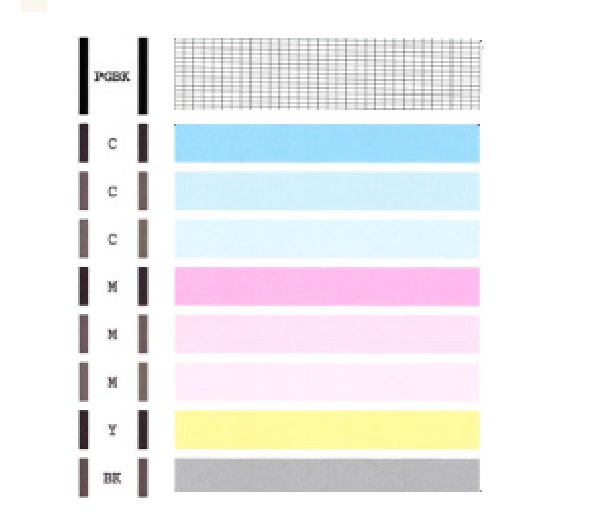
If they differ, please perform a few printhead cleanings.
To perform cleanings, please follow these steps:
1. Press <HOME>.
2. Rotate the menu to Maintenance and press <OK>.
3. Press <OK> on Cleaning.
4. Press <OK> on Yes.
5. Press <OK> on Yes.
After a few cleanings, please print another Nozzle Check.
Does the Nozzle Check print correctly?
If not, please contact our support group using the following link:
http://www.usa.canon.com/cusa/consumer/standard_display/contact_us_consumer
Options
- Mark as New
- Bookmark
- Subscribe
- Mute
- Subscribe to RSS Feed
- Permalink
- Report Inappropriate Content
09-25-2017 03:56 PM
hi ive have the same prob this printer has full ink cartridges yet still does not print. did you solve the problem with your printer or is it yet another pile off canon crap
Options
- Mark as New
- Bookmark
- Subscribe
- Mute
- Subscribe to RSS Feed
- Permalink
- Report Inappropriate Content
09-26-2017 11:23 AM
Never solved it!

Options
- Mark as New
- Bookmark
- Subscribe
- Mute
- Subscribe to RSS Feed
- Permalink
- Report Inappropriate Content
12-04-2023 04:56 PM
It appears to me that either the printer has run it's pre programmed count and switched off the ink flow, Counter needs a reset. or the absorber pads are full,...will need to be cleaned or renewed and preset counter needs a reset. It has happened to me. search for the reset tool and you might be lucky.


Announcements
07/22/2026: New firmware updates are available.
EOS R6 Mark III - Version 1.1.0
05/13/2026: New firmware updates are available.
EOS R5 Mark II - Version 1.3.0
EOS R6 Mark II - Version 1.7.0
04/28/2026: Service Notice: Caution Concerning use of Lithium Batteries
03/17/2026: New firmware updates are available.
SELPHY CP1500 - Version 1.0.7.0
02/23/2026: New firmware update is available for EOS C50- Version 1.0.3.1
01/23/2026: New firmware update is available for RF 24-105mm F4 IS USM- Version 2.0.7
01/20/2026: New firmware updates are available.
10/21/2025: Service Notice: To Users of the Compact Digital Camera PowerShot V1
10/15/2025: New firmware updates are available.
Speedlite EL-5 - Version 1.2.0
Speedlite EL-1 - Version 1.1.0
Speedlite Transmitter ST-E10 - Version 1.2.0
07/28/2025: Notice of Free Repair Service for the Mirrorless Camera EOS R50 (Black)
05/21/2025: New firmware update available for EOS C500 Mark II - Version 1.1.5.1
Related Content
- Canon Pixma G3430 slow printing in Desktop Inkjet Printers
- How to switch PIXMA Print Plan to a new printer in Desktop Inkjet Printers
- MF Toolbox can't connect to scanner over the network, but printing works: registry fix MF210 in Printer Software & Networking
- Can't print due to imagePROGRAF PRO-2100 thinking I'm out of ink, support code 1730 in Production Printing
- imageCLASS LBP6030w only working one job at a time after toner replacement in Office Printers

Ⓒ 2026
Canon U.S.A Inc. All Rights Reserved. Reproduction in whole or part without permission is prohibited.
