cancel
Showing results for 
Show  only  | Search instead for 
Did you mean: 

MX920 won't print black in from certain file formats

xzxkaroxzx
Apprentice

It will print color no problem. The biggest problem is pdf files and I have no idea why. I have reinstalled the drivers and everything. Black ink is in, it's not an issue with other file formats. If a pdf file has black ink and color it will skip the black ink and only print the color.


The only way I've been able to print pdfs with black ink is if I screenshot them and print them as a jpg or png; or export them to jpeg.


1 REPLY 1

Patrick
Product Expert
Product Expert

Hi xzxkaroxzx,

First, let's perform a test of your PIXMA MX922.  To do this, please follow these steps:

1.  Please press the MENU button on your PIXMA MX922.

2.  Use the down arrow key until the wrench and screwdriver icon is selected, then press OK.

3.  On Maintenance, press the OK button.

4.  Select Print nozzle check pattern and then press OK.

5.  Select Yes and then press the OK button.

A test page will print.  Please compare your printout with the example provided below.

Did a black grid print to the right of |PGBK| at the top of the page?
Are there any boxes missing within the grid?

Below that, did 3 blue, 3 pink, 1 yellow and 1 gray bars print?
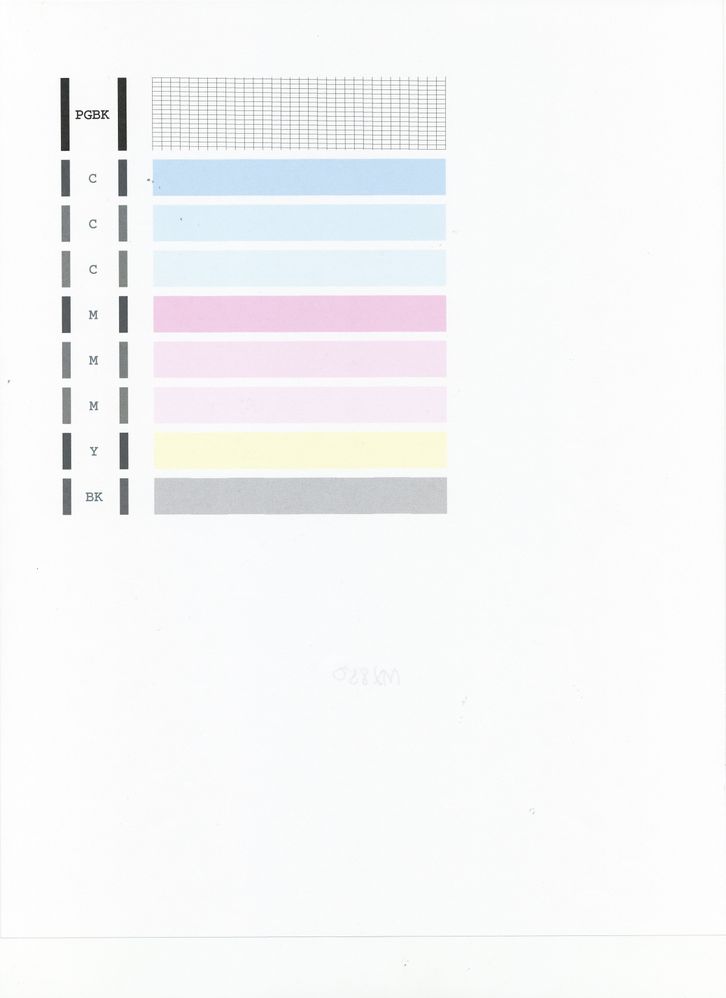
MX922 Nozzle Check.jpg

Holiday
Announcements
12/15/2025: New firmware update available for EOS C50 - Version 1.0.1.1

11/20/2025: New firmware updates are available.

EOS R6 Mark III - Version 1.0.1

EOS R3 - Version 2.0.0

EOS R1 - Version 1.2.0

EOS R5 Mark II - Version 1.2.0

EOS R5 - Version 2.2.1

PowerShot G7 X Mark III - Version 1.4.0

PowerShot SX740 HS - Version 1.0.2


10/21/2025: Service Notice: To Users of the Compact Digital Camera PowerShot V1

10/15/2025: New firmware updates are available.

Speedlite EL-5 - Version 1.2.0

Speedlite EL-1 - Version 1.1.0

Speedlite Transmitter ST-E10 - Version 1.2.0


07/28/2025: Notice of Free Repair Service for the Mirrorless Camera EOS R50 (Black)

07/24/2025: New firmware updates are available.


07/23/2025: New firmware updates are available.

EOS R5C - Version 1.1.1.1

EOS C80 - Version 1.0.3.1


7/17/2025: New firmware updates are available.

EOS R7 - Version 1.7.1

EOS R10 - Version 1.7.0

EOS R8 - Version 1.5.0

EOS R50 - Version 1.4.0

Powershot V10 - Version 1.4.0

Powershot V1 - Version 1.1.0

EOS R50V - Version 1.1.1


05/21/2025: New firmware update available for EOS C500 Mark II - Version 1.1.5.1

02/20/2025: New firmware updates are available.

RF70-200mm F2.8 L IS USM Z - Version 1.0.6

RF24-105mm F2.8 L IS USM Z - Version 1.0.9

RF100-300mm F2.8 L IS USM - Version 1.0.8

RF50mm F1.4 L VCM - Version 1.0.2

RF24mm F1.4 L VCM - Version 1.0.3


01/22/2024: Canon Supports Disaster Relief Efforts in California
01/14/2025: Steps to resolve still image problem when using certain SanDisk SD cards with the Canon EOS R5 Mark II


