Turn on suggestions
Auto-suggest helps you quickly narrow down your search results by suggesting possible matches as you type.
- Canon Community
- Discussions & Help
- Printer
- Desktop Inkjet Printers
- Re: MG5520 will not print after paper jam
Options
- Subscribe to RSS Feed
- Mark Topic as New
- Mark Topic as Read
- Float this Topic for Current User
- Bookmark
- Subscribe
- Mute
- Printer Friendly Page
MG5520 will not print after paper jam

Options
- Mark as New
- Bookmark
- Subscribe
- Mute
- Subscribe to RSS Feed
- Permalink
- Report Inappropriate Content
03-14-2020 03:36 PM
My MG5520 had a paper jam. It has been cleared and no other paper is still stuck in the machine. All ink cartridges are full but it will not print. It’s getting the signal and goes through all the motions but the paper is blank.
4 REPLIES 4
Options
- Mark as New
- Bookmark
- Subscribe
- Mute
- Subscribe to RSS Feed
- Permalink
- Report Inappropriate Content
03-14-2020 03:50 PM
I have also performed 2 print head cleanings. These have not changed the print.


Options
- Mark as New
- Bookmark
- Subscribe
- Mute
- Subscribe to RSS Feed
- Permalink
- Report Inappropriate Content
03-14-2020 04:30 PM
Hi, Ange1!
Thanks for posting on our forum! This community is designed for your fellow Canon owners to help each other out with any problems they may encounter. If this is a time-sensitive matter, click HERE search our knowledge base or find additional support options HERE.
Thanks and have a great day!
Options
- Mark as New
- Bookmark
- Subscribe
- Mute
- Subscribe to RSS Feed
- Permalink
- Report Inappropriate Content
03-14-2020 05:39 PM
Thank you! I did search before posting. I did not find a post pertaining to the particular printer.

Options
- Mark as New
- Bookmark
- Subscribe
- Mute
- Subscribe to RSS Feed
- Permalink
- Report Inappropriate Content
03-16-2020 04:03 PM
Hi Ange1,
Please perform a test of your PIXMA MG5520:
1. Select SETUP from the HOME screen of your PIXMA MG5520. It is the wrench and screwdriver icon.

2. Rotate the menu to Maintenance and press <OK>.

3. Press <OK> on Print nozzle check pattern.
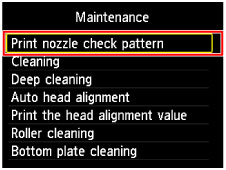
4. Press <OK> on Yes.
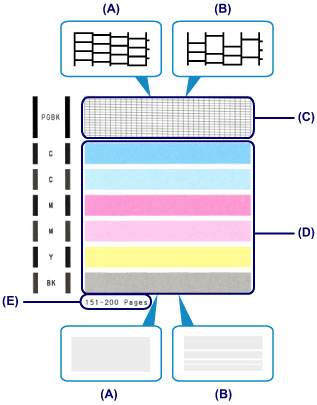
The Nozzle Check will print. Please compare your printout to the example below.
Does your Nozzle Check print correctly?


Announcements
05/13/2026: New firmware updates are available.
EOS R5 Mark II - Version 1.3.0
EOS R6 Mark II - Version 1.7.0
04/28/2026: Service Notice: Caution Concerning use of Lithium Batteries
03/17/2026: New firmware updates are available.
SELPHY CP1500 - Version 1.0.7.0
02/23/2026: New firmware update is available for EOS C50- Version 1.0.3.1
01/23/2026: New firmware update is available for RF 24-105mm F4 IS USM- Version 2.0.7
01/20/2026: New firmware updates are available.
12/22/2025: New firmware update is available for EOS R6 Mark III- Version 1.0.2
10/21/2025: Service Notice: To Users of the Compact Digital Camera PowerShot V1
10/15/2025: New firmware updates are available.
Speedlite EL-5 - Version 1.2.0
Speedlite EL-1 - Version 1.1.0
Speedlite Transmitter ST-E10 - Version 1.2.0
07/28/2025: Notice of Free Repair Service for the Mirrorless Camera EOS R50 (Black)
05/21/2025: New firmware update available for EOS C500 Mark II - Version 1.1.5.1
Related Content
- Help with Custom Sized Print with Pixma Pro 200S in Professional Photo Printers
- imagePROGRAF PRO-2000 reverting to default plain paper with standard quality setting in Professional Photo Printers
- Pixma TR8622a keeps printing blacks as light purple :( in Desktop Inkjet Printers
- Pixma TS6420 Error Code 7700 in Desktop Inkjet Printers
- Pixma MX922 keeps jamming paper in Desktop Inkjet Printers

Ⓒ 2026
Canon U.S.A Inc. All Rights Reserved. Reproduction in whole or part without permission is prohibited.
