04-11-2021 12:16 AM
Hello,
I have a canon mg3620 and in the country I am living in it features something called an 'infinite ink' system which seems to be an external tank that is linked to the two color and black cartridges inside the printer.
The problem is that all photography prints turn out greenish blueish and are too light, I mean the colors are very pale. And black also comes out greenish or very light, almost grey.
The ink tanks are full.
I have tried the cleaning and deep cleaning feature about 50 times sporadically over the last 10 months.
I also used a tissue with a few drops of water on it and cleaned the contacts of the printer head.
But the print pattern looks like this:
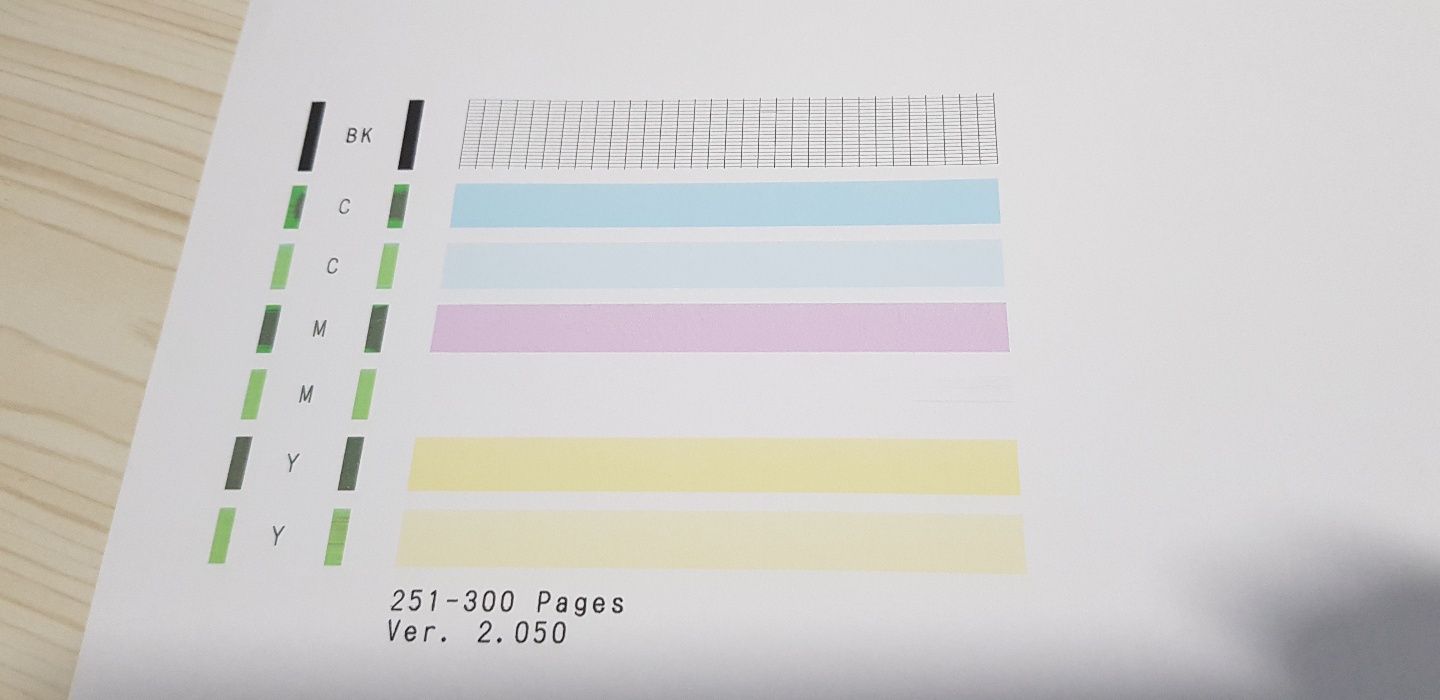
Can someone please tell me what is wrong with my printer?

04-26-2021 01:14 PM
Hello,
While I understand you are outside of the United States, the 'infinite ink' system is not a supported ink setup for Canon printers. I can only recommend using Canon ink that was designed to be used with the MG3620 to resolve this issue.
Did this answer your question? Please click the Accept as Solution button so that others may find the answer as well.
12/18/2025: New firmware updates are available.
11/20/2025: New firmware updates are available.
EOS R5 Mark II - Version 1.2.0
PowerShot G7 X Mark III - Version 1.4.0
PowerShot SX740 HS - Version 1.0.2
10/15/2025: New firmware updates are available.
Speedlite EL-5 - Version 1.2.0
Speedlite EL-1 - Version 1.1.0
Speedlite Transmitter ST-E10 - Version 1.2.0
7/17/2025: New firmware updates are available.
02/20/2025: New firmware updates are available.
RF70-200mm F2.8 L IS USM Z - Version 1.0.6
RF24-105mm F2.8 L IS USM Z - Version 1.0.9
RF100-300mm F2.8 L IS USM - Version 1.0.8
Canon U.S.A Inc. All Rights Reserved. Reproduction in whole or part without permission is prohibited.

