Turn on suggestions
Auto-suggest helps you quickly narrow down your search results by suggesting possible matches as you type.
- Canon Community
- Discussions & Help
- Camera
- Camera Software
- Re: red eye
Options
- Subscribe to RSS Feed
- Mark Topic as New
- Mark Topic as Read
- Float this Topic for Current User
- Bookmark
- Subscribe
- Mute
- Printer Friendly Page

Options
- Mark as New
- Bookmark
- Subscribe
- Mute
- Subscribe to RSS Feed
- Permalink
- Report Inappropriate Content
09-01-2015 12:37 PM
Hi forum. Can someone tell me how to get the red eye out in the new DPP software.
Solved! Go to Solution.
1 ACCEPTED SOLUTION
Accepted Solutions
Options
- Mark as New
- Bookmark
- Subscribe
- Mute
- Subscribe to RSS Feed
- Permalink
- Report Inappropriate Content
09-01-2015 10:20 PM
4 REPLIES 4


Options
- Mark as New
- Bookmark
- Subscribe
- Mute
- Subscribe to RSS Feed
- Permalink
- Report Inappropriate Content
09-01-2015 02:33 PM
So far as I'm aware, DPP 4 does not support this feature.
Normally DPP can't perform any "local" adjustment (adjustments are applied to "whole" images.) The exception to this is that there is a dust-delete feature.
There are many applications that can perform red-eye removal -- I just don't think DPP is one of them. 😕
Tim Campbell
5D III, 5D IV, 60Da
5D III, 5D IV, 60Da
Options
- Mark as New
- Bookmark
- Subscribe
- Mute
- Subscribe to RSS Feed
- Permalink
- Report Inappropriate Content
09-01-2015 10:20 PM
Thnx. I found out you have to do it in image browser EX
Options
- Mark as New
- Bookmark
- Subscribe
- Mute
- Subscribe to RSS Feed
- Permalink
- Report Inappropriate Content
07-15-2021 08:36 AM
Hi All,
I have reduced Red-Eye in my images using DPP4.
Below is an image of the tool panel, with the settings I have used.
Once you have set things to suit your personal requirement, it's just a matter of painting out the Red-Eye by clicking and draging the mouse pointer over the specific area of the image that you want to affect.
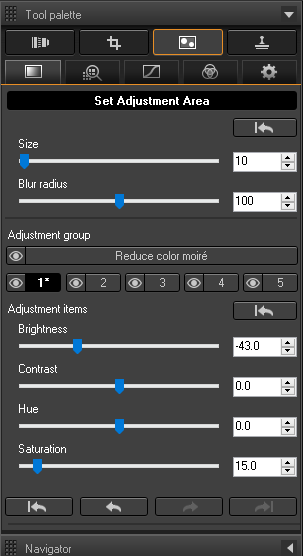
I hope this helps.
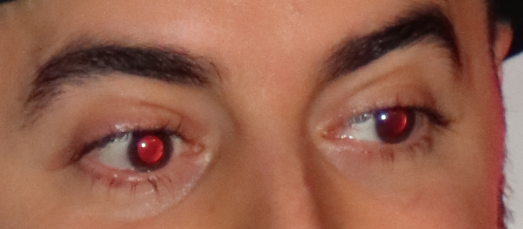
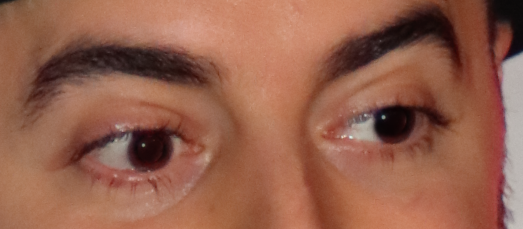
Here is a BEFORE and AFTER example...
BEFORE:
AFTER:
Options
- Mark as New
- Bookmark
- Subscribe
- Mute
- Subscribe to RSS Feed
- Permalink
- Report Inappropriate Content
07-20-2021 07:47 PM
Thanks I need it!
Game Developer


Announcements
07/22/2026: New firmware updates are available.
EOS R6 Mark III - Version 1.1.0
05/13/2026: New firmware updates are available.
EOS R5 Mark II - Version 1.3.0
EOS R6 Mark II - Version 1.7.0
04/28/2026: Service Notice: Caution Concerning use of Lithium Batteries
03/17/2026: New firmware updates are available.
SELPHY CP1500 - Version 1.0.7.0
02/23/2026: New firmware update is available for EOS C50- Version 1.0.3.1
01/23/2026: New firmware update is available for RF 24-105mm F4 IS USM- Version 2.0.7
01/20/2026: New firmware updates are available.
10/21/2025: Service Notice: To Users of the Compact Digital Camera PowerShot V1
10/15/2025: New firmware updates are available.
Speedlite EL-5 - Version 1.2.0
Speedlite EL-1 - Version 1.1.0
Speedlite Transmitter ST-E10 - Version 1.2.0
07/28/2025: Notice of Free Repair Service for the Mirrorless Camera EOS R50 (Black)
05/21/2025: New firmware update available for EOS C500 Mark II - Version 1.1.5.1
Related Content
- It all came to me! in EOS DSLR & Mirrorless Cameras
- new R6 Mark iii losing Time & Date when chging battery in EOS DSLR & Mirrorless Cameras
- Upgrade from Canon 70D? in EOS DSLR & Mirrorless Cameras
- Rebel T7 Beginner - Advice? in EOS DSLR & Mirrorless Cameras
- Canon Rebel t6 raw images are pixelated in EOS DSLR & Mirrorless Cameras

Ⓒ 2026
Canon U.S.A Inc. All Rights Reserved. Reproduction in whole or part without permission is prohibited.
