Turn on suggestions
Auto-suggest helps you quickly narrow down your search results by suggesting possible matches as you type.
- Canon Community
- Discussions & Help
- Camera
- Camera Software
- Re: New Canon T7 Rebel Firmware is not a valid num...
Options
- Subscribe to RSS Feed
- Mark Topic as New
- Mark Topic as Read
- Float this Topic for Current User
- Bookmark
- Subscribe
- Mute
- Printer Friendly Page

Options
- Mark as New
- Bookmark
- Subscribe
- Mute
- Subscribe to RSS Feed
- Permalink
- Report Inappropriate Content
11-15-2025 08:05 PM
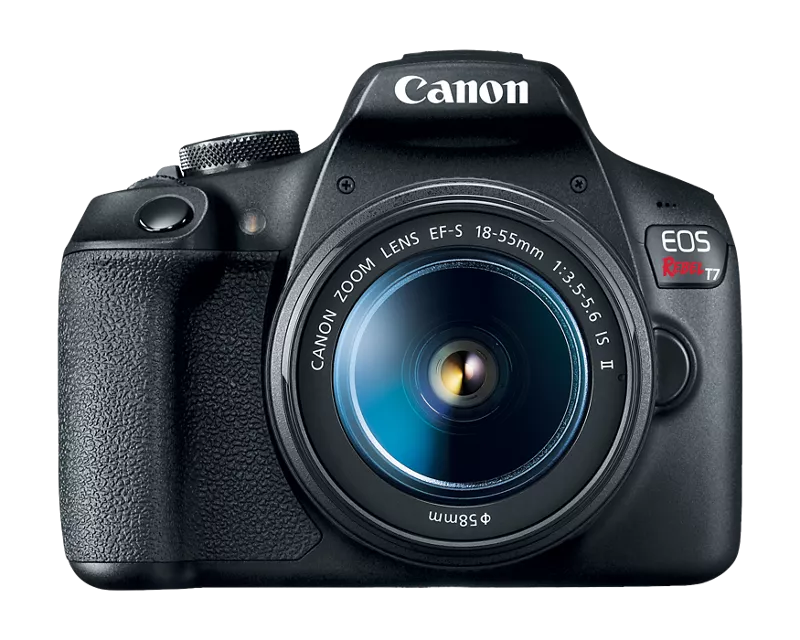
Just purchased this camera online. It does not seem to auto focus when Autofocus is selected. I've not used other than my phone for 15 years, so there could be user error. I've put it in Av Mode, verified the lense is set to 'Af', this is a 18-55mm lens and when I hold down the shutter button half way, I see no focus happening at all. Should the end of this lens be moving when if focuses?
I found a troubleshooting article online. It says to among other things, update the firmware it needed. I checked and it looks like the current is v1.2.1, however when I check the camera, it says it has 1.3.0 installed. Could that be right?? An online search that came back from an AI source suggested this could be a glitch. Ok, so I downloaded v1.2.1 put it on an SDCard, loaded it into the camera and the freaking update program does not offer any option to roll the firmware back. It just says, the version on the card is older and will stick to the current version.
I did find some supposed ways to roll back the firmware, but it involved 3rd party software, or trying to fool the cameraOS. I opted out of that for now. So customer support is closed till Monday. Any possible hope getting an answer here would be appreciated.
Solved! Go to Solution.
1 ACCEPTED SOLUTION
Accepted Solutions


Options
- Mark as New
- Bookmark
- Subscribe
- Mute
- Subscribe to RSS Feed
- Permalink
- Report Inappropriate Content
11-16-2025 08:14 AM - edited 11-16-2025 08:26 AM
Firmware Version 1.3.0 incorporates the following fix:
1. This firmware update ensures compliance with the EU RED EN18031 standard by removing certain network functions.
Affected Features:
Image Upload: Sending images to image.canon will be disabled.
FTP Transfer & Live Streaming: These functions will no longer be available after the update.
You may be able to downgrade to 1.2.1 if you use EOS Utility.
About the AF, just reset the camera first. It will remove custom settings like back button AF.
11 REPLIES 11

Options
- Mark as New
- Bookmark
- Subscribe
- Mute
- Subscribe to RSS Feed
- Permalink
- Report Inappropriate Content
11-16-2025 04:50 AM
Greetings,
Where did you purchase this camera? Was it purchased new or used?
Start by resetting the camera's main and custom functions. It's important that you reset both.
Confirm the brand, type and model of the SD card. You should use a full size SD card. Do not use a MicroSD with adapter.
Confirm you are using a Canon brand OEM battery.
Ensure the AF/MF switch on the lens is set to AF.
Put the camera into automatic mode. [A]+. Go outside in good daylight and try to take pictures.
Firmware version. Version 1.2.1 is available on the body's support portal but 1.3.0 might be possible If the camera was purchased new. If that's what the camera is displaying, it's not a glitch.
It is not a good idea to upgrade firmware on a body that is malfunctioning or not functioning as expected.
If you have other lenses you can test with that might be helpful.
After confirmation and testing, let us know your results.
~Rick
Bay Area - CA
~R5 C (1.1.3.1), ~RF Trinity, ~RF 100 Macro, ~RF 100~400, ~RF 100~500, ~RF 200-800, ~RF 1.4x TC, BG-R10, 430EX III-RT ~DxO PhotoLab Elite ~DaVinci Resolve Studio ~ImageClass MF644Cdw MF656Cdw ~Pixel 10 ~CarePaks Are Worth It
Options
- Mark as New
- Bookmark
- Subscribe
- Mute
- Subscribe to RSS Feed
- Permalink
- Report Inappropriate Content
11-16-2025 08:14 AM - edited 11-16-2025 08:26 AM
Firmware Version 1.3.0 incorporates the following fix:
1. This firmware update ensures compliance with the EU RED EN18031 standard by removing certain network functions.
Affected Features:
Image Upload: Sending images to image.canon will be disabled.
FTP Transfer & Live Streaming: These functions will no longer be available after the update.
You may be able to downgrade to 1.2.1 if you use EOS Utility.
About the AF, just reset the camera first. It will remove custom settings like back button AF.
Options
- Mark as New
- Bookmark
- Subscribe
- Mute
- Subscribe to RSS Feed
- Permalink
- Report Inappropriate Content
11-16-2025 08:25 AM
Thanks Peter. I figured it might be floating around out there somewhere. 👍. I didn't check Canon Hong Kong or elsewhere.
~Rick
Bay Area - CA
~R5 C (1.1.3.1), ~RF Trinity, ~RF 100 Macro, ~RF 100~400, ~RF 100~500, ~RF 200-800, ~RF 1.4x TC, BG-R10, 430EX III-RT ~DxO PhotoLab Elite ~DaVinci Resolve Studio ~ImageClass MF644Cdw MF656Cdw ~Pixel 10 ~CarePaks Are Worth It
Options
- Mark as New
- Bookmark
- Subscribe
- Mute
- Subscribe to RSS Feed
- Permalink
- Report Inappropriate Content
11-16-2025 02:29 PM
I played around with it, went down a list of things to check, and now auto- focus works! 😄 I bought this camera new. In this process I saw nothing amiss and it's likely some operator error was involved. The only remaining question is the firmware version listed as 1.3.0. Now that auto focus works, I'm not so concerned about it and will speak with Canon Customer Support this week about that. Thanks for your attention.
Options
- Mark as New
- Bookmark
- Subscribe
- Mute
- Subscribe to RSS Feed
- Permalink
- Report Inappropriate Content
11-16-2025 02:34 PM
Thanks so much. Curious when I go to the Canon web page, that is not listed... Anyway, don't need to call Canon. 😍
Options
- Mark as New
- Bookmark
- Subscribe
- Mute
- Subscribe to RSS Feed
- Permalink
- Report Inappropriate Content
11-16-2025 02:38 PM
For some reason the forum despite having an "edit reply" button, that's not working for me.
Of note, I've installed 'Cannon Connect' on my iPhone, and have connected my camera to it. It just says I'm up to date, and as noted in my first post, if I try to downgrade to 1.2.1, there is no option to do that using an SDCard and trying to manually accomplish this.
Is the EOS Utility something different and compatible with the T7? Thanks.
Options
- Mark as New
- Bookmark
- Subscribe
- Mute
- Subscribe to RSS Feed
- Permalink
- Report Inappropriate Content
11-16-2025 03:46 PM - edited 11-16-2025 03:59 PM
Greetings,
I would not recommend a firmware downgrade on your camera. This is a slightly involved process and I'd hate for you to brick your camera. It's also not officially supported by Canon. It looks like v1.3.0 removes image.canon and FTP support. Do you need these features?
Canon routinely upgrades firmware on cameras that come in for service, or are of recent manufacturer that may be newer than what's being offered on the cameras support portal.
You can contact them if you wish but I'm quite certain they'll tell you this.
Go with version 1.3.0. You have a newer firmware than what is currently being offered.
This is intentional. 😉
The EOS utility will not allow you to downgrade firmware. Firmware downgrades have to be performed manually. As I said before, they are not supported.
Posts can only be edited for about 30 minutes. They then become permanent.
~Rick
Bay Area - CA
~R5 C (1.1.3.1), ~RF Trinity, ~RF 100 Macro, ~RF 100~400, ~RF 100~500, ~RF 200-800, ~RF 1.4x TC, BG-R10, 430EX III-RT ~DxO PhotoLab Elite ~DaVinci Resolve Studio ~ImageClass MF644Cdw MF656Cdw ~Pixel 10 ~CarePaks Are Worth It

Options
- Mark as New
- Bookmark
- Subscribe
- Mute
- Subscribe to RSS Feed
- Permalink
- Report Inappropriate Content
11-16-2025 04:39 PM
Reset the camera back to factory settings. This will undo any changes you made, inadvertently or not.
Set the shooting mode to Program. Everything should work perfectly.
Download the full user manual from Canon so you can learn all about the camea's operation.:
https://www.usa.canon.com/support/p/eos-rebel-t7
DO NOT DO ANYTHING WITH THE FIRMWARE. Firmware updates do not fix hardware problems and can make things worse if there is a problem.
Who EXACTLY did you buy the camera from? if it new, it would have come with a Canon USA Warranty Card.If you don't have it, the camera is either not new, or it's a gray-market product which doesn't have a USA
Options
- Mark as New
- Bookmark
- Subscribe
- Mute
- Subscribe to RSS Feed
- Permalink
- Report Inappropriate Content
11-17-2025 05:07 AM
Firmware 1.3.0 is only visible on Canon Europe.

Announcements
07/22/2026: New firmware updates are available.
EOS R6 Mark III - Version 1.1.0
05/13/2026: New firmware updates are available.
EOS R5 Mark II - Version 1.3.0
EOS R6 Mark II - Version 1.7.0
04/28/2026: Service Notice: Caution Concerning use of Lithium Batteries
03/17/2026: New firmware updates are available.
SELPHY CP1500 - Version 1.0.7.0
02/23/2026: New firmware update is available for EOS C50- Version 1.0.3.1
01/23/2026: New firmware update is available for RF 24-105mm F4 IS USM- Version 2.0.7
01/20/2026: New firmware updates are available.
10/21/2025: Service Notice: To Users of the Compact Digital Camera PowerShot V1
10/15/2025: New firmware updates are available.
Speedlite EL-5 - Version 1.2.0
Speedlite EL-1 - Version 1.1.0
Speedlite Transmitter ST-E10 - Version 1.2.0
07/28/2025: Notice of Free Repair Service for the Mirrorless Camera EOS R50 (Black)
05/21/2025: New firmware update available for EOS C500 Mark II - Version 1.1.5.1
Related Content
- R6II slot 1 won’t read card in EOS DSLR & Mirrorless Cameras
- Aperture communication issues between Canon EOS R8 and sigma 150-600mm f/5-6.3 DG OS HSM C in EOS DSLR & Mirrorless Cameras
- Trouble using hot shoe on EOS R6 V in EOS DSLR & Mirrorless Cameras
- EOS R5 Mark II firmware won't update in EOS DSLR & Mirrorless Cameras
- DPP4: "Target file does not exist" in Camera Software

Ⓒ 2026
Canon U.S.A Inc. All Rights Reserved. Reproduction in whole or part without permission is prohibited.
