Turn on suggestions
Auto-suggest helps you quickly narrow down your search results by suggesting possible matches as you type.
- Canon Community
- Discussions & Help
- Camera
- Camera Software
- Image Transfer Utility 2 doesn't work if G7X M3 is...
Options
- Subscribe to RSS Feed
- Mark Topic as New
- Mark Topic as Read
- Float this Topic for Current User
- Bookmark
- Subscribe
- Mute
- Printer Friendly Page
Image Transfer Utility 2 doesn't work if G7X M3 is plugged into USB power

Options
- Mark as New
- Bookmark
- Subscribe
- Mute
- Subscribe to RSS Feed
- Permalink
- Report Inappropriate Content
08-13-2026 04:55 PM
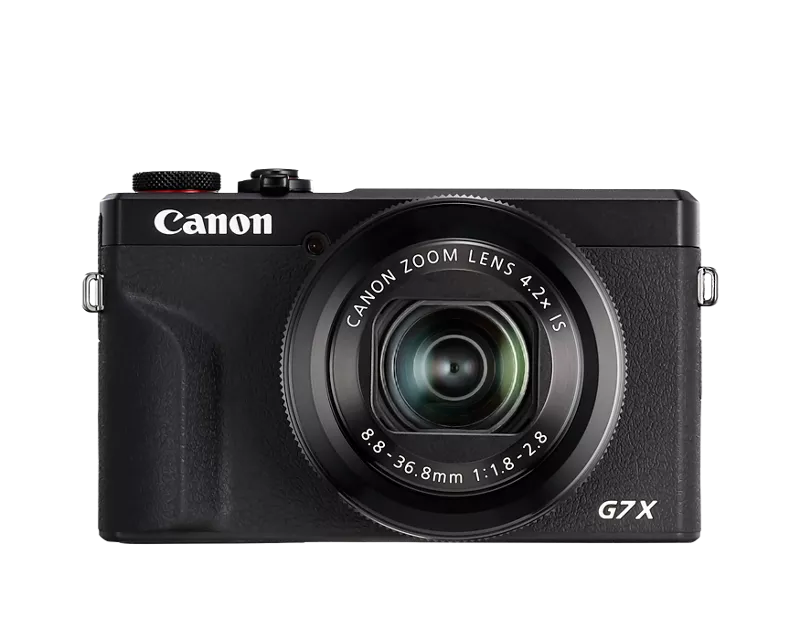
I'm using the Image Transfer Utility 2 for the first time and it has to download a LOT of images off the camera. So many, and so slowly, that the battery is depleting and shutting off the camera. I put a new battery in and restart. Lather, rinse, repeat.
In the manual it says that, with the camera off, you can plug in the USB power and it will power the camera. Which is true, except that Image Transfer Utility 2 refuses to see the camera until you unplug the USB power. So you're stuck having to run the thing off as many batteries as you've got.
Is there a way to:
a) Power the camera AND have Image Transfer Utility 2 work properly to connect? and
b) file a bug report for Image Transfer Utility 2?
Thanks
3 REPLIES 3


Options
- Mark as New
- Bookmark
- Subscribe
- Mute
- Subscribe to RSS Feed
- Permalink
- Report Inappropriate Content
08-14-2026 07:39 AM
Is there a reason you don’t want to use a card reader?
John Hoffman
Conway, NH
R6 Mark III, M200 (converted to infrared), RF lenses, Pixma PRO-100, Pixma TR8620a, Lr Classic
Conway, NH
R6 Mark III, M200 (converted to infrared), RF lenses, Pixma PRO-100, Pixma TR8620a, Lr Classic
Options
- Mark as New
- Bookmark
- Subscribe
- Mute
- Subscribe to RSS Feed
- Permalink
- Report Inappropriate Content
08-14-2026 10:39 AM
Hi John, thanks for replying.
Yes: on all my previous PowerShots (S100/110/120) it would organize photos in folders by day, in camera. The G7x just puts them all in a single folder. If I want to sort them out and put them in folders by day, I have to manually create the folders, pick out the images by hand, remember which ones I already sorted, and move everything manually.
On the other hand, Image Transfer Utility does all that for me. All I have to do is turn on the camera in range of my wifi, and ignore it. A card reader is a faster transfer, but that is the only fast part.
ITU does what I want except that it burns through batteries doing it because it can't use the USB power.
Do you have any ideas about how to power the camera while using ITU?
Thank you,
Matt
Options
- Mark as New
- Bookmark
- Subscribe
- Mute
- Subscribe to RSS Feed
- Permalink
- Report Inappropriate Content
08-14-2026 12:34 PM
I don’t, but you might try calling Canon support at 1-800-OK- CANON.
John Hoffman
Conway, NH
R6 Mark III, M200 (converted to infrared), RF lenses, Pixma PRO-100, Pixma TR8620a, Lr Classic
Conway, NH
R6 Mark III, M200 (converted to infrared), RF lenses, Pixma PRO-100, Pixma TR8620a, Lr Classic


Announcements
07/22/2026: New firmware updates are available.
EOS R6 Mark III - Version 1.1.0
05/13/2026: New firmware updates are available.
EOS R5 Mark II - Version 1.3.0
EOS R6 Mark II - Version 1.7.0
04/28/2026: Service Notice: Caution Concerning use of Lithium Batteries
03/17/2026: New firmware updates are available.
SELPHY CP1500 - Version 1.0.7.0
02/23/2026: New firmware update is available for EOS C50- Version 1.0.3.1
01/23/2026: New firmware update is available for RF 24-105mm F4 IS USM- Version 2.0.7
01/20/2026: New firmware updates are available.
10/21/2025: Service Notice: To Users of the Compact Digital Camera PowerShot V1
10/15/2025: New firmware updates are available.
Speedlite EL-5 - Version 1.2.0
Speedlite EL-1 - Version 1.1.0
Speedlite Transmitter ST-E10 - Version 1.2.0
07/28/2025: Notice of Free Repair Service for the Mirrorless Camera EOS R50 (Black)
05/21/2025: New firmware update available for EOS C500 Mark II - Version 1.1.5.1
Related Content
- Having trouble uploading photos from my EOS Rebel T2i to new Macbook :( in EOS DSLR & Mirrorless Cameras
- EOS Rebel and Product Advisory: Vulnerability Remediation for EOS Network Setting Tool in EOS DSLR & Mirrorless Cameras
- R6 Mark II, EOS Utility 3.20.20 - downloading only JPEGs or only CR3s in Camera Software
- EOS R50, EOS Utility Download Not Showing as Available Option in Camera Software

Ⓒ 2026
Canon U.S.A Inc. All Rights Reserved. Reproduction in whole or part without permission is prohibited.
