Turn on suggestions
Auto-suggest helps you quickly narrow down your search results by suggesting possible matches as you type.
- Canon Community
- Discussions & Help
- Camera
- Camera Software
- Re: EOS Utility 3 all options grayed out, says cam...
Options
- Subscribe to RSS Feed
- Mark Topic as New
- Mark Topic as Read
- Float this Topic for Current User
- Bookmark
- Subscribe
- Mute
- Printer Friendly Page
EOS Utility 3 all options grayed out, says camera isn't connected

Options
- Mark as New
- Bookmark
- Subscribe
- Mute
- Subscribe to RSS Feed
- Permalink
- Report Inappropriate Content
10-31-2023
12:07 PM
- last edited on
11-01-2023
08:25 AM
by
 Danny
Danny
Using a EOS 5D Mark IV camera using a wifi connection
Running OS 13.6.1 Operating System
Running 3.17.2 EOS Utility
When turning the camera on, the EOS Utility software fires up like it's supposed too automatically. The computer recognizes that the camera has been turned on. But when the software starts, all options are grayed out and the software tells me that I must connect a camera to the utility before I can do anything.
I have tried deleting all settings and setting up the camera settings from scratch, this sometimes will allow it to connect, once and then never again.
I have deleted all canon software and reinstalled, this made no difference.
Canon suggested that I try reverting system software to an older software, but this is not an option. Ventura has been out for over a year, any issue should be resolved by now.
I have spoke with Canon and they were able to reproduce the issue on their end 2 months ago, but so far have done nothing to correct the issue.
Has anyone ran into issue and found a work around that will consistently work?
9 REPLIES 9
Options
- Mark as New
- Bookmark
- Subscribe
- Mute
- Subscribe to RSS Feed
- Permalink
- Report Inappropriate Content
12-06-2023 11:40 PM
right the same issue for MacOS 12.7.1 (Monterey).
I tried to fix in the very same way, tried to use previous versions of EOS Utility – no result.
cable connection works fine.


Options
- Mark as New
- Bookmark
- Subscribe
- Mute
- Subscribe to RSS Feed
- Permalink
- Report Inappropriate Content
12-07-2023 07:32 AM
@dan329 wrote:Using a EOS 5D Mark IV camera using a wifi connection
Running OS 13.6.1 Operating System
Running 3.17.2 EOS Utility
When turning the camera on, the EOS Utility software fires up like it's supposed too automatically. The computer recognizes that the camera has been turned on. But when the software starts, all options are grayed out and the software tells me that I must connect a camera to the utility before I can do anything.
I have tried deleting all settings and setting up the camera settings from scratch, this sometimes will allow it to connect, once and then never again.
I have deleted all canon software and reinstalled, this made no difference.
Canon suggested that I try reverting system software to an older software, but this is not an option. Ventura has been out for over a year, any issue should be resolved by now.
I have spoke with Canon and they were able to reproduce the issue on their end 2 months ago, but so far have done nothing to correct the issue.
Has anyone ran into issue and found a work around that will consistently work?
Many folks have been having issues with EOSU and later macOS versions. This is the first report I have seen with a problem with WiFi.
John Hoffman
Conway, NH
R6 Mark III, M200 (converted to infrared), RF lenses, Pixma PRO-100, Pixma TR8620a, Lr Classic
Conway, NH
R6 Mark III, M200 (converted to infrared), RF lenses, Pixma PRO-100, Pixma TR8620a, Lr Classic
Options
- Mark as New
- Bookmark
- Subscribe
- Mute
- Subscribe to RSS Feed
- Permalink
- Report Inappropriate Content
02-01-2024 01:40 AM
Same problem, only when using Wifi. EOS Utility 3 automatically launches as soon as camera connects to Wifi, but everything stays greyed out.
Options
- Mark as New
- Bookmark
- Subscribe
- Mute
- Subscribe to RSS Feed
- Permalink
- Report Inappropriate Content
02-01-2024 06:46 AM
Which model camera.
John Hoffman
Conway, NH
R6 Mark III, M200 (converted to infrared), RF lenses, Pixma PRO-100, Pixma TR8620a, Lr Classic
Conway, NH
R6 Mark III, M200 (converted to infrared), RF lenses, Pixma PRO-100, Pixma TR8620a, Lr Classic
Options
- Mark as New
- Bookmark
- Subscribe
- Mute
- Subscribe to RSS Feed
- Permalink
- Report Inappropriate Content
02-01-2024 10:49 AM
EOS R5, firmware 1.9.0
Options
- Mark as New
- Bookmark
- Subscribe
- Mute
- Subscribe to RSS Feed
- Permalink
- Report Inappropriate Content
02-01-2024 11:12 AM
Does it work with cable connect?
John Hoffman
Conway, NH
R6 Mark III, M200 (converted to infrared), RF lenses, Pixma PRO-100, Pixma TR8620a, Lr Classic
Conway, NH
R6 Mark III, M200 (converted to infrared), RF lenses, Pixma PRO-100, Pixma TR8620a, Lr Classic

Options
- Mark as New
- Bookmark
- Subscribe
- Mute
- Subscribe to RSS Feed
- Permalink
- Report Inappropriate Content
02-01-2024 12:44 PM
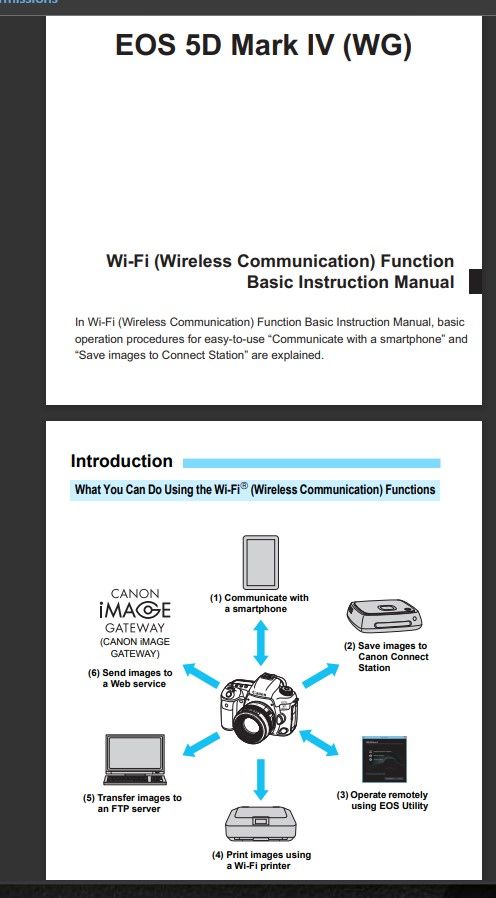
The 5D4 does not even have Wi-Fi.
--------------------------------------------------------
"Enjoying photography since 1972."
"Enjoying photography since 1972."
Options
- Mark as New
- Bookmark
- Subscribe
- Mute
- Subscribe to RSS Feed
- Permalink
- Report Inappropriate Content
02-01-2024 01:21 PM
It does.
John Hoffman
Conway, NH
R6 Mark III, M200 (converted to infrared), RF lenses, Pixma PRO-100, Pixma TR8620a, Lr Classic
Conway, NH
R6 Mark III, M200 (converted to infrared), RF lenses, Pixma PRO-100, Pixma TR8620a, Lr Classic
Options
- Mark as New
- Bookmark
- Subscribe
- Mute
- Subscribe to RSS Feed
- Permalink
- Report Inappropriate Content
02-01-2024 11:36 PM - edited 02-01-2024 11:37 PM
Ah, that’s correct. It lacks Bluetooth, which can automate Wi-Fi connections and configurations. My 5Dsr does not have it.
Make sure the camera is set for USB. It cannot switch between USB and wireless on its own.
--------------------------------------------------------
"Enjoying photography since 1972."
"Enjoying photography since 1972."


Announcements
07/22/2026: New firmware updates are available.
EOS R6 Mark III - Version 1.1.0
05/13/2026: New firmware updates are available.
EOS R5 Mark II - Version 1.3.0
EOS R6 Mark II - Version 1.7.0
04/28/2026: Service Notice: Caution Concerning use of Lithium Batteries
03/17/2026: New firmware updates are available.
SELPHY CP1500 - Version 1.0.7.0
02/23/2026: New firmware update is available for EOS C50- Version 1.0.3.1
01/23/2026: New firmware update is available for RF 24-105mm F4 IS USM- Version 2.0.7
01/20/2026: New firmware updates are available.
10/21/2025: Service Notice: To Users of the Compact Digital Camera PowerShot V1
10/15/2025: New firmware updates are available.
Speedlite EL-5 - Version 1.2.0
Speedlite EL-1 - Version 1.1.0
Speedlite Transmitter ST-E10 - Version 1.2.0
07/28/2025: Notice of Free Repair Service for the Mirrorless Camera EOS R50 (Black)
05/21/2025: New firmware update available for EOS C500 Mark II - Version 1.1.5.1
Related Content
- EOS Utility Launcher not detecting EOS R7 in Camera Software
- EOS R7 getting ERR 12 when trying to connect to MacBook Pro (macOS Tahoe 26.5.2). EOS Utility 3 in Camera Software
- EOS R50, EOS Utility Download Not Showing as Available Option in Camera Software
- No White Balance option on Canon Camera Connect app in Camera Software
- EOS R5 Mark II firmware 1.30 notes in Camera Software

Ⓒ 2026
Canon U.S.A Inc. All Rights Reserved. Reproduction in whole or part without permission is prohibited.
