Turn on suggestions
Auto-suggest helps you quickly narrow down your search results by suggesting possible matches as you type.
- Canon Community
- Discussions & Help
- Camera
- Camera Software
- DPP 4.13.10 no longer opening
Options
- Subscribe to RSS Feed
- Mark Topic as New
- Mark Topic as Read
- Float this Topic for Current User
- Bookmark
- Subscribe
- Mute
- Printer Friendly Page
DPP 4.13.10 no longer opening

Options
- Mark as New
- Bookmark
- Subscribe
- Mute
- Subscribe to RSS Feed
- Permalink
- Report Inappropriate Content
01-25-2021 03:54 AM
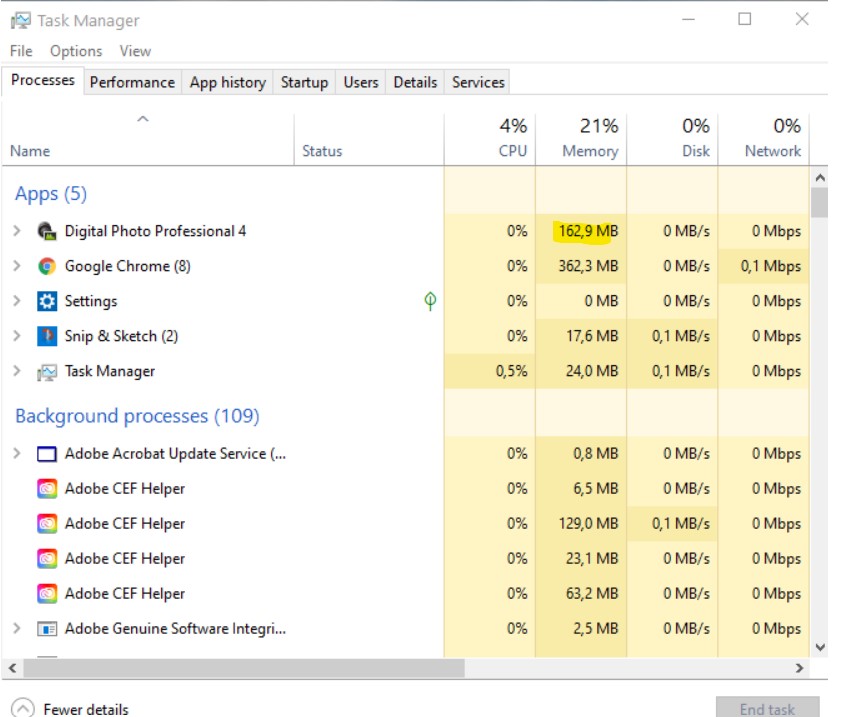
Morning all not sure if anybody can provide any guidance - I have been using this program for a while now on Win 10 and its been fine. This weekend I brought in the latest photos / videos from my R5 and a 7D11. I started editing a few pics and then noticed that it was becoming a little unstable - when I changed the folder and said yes for save for all I would have a few 'file not found' issues - did not think too much of it, went away and then came back and tried to restart DPP - the logo came up but then the application sat there and did nothing? I can see the app allocated some memory to itself but CPU activity was zero!
I then decided just to uninstall and reinstall but that didnt help - I then downloaded 10bit uninstaller and removed all the Canon apps and reinstalled these but still no joy - just remains the same - any ideas would be much appreciated?
6 REPLIES 6


Options
- Mark as New
- Bookmark
- Subscribe
- Mute
- Subscribe to RSS Feed
- Permalink
- Report Inappropriate Content
01-25-2021 09:34 AM
Welcome to the forum.
You could try this:
Fix problems that block programs from being installed or removed (microsoft.com)
When I was having problems with DPP, before I new of that link, I used the CCleaner (free app) registry repair tool - that fixed my problem.
John Hoffman
Conway, NH
R6 Mark III, M200 (converted to infrared), RF lenses, Pixma PRO-100, Pixma TR8620a, Lr Classic
Conway, NH
R6 Mark III, M200 (converted to infrared), RF lenses, Pixma PRO-100, Pixma TR8620a, Lr Classic
Options
- Mark as New
- Bookmark
- Subscribe
- Mute
- Subscribe to RSS Feed
- Permalink
- Report Inappropriate Content
01-25-2021 09:54 AM
Much appreciated
Tried that and restarted but unfortunately, the issue remains the same.
Options
- Mark as New
- Bookmark
- Subscribe
- Mute
- Subscribe to RSS Feed
- Permalink
- Report Inappropriate Content
01-25-2021 09:57 AM
Did you try CCleaner as well?
John Hoffman
Conway, NH
R6 Mark III, M200 (converted to infrared), RF lenses, Pixma PRO-100, Pixma TR8620a, Lr Classic
Conway, NH
R6 Mark III, M200 (converted to infrared), RF lenses, Pixma PRO-100, Pixma TR8620a, Lr Classic
Options
- Mark as New
- Bookmark
- Subscribe
- Mute
- Subscribe to RSS Feed
- Permalink
- Report Inappropriate Content
01-25-2021 10:04 AM
Yes I did thanks,
CDR

Options
- Mark as New
- Bookmark
- Subscribe
- Mute
- Subscribe to RSS Feed
- Permalink
- Report Inappropriate Content
01-25-2021 10:13 AM
Greetings,
As a test, consider trying to run the software under a different user profile
Are you running any 3rd party antivirus?
If neither of these yeild a different result:
I suggest you try System Restore and choose a prior point in time when the software worked on your system.
~Rick
Bay Area - CA
~R5 C (1.1.3.1), ~RF Trinity, ~RF 100 Macro, ~RF 100~400, ~RF 100~500, ~RF 200-800, ~RF 1.4x TC, BG-R10, 430EX III-RT ~DxO PhotoLab Elite ~DaVinci Resolve Studio ~ImageClass MF644Cdw MF656Cdw ~Pixel 10 ~CarePaks Are Worth It
Options
- Mark as New
- Bookmark
- Subscribe
- Mute
- Subscribe to RSS Feed
- Permalink
- Report Inappropriate Content
01-26-2021 01:18 AM
Thank you very much - I created a new profile and DPP works perfectly from the new profile! Seems like this a Win 10 profile issue and as I understand it the only way I can correct is to use the new profile - correct?
CDR

Announcements
07/22/2026: New firmware updates are available.
EOS R6 Mark III - Version 1.1.0
05/13/2026: New firmware updates are available.
EOS R5 Mark II - Version 1.3.0
EOS R6 Mark II - Version 1.7.0
04/28/2026: Service Notice: Caution Concerning use of Lithium Batteries
03/17/2026: New firmware updates are available.
SELPHY CP1500 - Version 1.0.7.0
02/23/2026: New firmware update is available for EOS C50- Version 1.0.3.1
01/23/2026: New firmware update is available for RF 24-105mm F4 IS USM- Version 2.0.7
01/20/2026: New firmware updates are available.
10/21/2025: Service Notice: To Users of the Compact Digital Camera PowerShot V1
10/15/2025: New firmware updates are available.
Speedlite EL-5 - Version 1.2.0
Speedlite EL-1 - Version 1.1.0
Speedlite Transmitter ST-E10 - Version 1.2.0
07/28/2025: Notice of Free Repair Service for the Mirrorless Camera EOS R50 (Black)
05/21/2025: New firmware update available for EOS C500 Mark II - Version 1.1.5.1
Related Content
- EOS Rebel T7 continuously opening and closing shutter on its own in EOS DSLR & Mirrorless Cameras
- Camera Connect won't connect to PowerShot SX720 HS after app update in Camera Software
- EOS R5 hot pixels lower iso in video mode in EOS DSLR & Mirrorless Cameras
- Canon Connect no longer working in Camera Software
- Canon Remote BR-E2 Battery Problem: Unable to open battery compartment in Camera Accessories

Ⓒ 2026
Canon U.S.A Inc. All Rights Reserved. Reproduction in whole or part without permission is prohibited.
