Turn on suggestions
Auto-suggest helps you quickly narrow down your search results by suggesting possible matches as you type.
- Canon Community
- Discussions & Help
- Video
- Camcorders
- Re: LEGRIA HF R506 How to change depth of field.
Options
- Subscribe to RSS Feed
- Mark Topic as New
- Mark Topic as Read
- Float this Topic for Current User
- Bookmark
- Subscribe
- Mute
- Printer Friendly Page
LEGRIA HF R506 How to change depth of field.

Options
- Mark as New
- Bookmark
- Subscribe
- Mute
- Subscribe to RSS Feed
- Permalink
- Report Inappropriate Content
03-13-2024
06:21 AM
- last edited on
03-13-2024
08:11 AM
by
 Danny
Danny
Good morning,
I have had a Legria HF R 506 in perfect working order for several years. I need to know where I can find the right information in the instruction manual to be able to change the depth of field.
Thank you very much for your help
Siro Carlo
8 REPLIES 8


Options
- Mark as New
- Bookmark
- Subscribe
- Mute
- Subscribe to RSS Feed
- Permalink
- Report Inappropriate Content
03-13-2024 06:29 AM - edited 03-13-2024 06:50 AM
The manual might be available at: https://www.canon-europe.com/support/consumer/products/camcorders/legria/hf-r-series/legria-hf-r506....
https://gdlp01.c-wss.com/gds/6/0300013666/02/hfr56-57-506-im2-p-en.pdf
I do not have this camera, but from a quick look at the manual, it seems to me that the only control over depth of field will be distance to the subject, wide vs. tight, and tele-macro on or off.

Options
- Mark as New
- Bookmark
- Subscribe
- Mute
- Subscribe to RSS Feed
- Permalink
- Report Inappropriate Content
03-13-2024 08:23 AM - edited 03-13-2024 08:24 AM
You will need to use manual exposure. A wide aperture such as f2 will give a shallow depth of field, and a small aperture such as f16 will give a deeper depth of field. You will find that a wide aperture will overexpose the image if you are in bright surroundings so you will have to add an ND filter or filters to the front of your lens to cut down the light, or increase your shutter speed.
Another way of achieving a shallow depth of field is to move away from your subject and zoom in.
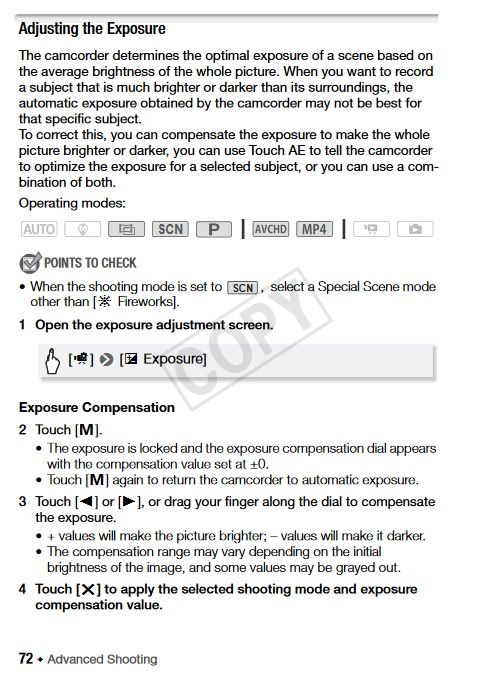
Information on manual exposure is on page 72 of the user manual.
__________________________________________________________________________________________
EOS C100 mk2 with a Canon EF-S 18-135mm IS STM, and a Sigma EF mount 10mm-20mm EX DC HSM wide angle - Zoom H2Essential - Dell 8700 i7-4790 3.6Ghz, 24GB Ram, Win 10, Nvidia GTX 1060 6GB - DaVinci Resolve Studio 20.3 - Blackmagic Speed Editor - Presonus Faderport 1.
EOS C100 mk2 with a Canon EF-S 18-135mm IS STM, and a Sigma EF mount 10mm-20mm EX DC HSM wide angle - Zoom H2Essential - Dell 8700 i7-4790 3.6Ghz, 24GB Ram, Win 10, Nvidia GTX 1060 6GB - DaVinci Resolve Studio 20.3 - Blackmagic Speed Editor - Presonus Faderport 1.

Options
- Mark as New
- Bookmark
- Subscribe
- Mute
- Subscribe to RSS Feed
- Permalink
- Report Inappropriate Content
03-13-2024 09:24 AM
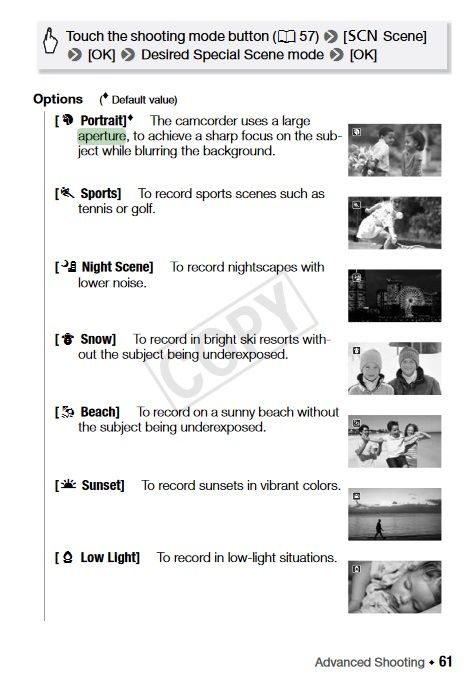
Page 72 says nothing about aperture. OP, you will need to use the Portrait special scene mode:
The only place that it mentions a large aperture is here:
Options
- Mark as New
- Bookmark
- Subscribe
- Mute
- Subscribe to RSS Feed
- Permalink
- Report Inappropriate Content
03-13-2024 03:45 PM
Thanks everyone for your replies, now I have some foundations to work on. I will update you on the results I manage to obtain.
Much good to all of you
Siro Carlo
Siro Carlo
Options
- Mark as New
- Bookmark
- Subscribe
- Mute
- Subscribe to RSS Feed
- Permalink
- Report Inappropriate Content
03-14-2024 04:48 AM
Exposure is controlled by the aperture a lens is set to. You can set it manually or use an automatic setting. Those illustrated on page 61 of the manual are merely built in presets.
__________________________________________________________________________________________
EOS C100 mk2 with a Canon EF-S 18-135mm IS STM, and a Sigma EF mount 10mm-20mm EX DC HSM wide angle - Zoom H2Essential - Dell 8700 i7-4790 3.6Ghz, 24GB Ram, Win 10, Nvidia GTX 1060 6GB - DaVinci Resolve Studio 20.3 - Blackmagic Speed Editor - Presonus Faderport 1.
EOS C100 mk2 with a Canon EF-S 18-135mm IS STM, and a Sigma EF mount 10mm-20mm EX DC HSM wide angle - Zoom H2Essential - Dell 8700 i7-4790 3.6Ghz, 24GB Ram, Win 10, Nvidia GTX 1060 6GB - DaVinci Resolve Studio 20.3 - Blackmagic Speed Editor - Presonus Faderport 1.
Options
- Mark as New
- Bookmark
- Subscribe
- Mute
- Subscribe to RSS Feed
- Permalink
- Report Inappropriate Content
03-14-2024 09:21 AM
The word "aperture" shows up twice in the manual. Once that I posted, and the other saying that the camera contols it to set the exposure. I also posted page 72 which says nothing about setting the aperture.
Post the page in the manual that describes how to set the Aperture independently.
Options
- Mark as New
- Bookmark
- Subscribe
- Mute
- Subscribe to RSS Feed
- Permalink
- Report Inappropriate Content
03-14-2024 08:01 PM
In the M manual mode the Exposure Compensation Dial is used for adjusting the aperture, or iris if you prefer, which is what adjusts the exposure, that is, the amount of light entering the camera. This is how lenses work, whether you adjust the aperture electronically or manually with a ring on the lens.
__________________________________________________________________________________________
EOS C100 mk2 with a Canon EF-S 18-135mm IS STM, and a Sigma EF mount 10mm-20mm EX DC HSM wide angle - Zoom H2Essential - Dell 8700 i7-4790 3.6Ghz, 24GB Ram, Win 10, Nvidia GTX 1060 6GB - DaVinci Resolve Studio 20.3 - Blackmagic Speed Editor - Presonus Faderport 1.
EOS C100 mk2 with a Canon EF-S 18-135mm IS STM, and a Sigma EF mount 10mm-20mm EX DC HSM wide angle - Zoom H2Essential - Dell 8700 i7-4790 3.6Ghz, 24GB Ram, Win 10, Nvidia GTX 1060 6GB - DaVinci Resolve Studio 20.3 - Blackmagic Speed Editor - Presonus Faderport 1.
Options
- Mark as New
- Bookmark
- Subscribe
- Mute
- Subscribe to RSS Feed
- Permalink
- Report Inappropriate Content
03-14-2024 11:48 PM
I understand that, but if you mess up the exposure it doesn't really matter what happens to the depth of field, now, does it?

Announcements
07/22/2026: New firmware updates are available.
EOS R6 Mark III - Version 1.1.0
05/13/2026: New firmware updates are available.
EOS R5 Mark II - Version 1.3.0
EOS R6 Mark II - Version 1.7.0
04/28/2026: Service Notice: Caution Concerning use of Lithium Batteries
03/17/2026: New firmware updates are available.
SELPHY CP1500 - Version 1.0.7.0
02/23/2026: New firmware update is available for EOS C50- Version 1.0.3.1
01/23/2026: New firmware update is available for RF 24-105mm F4 IS USM- Version 2.0.7
01/20/2026: New firmware updates are available.
10/21/2025: Service Notice: To Users of the Compact Digital Camera PowerShot V1
10/15/2025: New firmware updates are available.
Speedlite EL-5 - Version 1.2.0
Speedlite EL-1 - Version 1.1.0
Speedlite Transmitter ST-E10 - Version 1.2.0
07/28/2025: Notice of Free Repair Service for the Mirrorless Camera EOS R50 (Black)
05/21/2025: New firmware update available for EOS C500 Mark II - Version 1.1.5.1
Related Content
- I can't change the media storage for video on a Legria HF G25 in Camcorders
- Legria g50, Macro settings in dentistry. in Camcorders
- LEGRIA HF R506 How to change depth of field. in Camcorders
- Vixia HFG50 - Flickering Video in Camcorders
- "canon LEGRIA hf r806" video camera splits videos after recording 34:28 minutes in Camcorders

Ⓒ 2026
Canon U.S.A Inc. All Rights Reserved. Reproduction in whole or part without permission is prohibited.
