Turn on suggestions
Auto-suggest helps you quickly narrow down your search results by suggesting possible matches as you type.
- Canon Community
- Discussions & Help
- Printer
- Printer Software & Networking
- Printer suddenly stopped working.
Options
- Subscribe to RSS Feed
- Mark Topic as New
- Mark Topic as Read
- Float this Topic for Current User
- Bookmark
- Subscribe
- Mute
- Printer Friendly Page
Printer suddenly stopped working.

Options
- Mark as New
- Bookmark
- Subscribe
- Mute
- Subscribe to RSS Feed
- Permalink
- Report Inappropriate Content
03-20-2016 08:26 AM
My Canon MP970 is connected via a network cable directly to my pc network port. My printer was working fine until now it just doesnt print anymore.
When i press print all i see is this:
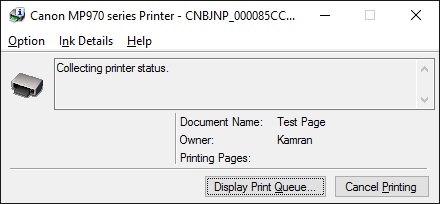
When i check the Canon Network Scan utility, it displays this when searching:
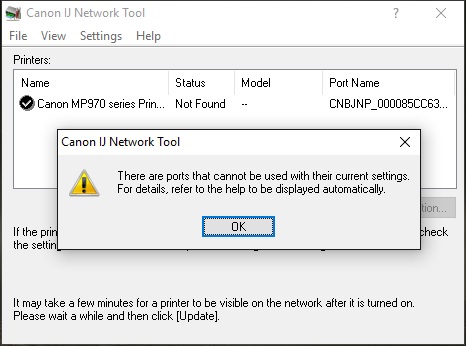
I have connected the printer via a network cable to a laptop and it works fine there so its not the printer. Not sure what could have change on my PC for it to suddenly stop working.
Any one have any ideas?
Thanks
Spec:
Windows 10 Pro x64 with all the latesst updates.
3 REPLIES 3


Options
- Mark as New
- Bookmark
- Subscribe
- Mute
- Subscribe to RSS Feed
- Permalink
- Report Inappropriate Content
03-20-2016 11:30 AM
"My Canon MP970 is connected via a network cable directly to my pc network port. ... ... ...
I have connected the printer via a network cable to a laptop and it works fine there so its not the printer. Not sure what could have change on my PC for it to suddenly stop working."
-------------------------------------------------
Under ordinary circumstances, you shouldn't be able to use the same cable for both purposes: connecting a network client to a network port on a network switch, or connecting a netowrk client to a network port on another network client device, such as your laptop.
Connecting two network clients together requires what is known as a 'crossover' cable, which differs from a more conventional network CAT-5/6 cable because the crossover has two signal wires swapped, Tx and Rx. Using the wrong type of cable should result in communication failure, which would appear to the network client as if the port has failed.
--------------------------------------------------------
"Enjoying photography since 1972."
"Enjoying photography since 1972."
Options
- Mark as New
- Bookmark
- Subscribe
- Mute
- Subscribe to RSS Feed
- Permalink
- Report Inappropriate Content
03-20-2016 11:33 AM
I understand that but it was workign fine for months on end and suddenly it decides to not work anymore plus with the same cable it works ont he laptop.
I guess i can try it with a crossover cable but i dont understand why it would stop working all of a sudden. If its the cable that is the issue then it shouldnt have worked at all.
Options
- Mark as New
- Bookmark
- Subscribe
- Mute
- Subscribe to RSS Feed
- Permalink
- Report Inappropriate Content
03-20-2016 11:38 AM
@Erazor wrote:I understand that but it was workign fine for months on end and suddenly it decides to not work anymore plus with the same cable it works ont he laptop.
I guess i can try it with a crossover cable but i dont understand why it would stop working all of a sudden. If its the cable that is the issue then it shouldnt have worked at all.
Well, in that case, then I have misunderstood your scenario. Under normal circumstances, a network cable used to connect two clients directly together will not work when it is then used to connect a client to a network switch.
--------------------------------------------------------
"Enjoying photography since 1972."
"Enjoying photography since 1972."


Announcements
07/22/2026: New firmware updates are available.
EOS R6 Mark III - Version 1.1.0
05/13/2026: New firmware updates are available.
EOS R5 Mark II - Version 1.3.0
EOS R6 Mark II - Version 1.7.0
04/28/2026: Service Notice: Caution Concerning use of Lithium Batteries
03/17/2026: New firmware updates are available.
SELPHY CP1500 - Version 1.0.7.0
02/23/2026: New firmware update is available for EOS C50- Version 1.0.3.1
01/23/2026: New firmware update is available for RF 24-105mm F4 IS USM- Version 2.0.7
01/20/2026: New firmware updates are available.
10/21/2025: Service Notice: To Users of the Compact Digital Camera PowerShot V1
10/15/2025: New firmware updates are available.
Speedlite EL-5 - Version 1.2.0
Speedlite EL-1 - Version 1.1.0
Speedlite Transmitter ST-E10 - Version 1.2.0
07/28/2025: Notice of Free Repair Service for the Mirrorless Camera EOS R50 (Black)
05/21/2025: New firmware update available for EOS C500 Mark II - Version 1.1.5.1
Related Content
- PIXMA TS4150i – Starter cartridges stopped working after cancelling PIXMA Print Plan in Desktop Inkjet Printers
- Canon imageCLASS MF645cx – Unable to Perform Color Correction / All Colors Misaligned in Office Printers
- SELPHY CP1500 won't connect to phone or computer in Printer Software & Networking
- PIXMA TR8620a unable to be found on network in Printer Software & Networking
- Which UK-model printer uses the same inks as the PIXMA TS8350a? in Desktop Inkjet Printers

Ⓒ 2026
Canon U.S.A Inc. All Rights Reserved. Reproduction in whole or part without permission is prohibited.
