Turn on suggestions
Auto-suggest helps you quickly narrow down your search results by suggesting possible matches as you type.
- Canon Community
- Discussions & Help
- Printer
- Printer Software & Networking
- Re: PIXMA iP8720 won't connect to new network
Options
- Subscribe to RSS Feed
- Mark Topic as New
- Mark Topic as Read
- Float this Topic for Current User
- Bookmark
- Subscribe
- Mute
- Printer Friendly Page
PIXMA iP8720 won't connect to new network

Options
- Mark as New
- Bookmark
- Subscribe
- Mute
- Subscribe to RSS Feed
- Permalink
- Report Inappropriate Content
10-14-2020 08:18 PM
hello, I have a canon PIXMA iP8720 and just installed a new router/wifi: motorola MG7540.
I have held the blue wifi button on the printer and waited for power to pulse 2 times. the wifi then pulses in 2s and continues. I clicked the WPS button on the router (I believe i need to do that) and the blue wifi continues to pulse.
It does not seem to connect as my MAC cannot see the printer in setup.
After some the ORANGE light comes on.
I don't know the process for how to fix this.
2 REPLIES 2


Options
- Mark as New
- Bookmark
- Subscribe
- Mute
- Subscribe to RSS Feed
- Permalink
- Report Inappropriate Content
10-21-2020 04:27 PM - edited 10-21-2020 04:30 PM
Hi Taliesinian,
If you are using the WPS push button method, please hold down the Wi-Fi button on your PIXMA iP8720 until the power light blinks 1 time and then let it go. Once complete, press the WPS button on your router.
To view this process, please use the following link:
https://support.usa.canon.com/kb/index?page=content&id=ART114494
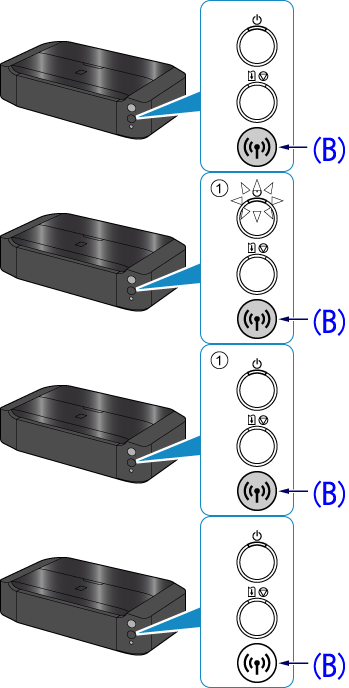
Please note, not all routers have WPS enabled by default.
If this is the case, you can log into your router's web interface and enable it or you can use a different method:
https://support.usa.canon.com/kb/index?page=content&id=ART166929
Options
- Mark as New
- Bookmark
- Subscribe
- Mute
- Subscribe to RSS Feed
- Permalink
- Report Inappropriate Content
04-03-2021 11:09 PM
I did this, and the network sees the printer, but it won't connect.
Any ideas?

Announcements
07/22/2026: New firmware updates are available.
EOS R6 Mark III - Version 1.1.0
05/13/2026: New firmware updates are available.
EOS R5 Mark II - Version 1.3.0
EOS R6 Mark II - Version 1.7.0
04/28/2026: Service Notice: Caution Concerning use of Lithium Batteries
03/17/2026: New firmware updates are available.
SELPHY CP1500 - Version 1.0.7.0
02/23/2026: New firmware update is available for EOS C50- Version 1.0.3.1
01/23/2026: New firmware update is available for RF 24-105mm F4 IS USM- Version 2.0.7
01/20/2026: New firmware updates are available.
10/21/2025: Service Notice: To Users of the Compact Digital Camera PowerShot V1
10/15/2025: New firmware updates are available.
Speedlite EL-5 - Version 1.2.0
Speedlite EL-1 - Version 1.1.0
Speedlite Transmitter ST-E10 - Version 1.2.0
07/28/2025: Notice of Free Repair Service for the Mirrorless Camera EOS R50 (Black)
05/21/2025: New firmware update available for EOS C500 Mark II - Version 1.1.5.1
Related Content
- imageCLASS MF644Cdw has trouble staying connected to network and computer in Printer Software & Networking
- imageCLASS MF264dw Looking for second USB port to connect scanner in Printer Software & Networking
- Can't connect Canon PRINT app to Android, Failed to configure the printer's Wi-Fi settings error in Printer Software & Networking
- imageCLASS LBP247dw II drops network connection and goes to sleep in Printer Software & Networking
- Just purchase a PIXMA TR4720 and ink cartridge error in Desktop Inkjet Printers

Ⓒ 2026
Canon U.S.A Inc. All Rights Reserved. Reproduction in whole or part without permission is prohibited.
