Turn on suggestions
Auto-suggest helps you quickly narrow down your search results by suggesting possible matches as you type.
- Canon Community
- Discussions & Help
- Camera
- Point & Shoot Digital Cameras
- Discuss best settings for non-DSLR camera - Bird s...
Options
- Subscribe to RSS Feed
- Mark Topic as New
- Mark Topic as Read
- Float this Topic for Current User
- Bookmark
- Subscribe
- Mute
- Printer Friendly Page
Discuss best settings for non-DSLR camera - Bird shots.

Options
- Mark as New
- Bookmark
- Subscribe
- Mute
- Subscribe to RSS Feed
- Permalink
- Report Inappropriate Content
01-16-2014 11:51 AM
Hello All,
I want inhanced feather defination, especially for white birds. I usually take shots before 11AM and between 3PM and sunset.
Owner of a Canon Power Shot SX50 HS. I like the 50X zoom, but maybe I zoom in too much or birds are to far away.
21 REPLIES 21

Options
- Mark as New
- Bookmark
- Subscribe
- Mute
- Subscribe to RSS Feed
- Permalink
- Report Inappropriate Content
01-20-2014 11:04 PM - edited 01-21-2014 12:55 AM
Gloria,
You might want to download and install the RAW Codec from Microsoft. It will enable your computer to recognize the RAW files. This is compatible with your SX50
http://www.microsoft.com/en-us/download/details.aspx?id=26829
I would still recommend installing the Canon DPP program. Adjust your RAW files there then convert them to Jpeg for use.
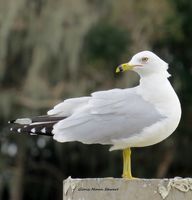
Edit: Just saw your pictures...they are great pictures...they are a bit soft but I think they simply need a bit of contrast adjustment. Not sure what your program does, in photoshop, I manipulate clarity, vibrancy and saturation to make the images pop and I must admit I overdo it often.
This picture was my very first bird picture taken from an SX10 IS P&S camera. I didn't know what I was doing back then but this was about as good as I can get it to do for me.

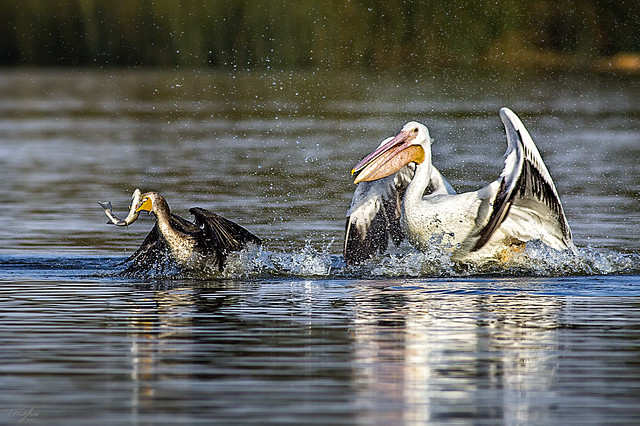
Here is a recent picture I took using a Canon 5DMkIII DSLR and a Canon EF 400mm f/5.6L lens...the difference is mainly the ability to focus on and freeze fast actions required for BIF.

================================================
Diverhank's photos on Flickr
Diverhank's photos on Flickr
Options
- Mark as New
- Bookmark
- Subscribe
- Mute
- Subscribe to RSS Feed
- Permalink
- Report Inappropriate Content
01-20-2014 11:12 PM
I have changed all Modes to JEPG. Also I did save a PFD file for viewing the Canon manual. I have been reading as I get a chance.

- « Previous
- Next »
- « Previous
- Next »
Announcements
07/22/2026: New firmware updates are available.
EOS R6 Mark III - Version 1.1.0
05/13/2026: New firmware updates are available.
EOS R5 Mark II - Version 1.3.0
EOS R6 Mark II - Version 1.7.0
04/28/2026: Service Notice: Caution Concerning use of Lithium Batteries
03/17/2026: New firmware updates are available.
SELPHY CP1500 - Version 1.0.7.0
02/23/2026: New firmware update is available for EOS C50- Version 1.0.3.1
01/23/2026: New firmware update is available for RF 24-105mm F4 IS USM- Version 2.0.7
01/20/2026: New firmware updates are available.
10/21/2025: Service Notice: To Users of the Compact Digital Camera PowerShot V1
10/15/2025: New firmware updates are available.
Speedlite EL-5 - Version 1.2.0
Speedlite EL-1 - Version 1.1.0
Speedlite Transmitter ST-E10 - Version 1.2.0
07/28/2025: Notice of Free Repair Service for the Mirrorless Camera EOS R50 (Black)
05/21/2025: New firmware update available for EOS C500 Mark II - Version 1.1.5.1
Related Content
- PowerShot V1 file name numbers? in Point & Shoot Digital Cameras
- EOS R5 Mark II How and Why to Use Picture Style settings and In-Camera Sharpening in EOS DSLR & Mirrorless Cameras
- USB-C not charging my EOS R50 V in EOS DSLR & Mirrorless Cameras
- Rebel SL3 - Screen is dark (can't see subject matter) when I choose "on" setting in EOS DSLR & Mirrorless Cameras
- EOS R5 Mark II How to use Pre-Continuous shooting in High Burst Rate. in EOS DSLR & Mirrorless Cameras

Ⓒ 2026
Canon U.S.A Inc. All Rights Reserved. Reproduction in whole or part without permission is prohibited.
