cancel
Showing results for 
Show  only  | Search instead for 
Did you mean: 

Image class 4820d with Windows 7 - Tool box, giving prompt that "Cannot communicate with the scanner

rejoymohan
Apprentice

Dear All,


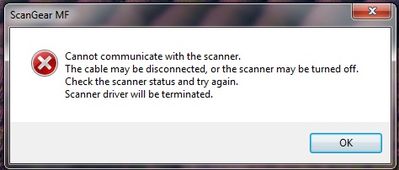
My Image class 4820d connected to a PC running Windows 7 Ultimate. The priting function is working. But while trying to scan, using the tool box, a prompt appears like this "Cannot communicate with the scanner....."


I have used the CD that came with the product. Since it didn't work, I had downloaded the driver from Canon support. I had connected the usb cable, only after the installation and restart of the PC.


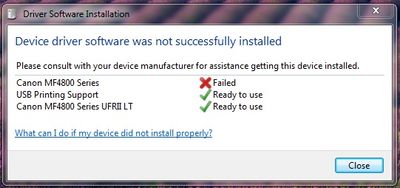
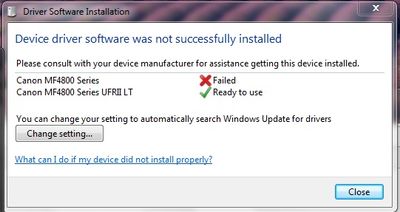
Once the USB was connected, the installation was continued, but a prompt used to appear during all my attempts telling that, "The installation has failed"


Screen shots of the two error messages I got, during my several attempts.

Kindly help me, to solve this issue. Thanks in advance.


Rejoy Mohan
 

Canon MF 4820d Installation error_1.jpg

Canon MF 4820 Installation error_2.jpg

1 REPLY 1

rejoymohan
Apprentice

Dear All, 


Please help. Canon Service guy mentioned that, it is a windows error. 


Giving below, the error promt I'm getting while trying to scan, using the Tool box.


Canon MF 4820d_Scanner Error.jpg


Thanks in Advance.


Rejoy Mohan

Holiday
Announcements
12/15/2025: New firmware update available for EOS C50 - Version 1.0.1.1

11/20/2025: New firmware updates are available.

EOS R6 Mark III - Version 1.0.1

EOS R3 - Version 2.0.0

EOS R1 - Version 1.2.0

EOS R5 Mark II - Version 1.2.0

EOS R5 - Version 2.2.1

PowerShot G7 X Mark III - Version 1.4.0

PowerShot SX740 HS - Version 1.0.2


10/21/2025: Service Notice: To Users of the Compact Digital Camera PowerShot V1

10/15/2025: New firmware updates are available.

Speedlite EL-5 - Version 1.2.0

Speedlite EL-1 - Version 1.1.0

Speedlite Transmitter ST-E10 - Version 1.2.0


07/28/2025: Notice of Free Repair Service for the Mirrorless Camera EOS R50 (Black)

07/24/2025: New firmware updates are available.


07/23/2025: New firmware updates are available.

EOS R5C - Version 1.1.1.1

EOS C80 - Version 1.0.3.1


7/17/2025: New firmware updates are available.

EOS R7 - Version 1.7.1

EOS R10 - Version 1.7.0

EOS R8 - Version 1.5.0

EOS R50 - Version 1.4.0

Powershot V10 - Version 1.4.0

Powershot V1 - Version 1.1.0

EOS R50V - Version 1.1.1


05/21/2025: New firmware update available for EOS C500 Mark II - Version 1.1.5.1

02/20/2025: New firmware updates are available.

RF70-200mm F2.8 L IS USM Z - Version 1.0.6

RF24-105mm F2.8 L IS USM Z - Version 1.0.9

RF100-300mm F2.8 L IS USM - Version 1.0.8

RF50mm F1.4 L VCM - Version 1.0.2

RF24mm F1.4 L VCM - Version 1.0.3


01/22/2024: Canon Supports Disaster Relief Efforts in California
01/14/2025: Steps to resolve still image problem when using certain SanDisk SD cards with the Canon EOS R5 Mark II