Turn on suggestions
Auto-suggest helps you quickly narrow down your search results by suggesting possible matches as you type.
- Canon Community
- Discussions & Help
- Camera
- EF & RF Lenses
- Re: 300mm F4 L IS Question???
Options
- Subscribe to RSS Feed
- Mark Topic as New
- Mark Topic as Read
- Float this Topic for Current User
- Bookmark
- Subscribe
- Mute
- Printer Friendly Page
300mm F4 L IS Question???

Options
- Mark as New
- Bookmark
- Subscribe
- Mute
- Subscribe to RSS Feed
- Permalink
- Report Inappropriate Content
03-01-2021 11:40 PM
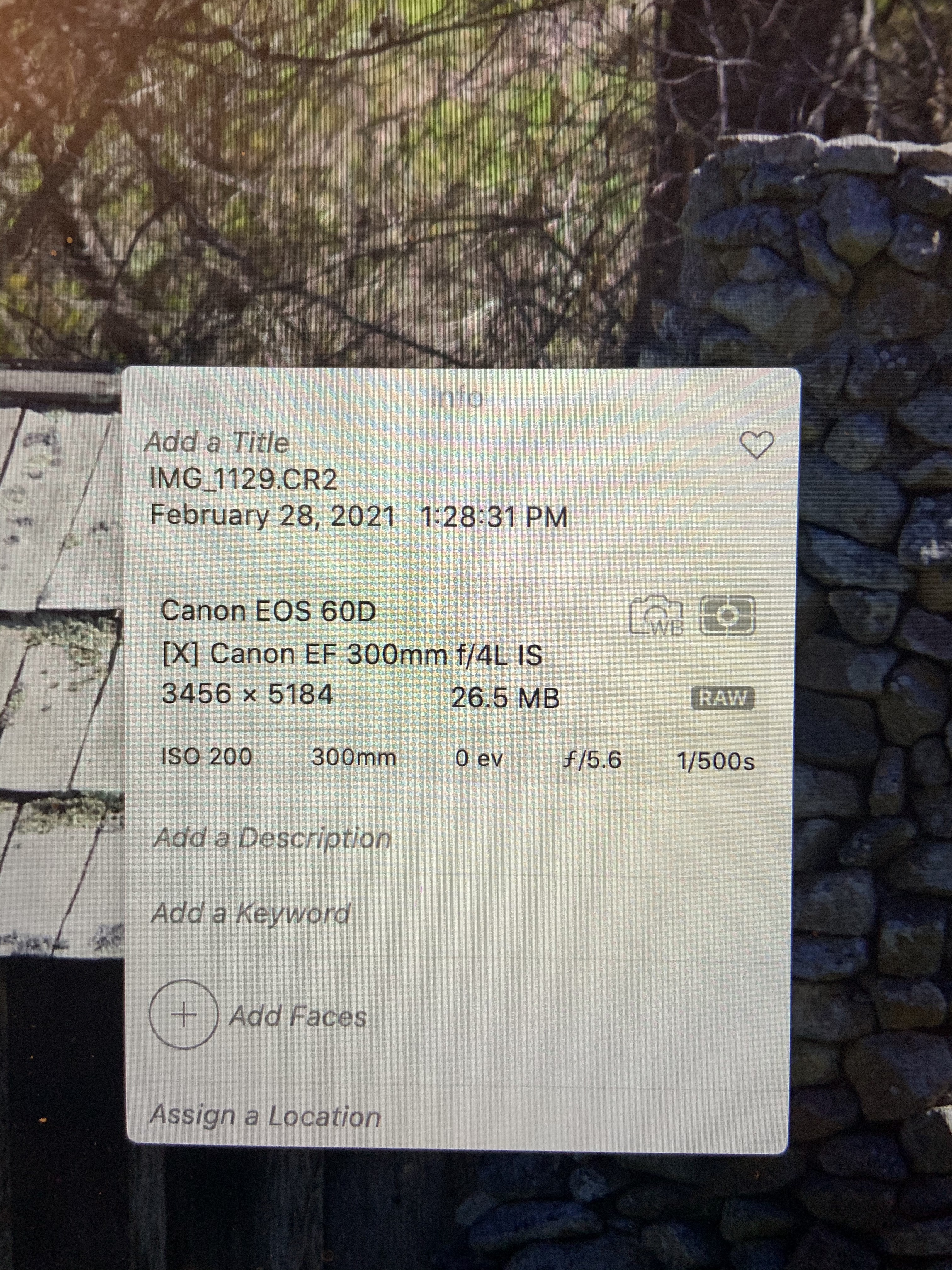
I have a canon 300mm F4L IS lens That Shows the lens info [X] Canon EF300mm f/4 IS in the EXIF Files. Has anyone seen this before or know if it means anything?
6 REPLIES 6


Options
- Mark as New
- Bookmark
- Subscribe
- Mute
- Subscribe to RSS Feed
- Permalink
- Report Inappropriate Content
03-02-2021 12:48 AM - edited 03-02-2021 12:48 AM
Your screenshot shows "Canon EF 300 f/4L IS". It seems to left off the "USM" part of the model number.
--------------------------------------------------------
"Enjoying photography since 1972."
"Enjoying photography since 1972."

Options
- Mark as New
- Bookmark
- Subscribe
- Mute
- Subscribe to RSS Feed
- Permalink
- Report Inappropriate Content
03-02-2021 09:15 AM
My EF-S 18-135 shows up fine in Photos and Preview. Have you tried the inspector in Preview? Have you tried DPP?
Options
- Mark as New
- Bookmark
- Subscribe
- Mute
- Subscribe to RSS Feed
- Permalink
- Report Inappropriate Content
03-02-2021 11:01 AM
It shows up the same way in inspector. My other lens show up correctly in photos and inspector.
Options
- Mark as New
- Bookmark
- Subscribe
- Mute
- Subscribe to RSS Feed
- Permalink
- Report Inappropriate Content
03-02-2021 11:06 AM
I believe that the EXIF info is just a code and the EXIF software has to translate it. In this case, it looks like the Mac is translating it wrong. I would guess that DPP would be correct.
Send feedback to Apple:
https://www.apple.com/feedback/
for MacOS.
Options
- Mark as New
- Bookmark
- Subscribe
- Mute
- Subscribe to RSS Feed
- Permalink
- Report Inappropriate Content
03-02-2021 10:22 PM
You are right it shows up correctly in DDP. This is a older lens I bought off of ebay. Could that be the reason its not showing up correctly in preview, photos and the exif online data viewers?
Options
- Mark as New
- Bookmark
- Subscribe
- Mute
- Subscribe to RSS Feed
- Permalink
- Report Inappropriate Content
03-03-2021 09:21 AM
It is just what Apple displays when it sees that code in the Exif, Apple has to change it.


Announcements
05/13/2026: New firmware updates are available.
EOS R5 Mark II - Version 1.3.0
EOS R6 Mark II - Version 1.7.0
04/28/2026: Service Notice: Caution Concerning use of Lithium Batteries
03/17/2026: New firmware updates are available.
SELPHY CP1500 - Version 1.0.7.0
02/23/2026: New firmware update is available for EOS C50- Version 1.0.3.1
01/23/2026: New firmware update is available for RF 24-105mm F4 IS USM- Version 2.0.7
01/20/2026: New firmware updates are available.
12/22/2025: New firmware update is available for EOS R6 Mark III- Version 1.0.2
10/21/2025: Service Notice: To Users of the Compact Digital Camera PowerShot V1
10/15/2025: New firmware updates are available.
Speedlite EL-5 - Version 1.2.0
Speedlite EL-1 - Version 1.1.0
Speedlite Transmitter ST-E10 - Version 1.2.0
07/28/2025: Notice of Free Repair Service for the Mirrorless Camera EOS R50 (Black)
05/21/2025: New firmware update available for EOS C500 Mark II - Version 1.1.5.1
Related Content
- RF 70-200mm f/2.8L compatibility and IS performance on the EOS R6 Mark II? in EF & RF Lenses
- EF 75-300mm f/4-5.6 III won't work with EOS Rebel T7, other lenses OK in EF & RF Lenses
- EOS R5 + EF-EOS R Adapter: RF lenses work perfectly, but no AF and no shutter with any EF lenses in EOS DSLR & Mirrorless Cameras
- EOS 90D set to CRAW, photos indicate they're taken as JPG in EOS DSLR & Mirrorless Cameras
- Canon 5D MK I in DPP4: Lens Data not available in Camera Software

Ⓒ 2026
Canon U.S.A Inc. All Rights Reserved. Reproduction in whole or part without permission is prohibited.
