Turn on suggestions
Auto-suggest helps you quickly narrow down your search results by suggesting possible matches as you type.
- Canon Community
- Discussions & Help
- Camera
- Camera Software
- Re: EOS Utility not working, won't recognize camer...
Options
- Subscribe to RSS Feed
- Mark Topic as New
- Mark Topic as Read
- Float this Topic for Current User
- Bookmark
- Subscribe
- Mute
- Printer Friendly Page
EOS Utility not working, won't recognize camera and crashes

Options
- Mark as New
- Bookmark
- Subscribe
- Mute
- Subscribe to RSS Feed
- Permalink
- Report Inappropriate Content
04-26-2018
12:23 AM
- last edited on
09-23-2023
03:39 PM
by
 Danny
Danny
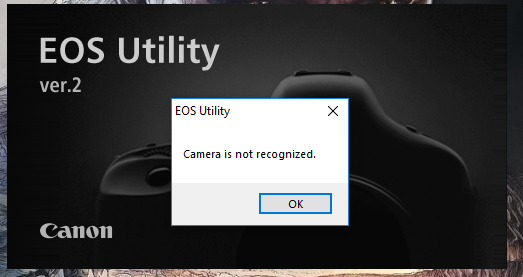
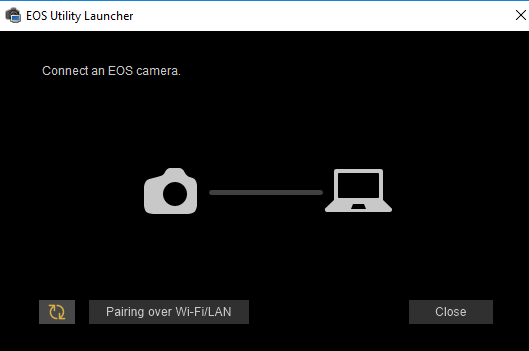
For whatever reason after a few days of not using EOS utility the software will not recognize my camera even if windows 10 does, I have turned off WiFi/NFC and connected it via usb but EOS utility does nothing with it. When I use EOS Utility 3 it just says "Connect an EOS camera." despite it already being connected. When I have used EOS utility 2 the software says "Camera is not recognized" when I launch the software and then connect the camera it immediately closes and gives that message as well.
Solutions Tried:
Double checking WiFi/NFC is disabled
Deleting the driver on windows and re-installing it (x10+)
Deleteing and re-installing EOS Utility 2 and 3 (x2)
Contacting support (they didn't seem to read my message and recomended me a solution I had already tried)
Giving up on life
Specs:
EOS Rebel T6
Windows 10 Home
I just don't know what else to do
31 REPLIES 31

Options
- Mark as New
- Bookmark
- Subscribe
- Mute
- Subscribe to RSS Feed
- Permalink
- Report Inappropriate Content
09-02-2025 05:46 PM
almost 7 years having the same problem with diferent cameras and pc/mac and no easy solution to fix this problem to us users... this is extremely sad that a company of this size can't make an app that actually works for its users...


Options
- Mark as New
- Bookmark
- Subscribe
- Mute
- Subscribe to RSS Feed
- Permalink
- Report Inappropriate Content
09-02-2025 07:35 PM
“ almost 7 years having the same problem with diferent cameras. “
Please start a new thread. Thanks!
--------------------------------------------------------
"Enjoying photography since 1972."
"Enjoying photography since 1972."

- « Previous
- Next »
- « Previous
- Next »
Announcements
07/22/2026: New firmware updates are available.
EOS R6 Mark III - Version 1.1.0
05/13/2026: New firmware updates are available.
EOS R5 Mark II - Version 1.3.0
EOS R6 Mark II - Version 1.7.0
04/28/2026: Service Notice: Caution Concerning use of Lithium Batteries
03/17/2026: New firmware updates are available.
SELPHY CP1500 - Version 1.0.7.0
02/23/2026: New firmware update is available for EOS C50- Version 1.0.3.1
01/23/2026: New firmware update is available for RF 24-105mm F4 IS USM- Version 2.0.7
01/20/2026: New firmware updates are available.
10/21/2025: Service Notice: To Users of the Compact Digital Camera PowerShot V1
10/15/2025: New firmware updates are available.
Speedlite EL-5 - Version 1.2.0
Speedlite EL-1 - Version 1.1.0
Speedlite Transmitter ST-E10 - Version 1.2.0
07/28/2025: Notice of Free Repair Service for the Mirrorless Camera EOS R50 (Black)
05/21/2025: New firmware update available for EOS C500 Mark II - Version 1.1.5.1
Related Content
- EOS R5 Mark II firmware 1.30 notes in Camera Software
- Autofocus defect 4 times - Sigma art lenses on Canon R8 in EOS DSLR & Mirrorless Cameras
- EOS 600D wont recognize as camera when i plug in the computer in EOS DSLR & Mirrorless Cameras
- How to get EOS R3 to recognize Speedlite EL-5 in EOS DSLR & Mirrorless Cameras
- CameraWindow does not open in Windows 11 in Camera Software

Ⓒ 2026
Canon U.S.A Inc. All Rights Reserved. Reproduction in whole or part without permission is prohibited.
