Turn on suggestions
Auto-suggest helps you quickly narrow down your search results by suggesting possible matches as you type.
- Canon Community
- Discussions & Help
- EOS Webcam Utility Pro
- EOS Webcam Utility Pro - Discussions
- Error Code when trying to install EOS Webcam Utili...
Options
- Subscribe to RSS Feed
- Mark Topic as New
- Mark Topic as Read
- Float this Topic for Current User
- Bookmark
- Subscribe
- Mute
- Printer Friendly Page

Options
- Mark as New
- Bookmark
- Subscribe
- Mute
- Subscribe to RSS Feed
- Permalink
- Report Inappropriate Content
12-27-2023 11:43 PM
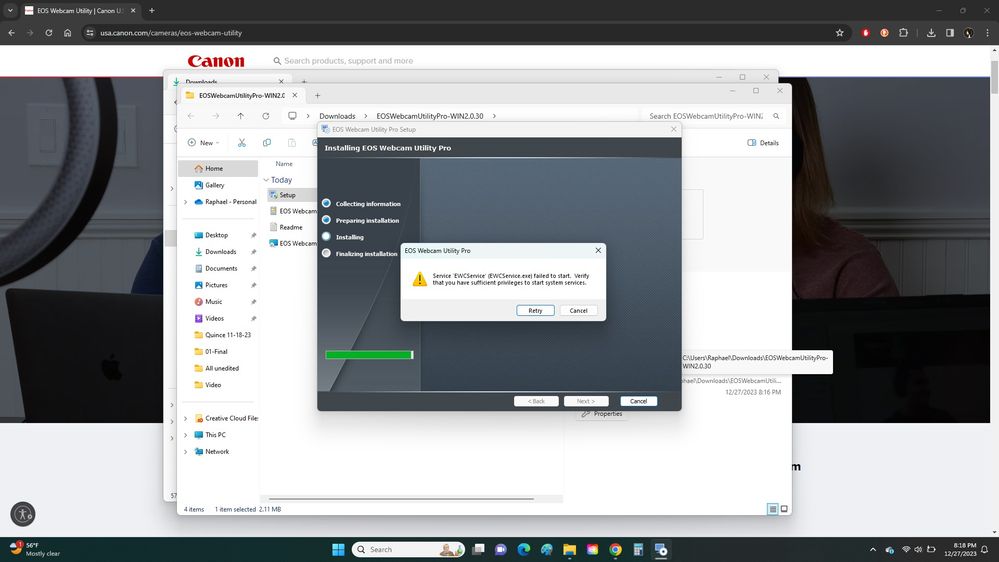
I follow the prompts to download the correct utility for my OS (Windows 11). and when it comes to the installing section of the EOS Webcam Utility Pro it gives me an error code:
"Service 'EWCService' (EWCService.exe) failed to start. Verify that you have sufficient privileges to start system services."
I have no idea what it means. My EOS utility works fine but I'm trying to use my Canon camera for Twitch and it appears the only way to do that with by using EOS Webcam Utility. Which I can't seem to get it installed no matter how many times I try.
Any help is appreciated.
PS. I have registered to USA.Canon and also registered my camera as well thinking that maybe that's what I needed to do.
Solved! Go to Solution.
1 ACCEPTED SOLUTION
Accepted Solutions


Options
- Mark as New
- Bookmark
- Subscribe
- Mute
- Subscribe to RSS Feed
- Permalink
- Report Inappropriate Content
12-28-2023 07:30 AM
There have been a number of users reporting this issue. The error message seems to be indicative of some unknown incompatibility with your Windows Platform.
I suggest that you contact Canon Support and Service directly regarding your issue. This user forum is neither Canon Support or Service.
--------------------------------------------------------
"Enjoying photography since 1972."
"Enjoying photography since 1972."
4 REPLIES 4
Options
- Mark as New
- Bookmark
- Subscribe
- Mute
- Subscribe to RSS Feed
- Permalink
- Report Inappropriate Content
12-28-2023 07:30 AM
There have been a number of users reporting this issue. The error message seems to be indicative of some unknown incompatibility with your Windows Platform.
I suggest that you contact Canon Support and Service directly regarding your issue. This user forum is neither Canon Support or Service.
--------------------------------------------------------
"Enjoying photography since 1972."
"Enjoying photography since 1972."
Options
- Mark as New
- Bookmark
- Subscribe
- Mute
- Subscribe to RSS Feed
- Permalink
- Report Inappropriate Content
12-28-2023 12:15 PM
“ My EOS utility works fine… “
During the installation, the EOS Utility must not be running. Also, the EOS Utility Launcher Service must be shut down. This Windows Service icon can be found in the System Tray near the System Clock. The icon should look like a little camera, very similar to the EOS Utility icon.
Right-Click on the little camera and select “Exit”. Try the installation again. If you are still experiencing issues, then contact Canon Support.
--------------------------------------------------------
"Enjoying photography since 1972."
"Enjoying photography since 1972."
Options
- Mark as New
- Bookmark
- Subscribe
- Mute
- Subscribe to RSS Feed
- Permalink
- Report Inappropriate Content
12-28-2023 04:23 PM
Thank you for the suggestion to reach Canon Support and Service. I keep trying but the website just keeps sending me to this forum or keeps repeating the FAQ libraries. Is there a direct link to their contact inbox or email?
Options
- Mark as New
- Bookmark
- Subscribe
- Mute
- Subscribe to RSS Feed
- Permalink
- Report Inappropriate Content
12-28-2023 04:24 PM
I did make sure that the EOS Utility was not running and I'm still not having success in installing, even after I reset my laptop.


Announcements
07/22/2026: New firmware updates are available.
EOS R6 Mark III - Version 1.1.0
05/13/2026: New firmware updates are available.
EOS R5 Mark II - Version 1.3.0
EOS R6 Mark II - Version 1.7.0
04/28/2026: Service Notice: Caution Concerning use of Lithium Batteries
03/17/2026: New firmware updates are available.
SELPHY CP1500 - Version 1.0.7.0
02/23/2026: New firmware update is available for EOS C50- Version 1.0.3.1
01/23/2026: New firmware update is available for RF 24-105mm F4 IS USM- Version 2.0.7
01/20/2026: New firmware updates are available.
10/21/2025: Service Notice: To Users of the Compact Digital Camera PowerShot V1
10/15/2025: New firmware updates are available.
Speedlite EL-5 - Version 1.2.0
Speedlite EL-1 - Version 1.1.0
Speedlite Transmitter ST-E10 - Version 1.2.0
07/28/2025: Notice of Free Repair Service for the Mirrorless Camera EOS R50 (Black)
05/21/2025: New firmware update available for EOS C500 Mark II - Version 1.1.5.1
Related Content
- eos webcam utility pro on windows 10 home not working in EOS Webcam Utility Pro - Discussions
- EOS Webcam Utility stopped working after a Windows Update. in EOS Webcam Utility Pro - Discussions
- This version of "EOSWebcamUtility" will not open in a future release of MacOS in EOS Webcam Utility Pro - Discussions
- EOS Webcam utility pro not working with 6D Mark 2 in EOS Webcam Utility Pro - Discussions
- EOS Webcam Utility PRO does not work after upgrade to Windows 11 in EOS Webcam Utility Pro - Discussions

Ⓒ 2026
Canon U.S.A Inc. All Rights Reserved. Reproduction in whole or part without permission is prohibited.
