- Meet Our Illuminaries
- Meet Our Illuminaries
- Discussions & Help
- Gallery
- Learn With Canon
- About Our Community
- Discussions & Help
- Gallery
- Learn With Canon
- About Our Community
Turn on suggestions
Auto-suggest helps you quickly narrow down your search results by suggesting possible matches as you type.
- Canon Community
- Discussions & Help
- Camera
- EOS DSLR & Mirrorless Cameras
- Re: Canon R6 / Firmware update needed/ have Macboo...
Options
- Subscribe to RSS Feed
- Mark Topic as New
- Mark Topic as Read
- Float this Topic for Current User
- Bookmark
- Subscribe
- Mute
- Printer Friendly Page

Options
- Mark as New
- Bookmark
- Subscribe
- Mute
- Subscribe to RSS Feed
- Permalink
- Report Inappropriate Content
01-25-2023
04:42 PM
- last edited on
02-02-2023
04:10 PM
by
 Danny
Danny
Hello,
I'm new to the group and hoping someone can help me.
I have the Canon R6, I want to update the firmware.
There is no option for Mac OS Ventura 13.1.
This is a fairly new laptop and OS.
How do I update the firmware?
I appreciate the help.
Thank you!
Kim
Solved! Go to Solution.
2 ACCEPTED SOLUTIONS
Accepted Solutions


Options
- Mark as New
- Bookmark
- Subscribe
- Mute
- Subscribe to RSS Feed
- Permalink
- Report Inappropriate Content
01-25-2023 06:44 PM
When I go to the follow Canon Support for EOS R6 page, I do see the option to download firmware after selecting macOS 13. Version 1.7.0 as of this writing.
Do you have an SD card slot on your Mac? If so, that's typically what I do (i.e. transfer the firmware file onto an SD card to then put into the camera for the update process).
--
Ricky
Camera: EOS R5 II, RF 50mm f/1.2L, RF 135mm f/1.8L
Lighting: Profoto Lights & Modifiers
Ricky
Camera: EOS R5 II, RF 50mm f/1.2L, RF 135mm f/1.8L
Lighting: Profoto Lights & Modifiers

Options
- Mark as New
- Bookmark
- Subscribe
- Mute
- Subscribe to RSS Feed
- Permalink
- Report Inappropriate Content
01-25-2023 11:58 PM
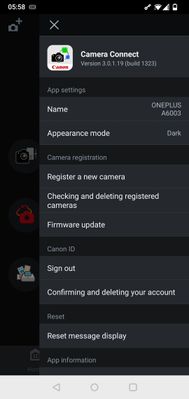
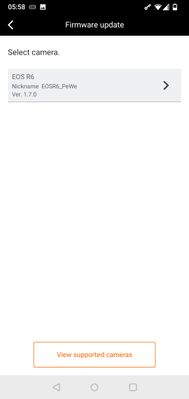
Easiest may be to just use the app Canon Connect and update the firmware via your phone.
6 REPLIES 6
Options
- Mark as New
- Bookmark
- Subscribe
- Mute
- Subscribe to RSS Feed
- Permalink
- Report Inappropriate Content
01-25-2023 06:44 PM
When I go to the follow Canon Support for EOS R6 page, I do see the option to download firmware after selecting macOS 13. Version 1.7.0 as of this writing.
Do you have an SD card slot on your Mac? If so, that's typically what I do (i.e. transfer the firmware file onto an SD card to then put into the camera for the update process).
--
Ricky
Camera: EOS R5 II, RF 50mm f/1.2L, RF 135mm f/1.8L
Lighting: Profoto Lights & Modifiers
Ricky
Camera: EOS R5 II, RF 50mm f/1.2L, RF 135mm f/1.8L
Lighting: Profoto Lights & Modifiers
Options
- Mark as New
- Bookmark
- Subscribe
- Mute
- Subscribe to RSS Feed
- Permalink
- Report Inappropriate Content
01-25-2023 11:58 PM
Easiest may be to just use the app Canon Connect and update the firmware via your phone.
Options
- Mark as New
- Bookmark
- Subscribe
- Mute
- Subscribe to RSS Feed
- Permalink
- Report Inappropriate Content
02-02-2023 04:02 PM
Thank you Ricky for the reply.
I do have a SD adapter for my MAC, when downloading the firmware it saves to my MAC then i'm unable to open and send to card.
Is there a way to go directly to the card?
I appreciate your help.
Options
- Mark as New
- Bookmark
- Subscribe
- Mute
- Subscribe to RSS Feed
- Permalink
- Report Inappropriate Content
02-03-2023 06:56 AM
Canon typically provides firmware for macOS computers delivered as DMG files (Disk iMaGe). Thus, you wouldn't be able to download that file directly to the SD card. Instead, you'd need to copy the contents inside that DMG to the SD card.
Details...
In Finder, select Settings or Preferences and in the General Finder Settings panel, be sure that "Hard disks" and "External disks" are checked:
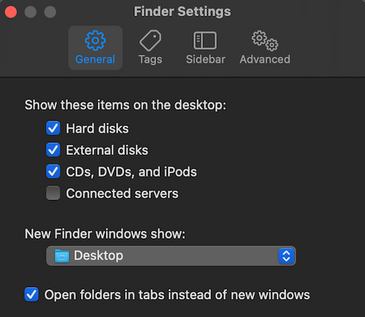
After you download the DMG file, locate it (by default, should be in the Downloads folder on your Mac), and double-click it. This will open up that file (will show up on your desktop) so you can see its contents.
The contents should include the firmware file itself along with instructions on what exactly you'll need to do. Typically this involves copying the firmware file (usually ends with .FIR or .BIN) to the top-level of your SD card (i.e. not copied to any folders that may exist on the SD card).
--
Ricky
Camera: EOS R5 II, RF 50mm f/1.2L, RF 135mm f/1.8L
Lighting: Profoto Lights & Modifiers
Ricky
Camera: EOS R5 II, RF 50mm f/1.2L, RF 135mm f/1.8L
Lighting: Profoto Lights & Modifiers
Options
- Mark as New
- Bookmark
- Subscribe
- Mute
- Subscribe to RSS Feed
- Permalink
- Report Inappropriate Content
02-06-2023 06:50 PM
Thank you fore the detailed instructions they are very helpful. Once I download the firmware for some reason it trys to save to photos and is not supported there. Ive deleted and retied and defaults photos.
Options
- Mark as New
- Bookmark
- Subscribe
- Mute
- Subscribe to RSS Feed
- Permalink
- Report Inappropriate Content
02-06-2023 06:51 PM
Thank you! I have downloaded the app. It wont work for the firmware, will come in handy for photo transfers.


Announcements
12/15/2025: New firmware update available for EOS C50 - Version 1.0.1.1
10/21/2025: Service Notice: To Users of the Compact Digital Camera PowerShot V1
07/28/2025: Notice of Free Repair Service for the Mirrorless Camera EOS R50 (Black)
05/21/2025: New firmware update available for EOS C500 Mark II - Version 1.1.5.1
01/22/2024: Canon Supports Disaster Relief Efforts in California
01/14/2025: Steps to resolve still image problem when using certain SanDisk SD cards with the Canon EOS R5 Mark II
11/20/2025: New firmware updates are available.
EOS R6 Mark III - Version 1.0.1
EOS R5 Mark II - Version 1.2.0
PowerShot G7 X Mark III - Version 1.4.0
PowerShot SX740 HS - Version 1.0.2
10/21/2025: Service Notice: To Users of the Compact Digital Camera PowerShot V1
10/15/2025: New firmware updates are available.
Speedlite EL-5 - Version 1.2.0
Speedlite EL-1 - Version 1.1.0
Speedlite Transmitter ST-E10 - Version 1.2.0
07/28/2025: Notice of Free Repair Service for the Mirrorless Camera EOS R50 (Black)
07/24/2025: New firmware updates are available.
07/23/2025: New firmware updates are available.
7/17/2025: New firmware updates are available.
05/21/2025: New firmware update available for EOS C500 Mark II - Version 1.1.5.1
02/20/2025: New firmware updates are available.
RF70-200mm F2.8 L IS USM Z - Version 1.0.6
RF24-105mm F2.8 L IS USM Z - Version 1.0.9
RF100-300mm F2.8 L IS USM - Version 1.0.8
RF50mm F1.4 L VCM - Version 1.0.2
RF24mm F1.4 L VCM - Version 1.0.3
01/22/2024: Canon Supports Disaster Relief Efforts in California
01/14/2025: Steps to resolve still image problem when using certain SanDisk SD cards with the Canon EOS R5 Mark II
Related Content
- DPP can't establish a connection for remote shooting with EOS 5D Mark III in Camera Software
- R6 Mark III Error 70 when trying to import into Lightroom Classic in EOS DSLR & Mirrorless Cameras
- EOS R5 Mark II Unable to update firmware in EOS DSLR & Mirrorless Cameras
- Canon EOS R50 UVC Webcam Not Working Properly on macOS v26 (Tahoe) in EOS DSLR & Mirrorless Cameras
- macOS and Android Canon camera apps not working in Camera Software

Ⓒ 2025
Canon U.S.A Inc. All Rights Reserved. Reproduction in whole or part without permission is prohibited.
