Turn on suggestions
Auto-suggest helps you quickly narrow down your search results by suggesting possible matches as you type.
- Canon Community
- Discussions & Help
- Camera
- Camera Software
- DPP 4.10.20.1 Instructions for cropping and pastin...
Options
- Subscribe to RSS Feed
- Mark Topic as New
- Mark Topic as Read
- Float this Topic for Current User
- Bookmark
- Subscribe
- Mute
- Printer Friendly Page

Options
- Mark as New
- Bookmark
- Subscribe
- Mute
- Subscribe to RSS Feed
- Permalink
- Report Inappropriate Content
03-25-2023
09:26 PM
- last edited on
03-28-2023
09:22 AM
by
 Danny
Danny
I'm cropping images in Digital Photo Professional 4.10.20.1 and pasting into a new image but can't find the instructions. Found several "manuals" but haven't found how I paste them into a new image; or how to just save the cropped portion of the image. This is my first DSLR.
Solved! Go to Solution.
1 ACCEPTED SOLUTION
Accepted Solutions


Options
- Mark as New
- Bookmark
- Subscribe
- Mute
- Subscribe to RSS Feed
- Permalink
- Report Inappropriate Content
03-25-2023 10:14 PM
That is how it is. When you crop an image in DPP all you are doing is saving an instruction. The image isn’t really cropped until to convert and save or print it.
John Hoffman
Conway, NH
R6 Mark III, M200, Many lenses, Pixma PRO-100, Pixma TR8620a, Lr Classic
Conway, NH
R6 Mark III, M200, Many lenses, Pixma PRO-100, Pixma TR8620a, Lr Classic
9 REPLIES 9
Options
- Mark as New
- Bookmark
- Subscribe
- Mute
- Subscribe to RSS Feed
- Permalink
- Report Inappropriate Content
03-25-2023 10:14 PM
That is how it is. When you crop an image in DPP all you are doing is saving an instruction. The image isn’t really cropped until to convert and save or print it.
John Hoffman
Conway, NH
R6 Mark III, M200, Many lenses, Pixma PRO-100, Pixma TR8620a, Lr Classic
Conway, NH
R6 Mark III, M200, Many lenses, Pixma PRO-100, Pixma TR8620a, Lr Classic

Options
- Mark as New
- Bookmark
- Subscribe
- Mute
- Subscribe to RSS Feed
- Permalink
- Report Inappropriate Content
03-25-2023 10:39 PM
@frevans7155
DPP is currently at v4.17.20
Windows
https://pdisp01.c-wss.com/gdl/WWUFORedirectSerialTarget.do?id=NGE4MjIzMWEx&cmp=ABR&lang=EN
Manual
cam.start.canon : For customers using the Digital Photo Professional
Mac
https://pdisp01.c-wss.com/gdl/WWUFORedirectSerialTarget.do?id=NGE4MjIzMjA1&cmp=ABR&lang=EN
Manual
Canon : Product Manual : Digital Photo Professional (start.canon)
~Rick
Bay Area - CA
~R5 C (1.0.9.1), ~R50v (1.1.1) ~RF Trinity, ~RF 100 Macro, ~RF 100~400, ~RF 100~500, ~RF 200-800 +RF 1.4x TC, BG-R10, 430EX III-RT ~DxO PhotoLab Elite ~DaVinci Resolve Studio ~ImageClass MF644Cdw/MF656Cdw ~Pixel 8 ~CarePaks Are Worth It
Options
- Mark as New
- Bookmark
- Subscribe
- Mute
- Subscribe to RSS Feed
- Permalink
- Report Inappropriate Content
03-25-2023 10:46 PM
Too clarify. You can copy the crop frame from one image and paste into others, but you cannot copy the cropped content.
John Hoffman
Conway, NH
R6 Mark III, M200, Many lenses, Pixma PRO-100, Pixma TR8620a, Lr Classic
Conway, NH
R6 Mark III, M200, Many lenses, Pixma PRO-100, Pixma TR8620a, Lr Classic
Options
- Mark as New
- Bookmark
- Subscribe
- Mute
- Subscribe to RSS Feed
- Permalink
- Report Inappropriate Content
03-25-2023 11:08 PM
So I can't crop and save as a new image?
Options
- Mark as New
- Bookmark
- Subscribe
- Mute
- Subscribe to RSS Feed
- Permalink
- Report Inappropriate Content
03-26-2023 07:19 AM
If you are working with a single image the area you have cropped will show if you print the image or export it as a file (JPEG or TIFF). You can't, and there is no need to, copy the cropped area and create a new image.
John Hoffman
Conway, NH
R6 Mark III, M200, Many lenses, Pixma PRO-100, Pixma TR8620a, Lr Classic
Conway, NH
R6 Mark III, M200, Many lenses, Pixma PRO-100, Pixma TR8620a, Lr Classic
Options
- Mark as New
- Bookmark
- Subscribe
- Mute
- Subscribe to RSS Feed
- Permalink
- Report Inappropriate Content
03-26-2023 03:48 PM
Thank you. I need to find a good, free software to do the editing I wanted to do. I wanted to crop and create a new image without losing the original. I really don't want to print every image.
Options
- Mark as New
- Bookmark
- Subscribe
- Mute
- Subscribe to RSS Feed
- Permalink
- Report Inappropriate Content
03-26-2023 04:09 PM
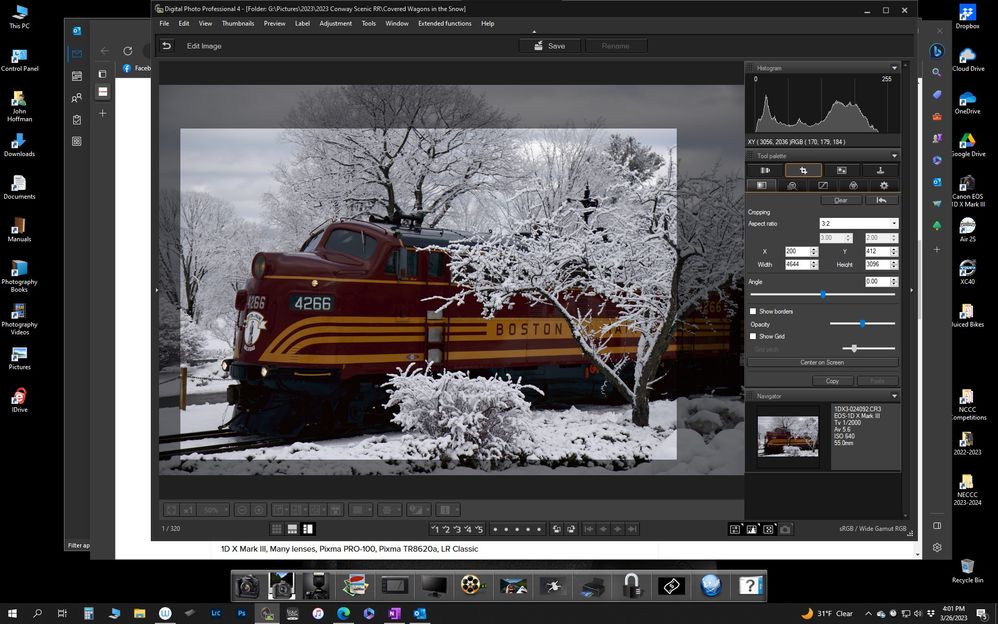
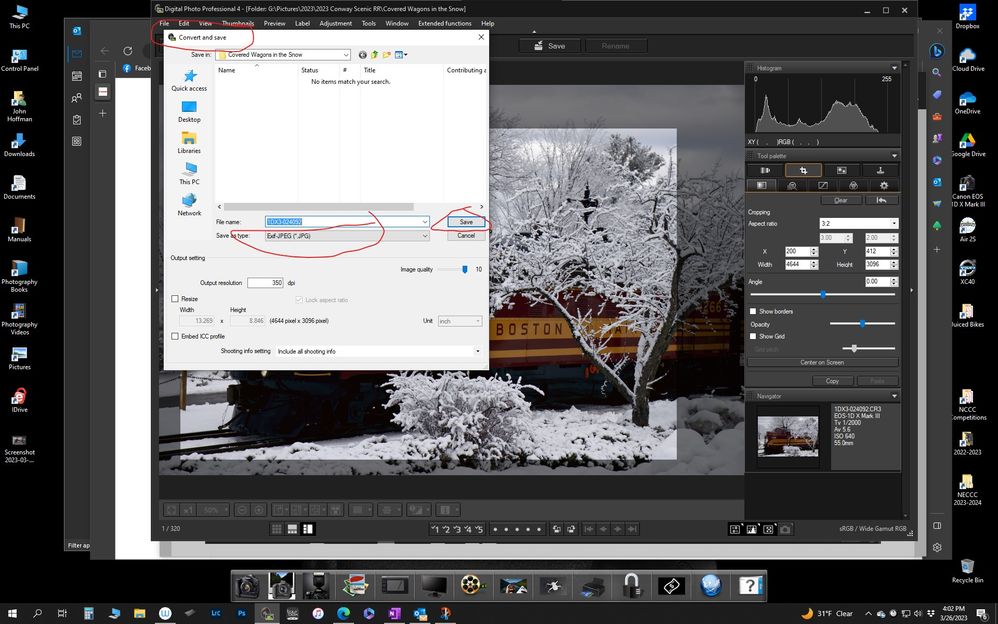
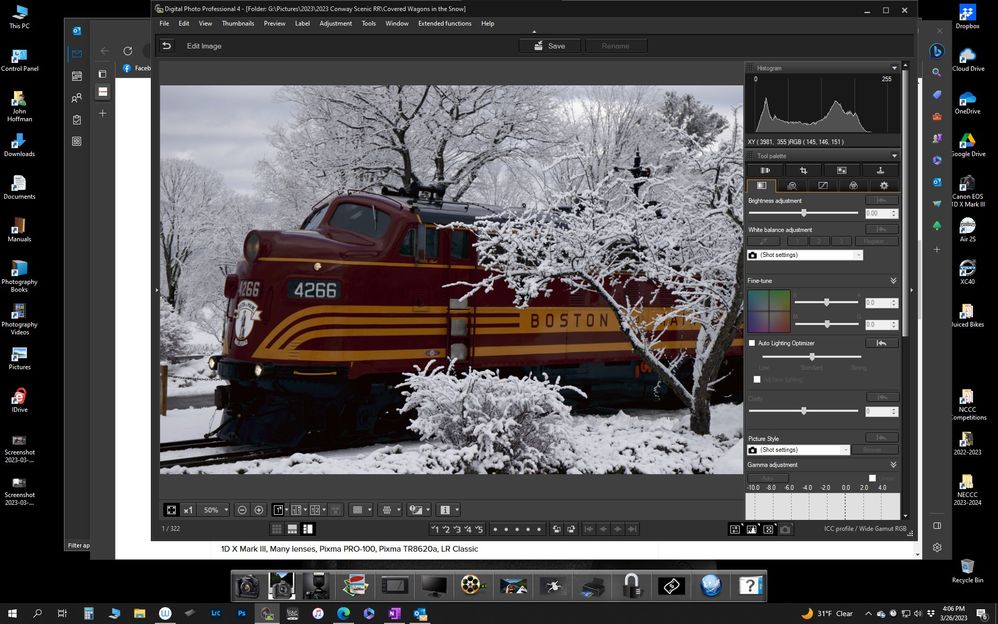
You don't have to print, just "Convert & Save" the new image:
John Hoffman
Conway, NH
R6 Mark III, M200, Many lenses, Pixma PRO-100, Pixma TR8620a, Lr Classic
Conway, NH
R6 Mark III, M200, Many lenses, Pixma PRO-100, Pixma TR8620a, Lr Classic
Options
- Mark as New
- Bookmark
- Subscribe
- Mute
- Subscribe to RSS Feed
- Permalink
- Report Inappropriate Content
03-26-2023 09:41 PM
OK,that would work. I guess I can save the original as a jpeg then crop and convert the raw image.
Options
- Mark as New
- Bookmark
- Subscribe
- Mute
- Subscribe to RSS Feed
- Permalink
- Report Inappropriate Content
03-26-2023 09:42 PM
Thank you; I need to read the manual, as well as the manual for the camera; it's a bit different than the 35mm I used years ago.


Announcements
12/18/2025: New firmware updates are available.
12/15/2025: New firmware update available for EOS C50 - Version 1.0.1.1
11/20/2025: New firmware updates are available.
EOS R6 Mark III - Version 1.0.1
EOS R5 Mark II - Version 1.2.0
PowerShot G7 X Mark III - Version 1.4.0
PowerShot SX740 HS - Version 1.0.2
10/21/2025: Service Notice: To Users of the Compact Digital Camera PowerShot V1
10/15/2025: New firmware updates are available.
Speedlite EL-5 - Version 1.2.0
Speedlite EL-1 - Version 1.1.0
Speedlite Transmitter ST-E10 - Version 1.2.0
07/28/2025: Notice of Free Repair Service for the Mirrorless Camera EOS R50 (Black)
7/17/2025: New firmware updates are available.
05/21/2025: New firmware update available for EOS C500 Mark II - Version 1.1.5.1
02/20/2025: New firmware updates are available.
RF70-200mm F2.8 L IS USM Z - Version 1.0.6
RF24-105mm F2.8 L IS USM Z - Version 1.0.9
RF100-300mm F2.8 L IS USM - Version 1.0.8
RF50mm F1.4 L VCM - Version 1.0.2
RF24mm F1.4 L VCM - Version 1.0.3
01/22/2024: Canon Supports Disaster Relief Efforts in California
01/14/2025: Steps to resolve still image problem when using certain SanDisk SD cards with the Canon EOS R5 Mark II

Ⓒ 2025
Canon U.S.A Inc. All Rights Reserved. Reproduction in whole or part without permission is prohibited.
