Turn on suggestions
Auto-suggest helps you quickly narrow down your search results by suggesting possible matches as you type.
- Canon Community
- Discussions & Help
- Camera
- Speedlite Flashes
- Re: Speedlite 600ex-rt battery problem
Options
- Subscribe to RSS Feed
- Mark Topic as New
- Mark Topic as Read
- Float this Topic for Current User
- Bookmark
- Subscribe
- Mute
- Printer Friendly Page

Options
- Mark as New
- Bookmark
- Subscribe
- Mute
- Subscribe to RSS Feed
- Permalink
- Report Inappropriate Content
01-02-2013 03:59 PM
Hi
I have just bought a 600ex-rt ... But the batteries I put in it (which are all new) only result in a "replace battery" sign and the flash refuses to switch on.
I have tried 3 new sets of batteries, all are top grade lithium batteries, is there a known issue with lithium batteries - the manual says they can be used?
Many thanks for any info that could help.
I have just bought a 600ex-rt ... But the batteries I put in it (which are all new) only result in a "replace battery" sign and the flash refuses to switch on.
I have tried 3 new sets of batteries, all are top grade lithium batteries, is there a known issue with lithium batteries - the manual says they can be used?
Many thanks for any info that could help.
Solved! Go to Solution.
93 REPLIES 93
Options
- Mark as New
- Bookmark
- Subscribe
- Mute
- Subscribe to RSS Feed
- Permalink
- Report Inappropriate Content
02-19-2014 09:10 AM
I posted earlier about the same issue. I finally got mine working. But on the first change of batteries the issue returned and this time none of the tricks worked. I sent it back to to B&H for an exchange. I am uncertain if the sent me a brand new or a refurbished unit but atleast it works (for now). The 600 is a beautiful device but it's hard to rely on a parachute that opens "most" of the time. I am not bashing Canon. I think the world of their products but it puzzles me why have not aggressively addressed this issue. My advice is if your flash doesn't work send it back for an exchnage ASAP.
Options
- Mark as New
- Bookmark
- Subscribe
- Mute
- Subscribe to RSS Feed
- Permalink
- Report Inappropriate Content
03-01-2014 11:37 AM
I had the same issue. Held the clear buttons and then flipped the switch to lock position. Took 10 times or so... No issues since reset.
Options
- Mark as New
- Bookmark
- Subscribe
- Mute
- Subscribe to RSS Feed
- Permalink
- Report Inappropriate Content
03-26-2014 07:01 AM
Hello All
Yesterday, I received my new 600EX RT and was excited to make it FLASH 🙂 But I had the same problem using the Ultra+ Energizer AA-LR6 alkaline batteries. Read through the instructions and rechecked the position/polarity of the batteries. No luck !! I got the crossed battery sign, so I checked the batteries with AVO meter! All ok, but flash did not power 😞 This morning, I went again through the ritual, and believe or not it powered and worked. Don't know what happened :-). The only thing that I did differently was that at first I put the switch to the "Lock" position, left it for a few seconds and then turned it to the "On" position and it worked.
Regards
Noel
Options
- Mark as New
- Bookmark
- Subscribe
- Mute
- Subscribe to RSS Feed
- Permalink
- Report Inappropriate Content
04-20-2014 05:51 AM
Thanks rdance3. Tried your same sequence of 'trial & errror" throughout the day!! It finally worked after reading yours and the others' posts!! If only I had come to this forum after I initially started having problems....would have saved me a lot of grief..and my sppedlite curses!! Thanks again to everyone!!
Options
- Mark as New
- Bookmark
- Subscribe
- Mute
- Subscribe to RSS Feed
- Permalink
- Report Inappropriate Content
04-30-2014 07:14 PM
Well ..... the manual does say to only use your stock standard ((zinc–carbon (dry cell)) Alkaline Battery types , they go on to state that the flash can have issues with Lithium and rechargables due to the way they contact the battery sensor .
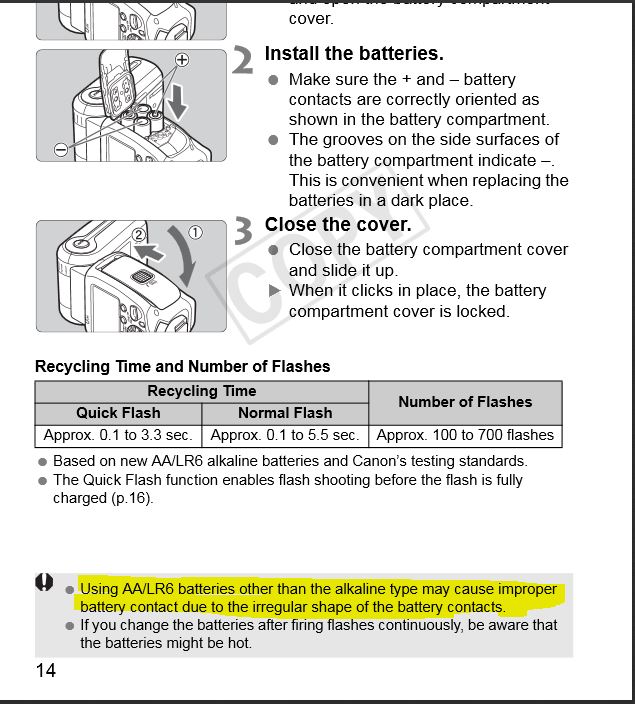
My thinking was orginaly that Lithium batteries would be better , but everytime I get a new set of Energizer® Ultimate Lithium AA Batteries, and put them in, I just get that battery symbol on the lcd and lights flashing but no other response from the Flash .. Then I have to go through up to 20 or 30 power cycles before the flash will start up properly I dont have to press and hold the reset buttons or anythign like that .. I suspect it is just a mater of power cycling untill it picks up on the batteries . Once it does pick up the batteries properly , I can turn it on and off at will and everything seems fine for a while ... it MIGHT be , that across different brands and makes and model of AA battery there is a bit of varince in the exact dimentions of the battery and contact terminals
"" An AA battery measures 49.2–50.5 mm (1.94–1.99 in) in length including the button terminal—and 13.5–14.5 mm (0.53–0.57 in) in diameter. The positive terminal button should be a minimum 1mm high and a maximum 5.5mm in diameter, the flat negative terminal should be a minimum diameter of 7mm.""" Wikipedia ...
Maybe the device is getting smarter ( more sensitive ) and thus limiting our options in battery choice .. maybe theres a deeper issue about the voltage .. I just dont know ....
I wish the guys who answer the phone at Canon tech support had capacity to shed light on this for me , but they just tell me to send the flash in for repairs, I am not really convinced that a repair will change much due to the fact that my flash works perfect when I put in the batteries that are reccomended by the Manual ...
When I use standard alkailine batteries as the instrction manual specfices , I have not experinced the issue ... In my case the advatage of having quicker recharge times and longer battery life with the Lithium battery is counterbalanced by the inconvience of having to " jumpstart" the unit ... If your workflow is to need the flash to be relible and not have to mess with it at what may be a time critical point ( potenital for lost photo oppertuinties) .. then probably best to use standard , alkline batteries , as the more expenive high quality lithiums seem to confuse this flash for some reason ... yet the same batties do not seem to confuse the earilier models of flash , like my 400 ex ...

Options
- Mark as New
- Bookmark
- Subscribe
- Mute
- Subscribe to RSS Feed
- Permalink
- Report Inappropriate Content
05-01-2014 12:49 PM
Wow. Never read this thread since I don't use the 600ex-RT, but I'm glad I poked my nose in. It doesn't surprise me that Canon contraindicates it, as they seem to be on this mission to drive out third party batteries. But I'm amazed that they don't actually work with the flash. Sounds to me like a design issue that Canon discovered too late and tried to fix with some labeling statements. That's a huge mark against the 600ex in my book.
The issue can't be consistent, otherwise this would be well known and there would have been a huge stink about it. Despite misconceptions posted in the other battery thread, Eneloops are the industry standard for flashes. If they didn't work at all in 600ex-RTs this would be well known.
Options
- Mark as New
- Bookmark
- Subscribe
- Mute
- Subscribe to RSS Feed
- Permalink
- Report Inappropriate Content
06-18-2014 10:45 AM
Did canon reply back to you on your battery issue. I am having the very same problem. This is my second speedlite. I returned the first one.
Options
- Mark as New
- Bookmark
- Subscribe
- Mute
- Subscribe to RSS Feed
- Permalink
- Report Inappropriate Content
06-25-2014 11:49 AM
Greetings all from Jakarta, Indonesia -
My speedlite 600ex-rt was working great until yesterday when I got the "battery empty" sign after I put in a fresh set of batteries. I thought the batteries might be bad so I bought a new set and still no luck.
For those interested I am using regular Alkaline (ABC brand) batteries which have worked fine for months.
I have also tried the few tricks posted in this forum with no luck.
I will return the flash tomorrow and tell everyone how it goes, cheers.
Jakartaguy
Options
- Mark as New
- Bookmark
- Subscribe
- Mute
- Subscribe to RSS Feed
- Permalink
- Report Inappropriate Content
06-25-2014 11:54 AM
WOW!! I just posted a second ago sharing my similar plight but just now found my own solution - please try it.
Step 1. Place in your batteries, don't close the cover.
Step 2. Turn the Flash ON
Step 3. Close the cover, you will see the "battery drained" sign
Step 4. Turn off the Flash, wait a few seconds.
Step 5. Push the SEL/SET button and don't let go.
Step 6. While holding the SEL/SET button turn ON the flash, or even move it to the LOCK position.
Your green light (hopefully) should turn on at this point.
If this works for you please be sure to do what you can to one day give back to the community,
cheers
Jakartaguy
Options
- Mark as New
- Bookmark
- Subscribe
- Mute
- Subscribe to RSS Feed
- Permalink
- Report Inappropriate Content
06-25-2014 04:32 PM
basicly the REAL answer is simply to turn it on and off several times untill the flash recognises the batteries ... All the button pressing and holding is superlitive to the fact that you are turning the flash unit on and off several times ... Sometime I have luck with one or two power cycles , other times 20 or more , but eventually it will pick up the batteries and I Never once pressed any extra buttons ...
Once the unit sees the batteries it will continue to see the batteries untill you take them out for a while , or let them drian down to 0%

Announcements
07/22/2026: New firmware updates are available.
EOS R6 Mark III - Version 1.1.0
05/13/2026: New firmware updates are available.
EOS R5 Mark II - Version 1.3.0
EOS R6 Mark II - Version 1.7.0
04/28/2026: Service Notice: Caution Concerning use of Lithium Batteries
03/17/2026: New firmware updates are available.
SELPHY CP1500 - Version 1.0.7.0
02/23/2026: New firmware update is available for EOS C50- Version 1.0.3.1
01/23/2026: New firmware update is available for RF 24-105mm F4 IS USM- Version 2.0.7
01/20/2026: New firmware updates are available.
10/21/2025: Service Notice: To Users of the Compact Digital Camera PowerShot V1
10/15/2025: New firmware updates are available.
Speedlite EL-5 - Version 1.2.0
Speedlite EL-1 - Version 1.1.0
Speedlite Transmitter ST-E10 - Version 1.2.0
07/28/2025: Notice of Free Repair Service for the Mirrorless Camera EOS R50 (Black)
05/21/2025: New firmware update available for EOS C500 Mark II - Version 1.1.5.1
Related Content
- Canon EOS3 film loading error code in EOS DSLR & Mirrorless Cameras
- EOS Rebel T7 continuously opening and closing shutter on its own in EOS DSLR & Mirrorless Cameras
- Canon Remote BR-E2 Battery Problem: Unable to open battery compartment in Camera Accessories
- Battery authenticity solution in Camera Accessories
- Canon R5ii showing overheat warning after 5 minutes and maybe 10 photos... in EOS DSLR & Mirrorless Cameras

Ⓒ 2026
Canon U.S.A Inc. All Rights Reserved. Reproduction in whole or part without permission is prohibited.
