Turn on suggestions
Auto-suggest helps you quickly narrow down your search results by suggesting possible matches as you type.
- Canon Community
- Discussions & Help
- Camera
- Point & Shoot Digital Cameras
- Re: G9 X - Picture edges unfocused on close range
Options
- Subscribe to RSS Feed
- Mark Topic as New
- Mark Topic as Read
- Float this Topic for Current User
- Bookmark
- Subscribe
- Mute
- Printer Friendly Page

Options
- Mark as New
- Bookmark
- Subscribe
- Mute
- Subscribe to RSS Feed
- Permalink
- Report Inappropriate Content
01-13-2018 01:39 PM
I just bought a PowerShot G9 X.
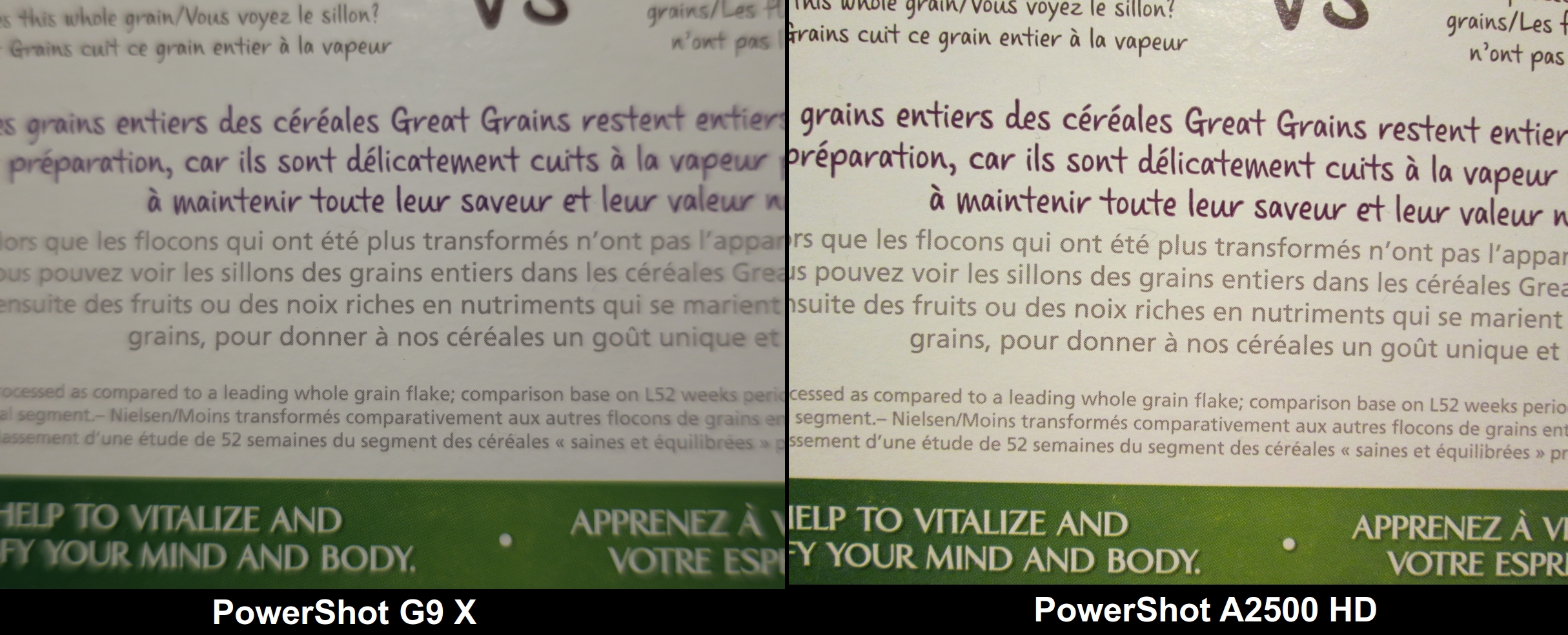
For close range photos the center focus is good, but the edges are out of focus. I've partially overcome this effect by selecting an edge for the focus frame, but then the center is out of focus though not as bad as the edges were. No matter what I try the focus is uneven and makes for bad close range photos. This camera is brand new.
My older, lower-end PowerShot A2500 HD manages to focus the whole shot evenly. See the attached photo comparisson.
My two questions are:
1) Is this normal or is something wrong with my camera?
2) If this is normal, can I change it so the focus is even across the image?
Thanks!
PowerShot G9 X
(not the mark ii version)

Solved! Go to Solution.
13 REPLIES 13
Options
- Mark as New
- Bookmark
- Subscribe
- Mute
- Subscribe to RSS Feed
- Permalink
- Report Inappropriate Content
01-14-2018 01:29 PM
@Waddizzle wrote:I frequently eyeball this table before I go out on a shoot. Select a camera with the same sensor size as yours.
http://www.dofmaster.com/doftable.html
It helps me to select lenses, and choose focal lengths. It is a bit dated, when it comes to camera selection. But, the size of sensors really has not changed. For example, I select the EOS 7D when I am using any APS-C DSLR by Canon.
You have to scroll way down the list to find PowerShot cameras.
I don't mean to be rude, but what the hell am I supposed to do with that chart? I'm not a photographer, just a regular point and shoot person. The only part that I could make sense of is "Circle of confusion".

Options
- Mark as New
- Bookmark
- Subscribe
- Mute
- Subscribe to RSS Feed
- Permalink
- Report Inappropriate Content
01-14-2018 02:09 PM
Anthony I'm just a point and shoot person too your camera is new and if I were you I'd call Canon and see if they have any ideas outside of buying a different camera and lenses etc.etc or if maybe they will replace yours with a new one. I still don't think what your seeing is normal and it makes no sense how it switches from bad middle to edge focus....get it on record contact Canon. I looked thru your manual and saw no "disclamers" like you can expect poor edge or center focus if you shoot like you did.
Options
- Mark as New
- Bookmark
- Subscribe
- Mute
- Subscribe to RSS Feed
- Permalink
- Report Inappropriate Content
01-14-2018 02:27 PM
Thanks John, your answer is the most helpful (and sensible). Why would they make a camera that's supposed to perform this badly? If I'm messing around with manual program functions and causing the problem, that's well and good, but if Auto setting is causing the problem and I have to work around with finicky manual settings, and STILL not get a satisfactory picture, then something's very wrong. Either the camera is defective or it just sucks. I hope it's the former rather than the latter.
I'm returning it to Amazon. What a bunch of stupid annoying trouble. I wish it was clearly damaged, like with big holes or tears in the images, or something easy to determine as defective. These subtle issues take longer to spot, lead to debates over the cause, and mean I have to go through a painstakingly meticulous testing process the next time I buy a camera. Why waste my time doing actual productive work when I could invest it on trying to figure out if my camera is bad?
Thands, I'll mark your answer as the solution.
Options
- Mark as New
- Bookmark
- Subscribe
- Mute
- Subscribe to RSS Feed
- Permalink
- Report Inappropriate Content
01-14-2018 03:03 PM
Your welcome Anthony and thankfully Amazon has a great return policy procedure. Your right those hidden, subtle problems dont always show up so fast. Consider an extended warranty with your next choice too. I wish you the best of luck. By the way I have the SX50HS and have taken many close shots both macro and just close up and never experienced what you have with the focus.

- « Previous
-
- 1
- 2
- Next »
- « Previous
-
- 1
- 2
- Next »
Announcements
07/22/2026: New firmware updates are available.
EOS R6 Mark III - Version 1.1.0
05/13/2026: New firmware updates are available.
EOS R5 Mark II - Version 1.3.0
EOS R6 Mark II - Version 1.7.0
04/28/2026: Service Notice: Caution Concerning use of Lithium Batteries
03/17/2026: New firmware updates are available.
SELPHY CP1500 - Version 1.0.7.0
02/23/2026: New firmware update is available for EOS C50- Version 1.0.3.1
01/23/2026: New firmware update is available for RF 24-105mm F4 IS USM- Version 2.0.7
01/20/2026: New firmware updates are available.
10/21/2025: Service Notice: To Users of the Compact Digital Camera PowerShot V1
10/15/2025: New firmware updates are available.
Speedlite EL-5 - Version 1.2.0
Speedlite EL-1 - Version 1.1.0
Speedlite Transmitter ST-E10 - Version 1.2.0
07/28/2025: Notice of Free Repair Service for the Mirrorless Camera EOS R50 (Black)
05/21/2025: New firmware update available for EOS C500 Mark II - Version 1.1.5.1
Related Content
- New Features Added For The C80 & C400 And Updates For The C50, C70 & R5C in Camera Software
- Best Settings for Low Light Photography on EOS R6 Mark II with RF 50mm f/1.2L? in EOS DSLR & Mirrorless Cameras
- EOS R7 Mark II "ideas discussion" in EOS DSLR & Mirrorless Cameras
- 24mm VCM is super sharp? in EF & RF Lenses
- A story about making a photo: Editing tips in Camera Software

Ⓒ 2026
Canon U.S.A Inc. All Rights Reserved. Reproduction in whole or part without permission is prohibited.
