Turn on suggestions
Auto-suggest helps you quickly narrow down your search results by suggesting possible matches as you type.
- Canon Community
- Discussions & Help
- Camera
- EOS DSLR & Mirrorless Cameras
- Re: EOS 90D Camera sensor scratches
Options
- Subscribe to RSS Feed
- Mark Topic as New
- Mark Topic as Read
- Float this Topic for Current User
- Bookmark
- Subscribe
- Mute
- Printer Friendly Page
EOS 90D Camera sensor scratches

Options
- Mark as New
- Bookmark
- Subscribe
- Mute
- Subscribe to RSS Feed
- Permalink
- Report Inappropriate Content
07-20-2022
07:36 AM
- last edited on
07-20-2022
08:19 AM
by
 Danny
Danny
Hello,
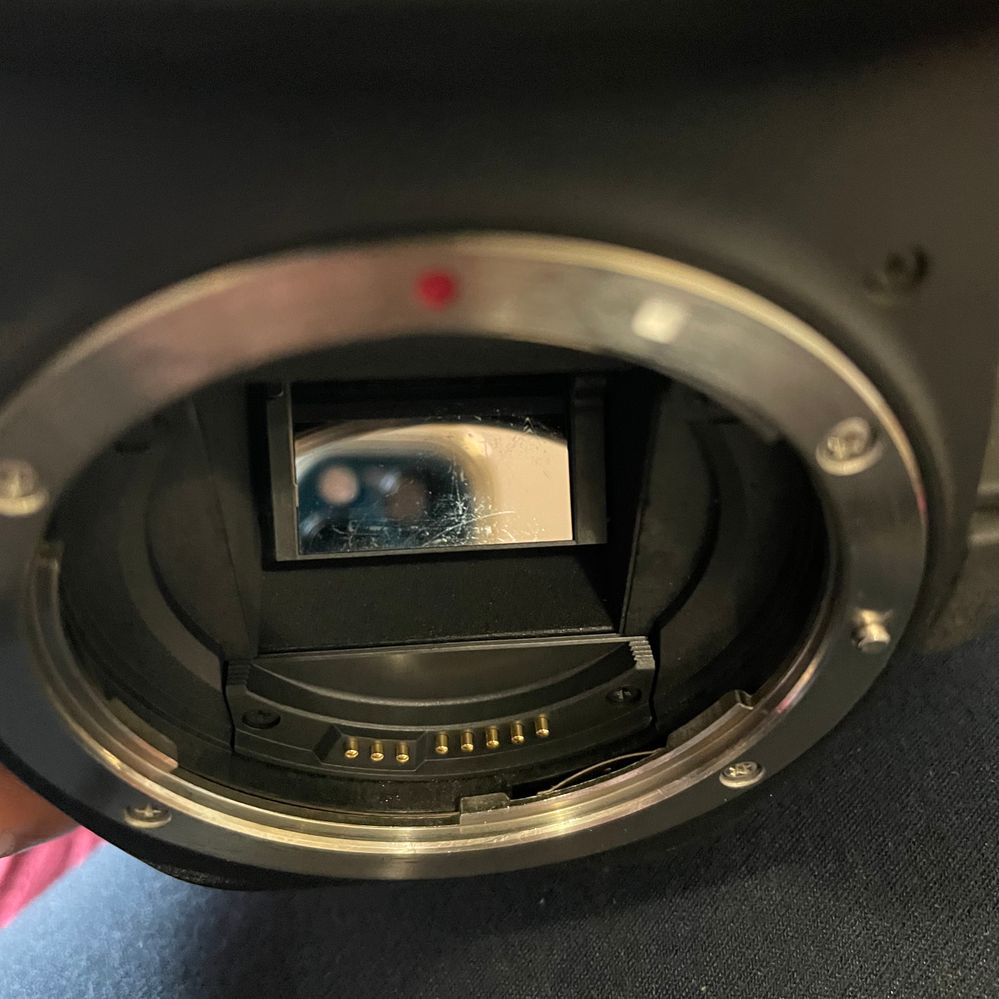
I recently returned from an African safari and needed to clean my lens and camera body. I did everything fine, but once I opened the camera cap and looked at the sensor, I was shocked to see so many scratches (photo attached)! Even though my pictures came out just fine, I was curious to examine (search for spots in the image) if there were any marks on the white paper photo. I checked out some videos on how to do a white paper test to check for spots in the sensor. The white paper photo has no mark on it that I can see (attached).
I'm wondering if the scratches are common for DSLR cameras. I bought the Canon 90D last year, and it has been great so far. Please let me know if this is something concerning.
Thank you!

24 REPLIES 24


Options
- Mark as New
- Bookmark
- Subscribe
- Mute
- Subscribe to RSS Feed
- Permalink
- Report Inappropriate Content
07-20-2022 11:23 AM
Understood😀. If it’s just dust you could try blowing it off or using the method Rick mentioned. It is hard to tell from the image, but I have never seen dust on the mirror look like you posted. The reason I asked if anyone had been inside the mirror box is that if someone tried cleaning and scratched the mirror it could look like that depending on the angle of the light. But, if no one had been in to clean then I think you should rule out that it could be fungus. Fungus can spread into your lenses as well.
If you aren’t comfortable trying to clean it maybe you have a local specialty camera shop or even a camera club where someone could advise you.
Ultimately you could send to Canon for a clean and adjust. That might be a good idea after returning from a safari.
John Hoffman
Conway, NH
R6 Mark III, M200 (converted to infrared), RF lenses, Pixma PRO-100, Pixma TR8620a, Lr Classic
Conway, NH
R6 Mark III, M200 (converted to infrared), RF lenses, Pixma PRO-100, Pixma TR8620a, Lr Classic
Options
- Mark as New
- Bookmark
- Subscribe
- Mute
- Subscribe to RSS Feed
- Permalink
- Report Inappropriate Content
07-20-2022 11:38 AM
It is not dust - I'm sure of that. It looks more like scratches because it stayed as it is even after some air puffs.
No one touches my camera gear. I have not had anyone cleaned it. Today was the first time I tried cleaning.
Once I accidentally changed the lens once without turning the camera switch off. It was outside in a park, the weather/temperature was nice and almost no humidity. Do you think that might be a reason for this? I will check with Canon support when I'm back in the US.
Thanks again!

Options
- Mark as New
- Bookmark
- Subscribe
- Mute
- Subscribe to RSS Feed
- Permalink
- Report Inappropriate Content
07-20-2022 01:21 PM
“Once I accidentally changed the lens once without turning the camera switch off. It was outside in a park, the weather/temperature was nice and almost no humidity. Do you think that might be a reason for this?”
No that did not damage anything.
EB
EOS 1DX and many lenses.
EOS 1DX and many lenses.
Options
- Mark as New
- Bookmark
- Subscribe
- Mute
- Subscribe to RSS Feed
- Permalink
- Report Inappropriate Content
07-20-2022 01:23 PM
You do need a pro to clean it and Canon is the best service people.
EB
EOS 1DX and many lenses.
EOS 1DX and many lenses.

Options
- Mark as New
- Bookmark
- Subscribe
- Mute
- Subscribe to RSS Feed
- Permalink
- Report Inappropriate Content
07-20-2022 02:20 PM
@ebiggs1 wrote:You do need a pro to clean it and Canon is the best service people.
I would hope that it is dust. It looks more like something hit it, to me.
--------------------------------------------------------
"Enjoying photography since 1972."
"Enjoying photography since 1972."

Options
- Mark as New
- Bookmark
- Subscribe
- Mute
- Subscribe to RSS Feed
- Permalink
- Report Inappropriate Content
07-20-2022 02:33 PM
Definitely agree that it's worth that Ernie. Not only will it mean the mirror is assessed and cleaned, but the sensor and interior should get a good cleaning too. If there is other dust or material in there it reduced the risk of it getting on the sensor and damaging that.
cheers, TREVOR
The mark of good photographer is less what they hold in their hand, it's more what they hold in their head;
"All the variety, all the charm, all the beauty of life is made up of light and shadow", Leo Tolstoy;
"Skill in photography is acquired by practice and not by purchase" Percy W. Harris

Options
- Mark as New
- Bookmark
- Subscribe
- Mute
- Subscribe to RSS Feed
- Permalink
- Report Inappropriate Content
07-20-2022 03:06 PM - edited 07-20-2022 03:07 PM
First of all, that is NOT your sensor.
That's the mirror which reflects the image to your viewfinder. Anything on that mirror will have NO EFFECT on images. The image sensor is behind a closed shutter, which itself is behind that mirror. When you take a photo that mirror flips up out of the way and seals off light coming in through the viewfinder, then the shutter opens to reveal the sensor and take the image, after which the shutter closes and the mirror drops back down. All this happens in a fraction of a second.
You might see those marks when looking through the viewfinder, but they're merely a nuisance. They likely aren't scratches, but just "smears" of something.
I DO NOT recommend you try to clean them yourself. The mirror is front-surfaced and delicate, with a semi-transparent patch (for the autofocus system). It is easy to damage and end up needing expensive repair... just to avoid a minor nuisance? Not worth it! Leave it alone and have the camera professionally cleaned sometime (perhaps when the sensor also needs cleaning).
Absolutely NEVER, EVER use common cotton buds ("Q-tips") inside a camera! Those shed tiny cotton fibers that can get into camera mechanisms and jam them. There are specialized lint free swabs for this sort of cleaning.
***********
Alan Myers
San Jose, Calif., USA
"Walk softly and carry a big lens."
GEAR: 5DII, 7DII (x2), 7D(x2) some other cameras, various lenses & accessories
FLICKR & ZENFOLIO
Options
- Mark as New
- Bookmark
- Subscribe
- Mute
- Subscribe to RSS Feed
- Permalink
- Report Inappropriate Content
07-20-2022 10:02 PM - edited 07-20-2022 10:13 PM
If you don't know what you are doing, send it to Canon for cleaning as others have mentioned. However, if your camera is out of warranty, you'll have to pay shipping and cleaning service (last time I did this costed me about $80 all together, $30 shipping + $50 cleaning, but they replaced the focusing screen as part of the dust cleaning). That was years ago and I'm not sure what the current cost for sensor cleaning is now. That was $80 because I tried cleaning my focusing screen (bad idea, don't touch focusing screen at all).
but...
sensor swap + 2 drops of sensor cleaning fluid and 4 passes with light pressure (swipe down left, swipt down right, flip swab, repeat left/right swap) and you have a clean mirror.

-jaewoo
Rebel XT, 7D, 5Dm3, 5DmIV (current), EOS R, EOS R5 (current), R50V (current)
Options
- Mark as New
- Bookmark
- Subscribe
- Mute
- Subscribe to RSS Feed
- Permalink
- Report Inappropriate Content
07-20-2022 10:26 PM - edited 07-20-2022 10:35 PM
What "air puffer" are you using? Is it like canned air spray or a manual bulb you have to squeeze? When I looked at the picture, it looked like some liquid that was pushed with a blast of air. Canned air has liquid propellant that can deposit some liquid on the mirror surface and the blast of air can spread that liquid around on the surface. This can happen when people tilt the canned air duster sideways or upside down, allowing some of the compressed liquid to be release with the gas. The only blower you should be using is a manual bulb blower inside your camera.

-jaewoo
Rebel XT, 7D, 5Dm3, 5DmIV (current), EOS R, EOS R5 (current), R50V (current)
Options
- Mark as New
- Bookmark
- Subscribe
- Mute
- Subscribe to RSS Feed
- Permalink
- Report Inappropriate Content
07-22-2022 10:56 AM
I used the manual bulb. I watched several videos before cleaning and most videos warned not to use the canned air spray.
Thank you!

Announcements
07/22/2026: New firmware updates are available.
EOS R6 Mark III - Version 1.1.0
05/13/2026: New firmware updates are available.
EOS R5 Mark II - Version 1.3.0
EOS R6 Mark II - Version 1.7.0
04/28/2026: Service Notice: Caution Concerning use of Lithium Batteries
03/17/2026: New firmware updates are available.
SELPHY CP1500 - Version 1.0.7.0
02/23/2026: New firmware update is available for EOS C50- Version 1.0.3.1
01/23/2026: New firmware update is available for RF 24-105mm F4 IS USM- Version 2.0.7
01/20/2026: New firmware updates are available.
10/21/2025: Service Notice: To Users of the Compact Digital Camera PowerShot V1
10/15/2025: New firmware updates are available.
Speedlite EL-5 - Version 1.2.0
Speedlite EL-1 - Version 1.1.0
Speedlite Transmitter ST-E10 - Version 1.2.0
07/28/2025: Notice of Free Repair Service for the Mirrorless Camera EOS R50 (Black)
05/21/2025: New firmware update available for EOS C500 Mark II - Version 1.1.5.1
Related Content
- vertical line on my canon ixus 145 in Point & Shoot Digital Cameras
- Canon 70d lens contact error in EOS DSLR & Mirrorless Cameras
- Canon RF-S 55-210mm F5-7.1 IS STM Lens - What is this inside the rear element? in EF & RF Lenses
- R1 cluster of hot pixels in EOS DSLR & Mirrorless Cameras
- EOS R5 Mark II - 4K60 “Fine” upgrade request in EOS DSLR & Mirrorless Cameras

Ⓒ 2026
Canon U.S.A Inc. All Rights Reserved. Reproduction in whole or part without permission is prohibited.
