Turn on suggestions
Auto-suggest helps you quickly narrow down your search results by suggesting possible matches as you type.
- Canon Community
- Discussions & Help
- Camera
- EOS DSLR & Mirrorless Cameras
- Changing default settings on the quick "rec" butto...
Options
- Subscribe to RSS Feed
- Mark Topic as New
- Mark Topic as Read
- Float this Topic for Current User
- Bookmark
- Subscribe
- Mute
- Printer Friendly Page

Options
- Mark as New
- Bookmark
- Subscribe
- Mute
- Subscribe to RSS Feed
- Permalink
- Report Inappropriate Content
09-26-2025 01:30 PM
Hi,
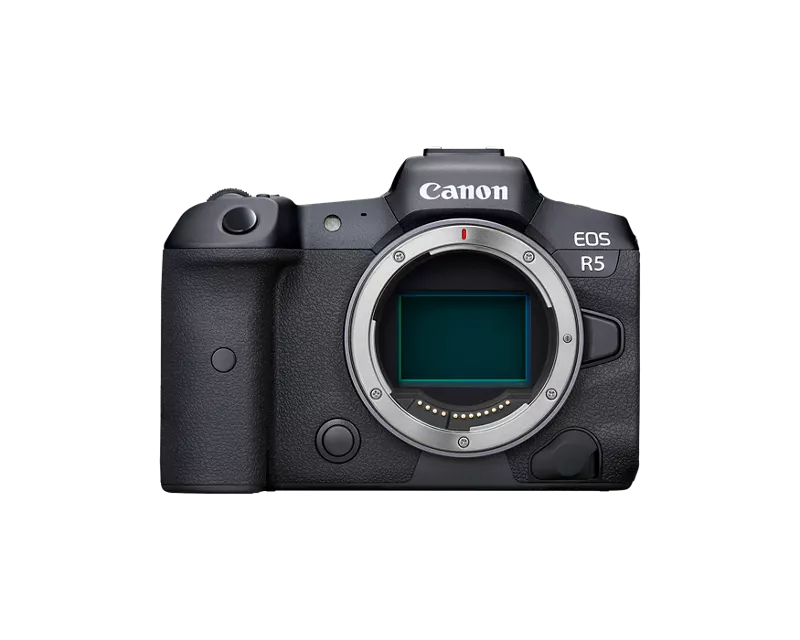
So I have the Canon R5, and discovered that I could quickly switch from photo mode to camera mode with the little "rec" button on top of the camera. I also discovered that this rec button is associated with the C3 camera mode, which I customised to fit my manual recording video mode. My problem is, whenever I'm taking photos, and I want to switch to video mode, the aperture is systematically set to 1.4 and the shutter speed to 1/40. And because I've been outside a lot lately, whenever I press the rec button I have to systematically change all the settings. My question is: how can I change the automatic and systematic 1.4 and 1/40 for whenever I press "rec"? Can't it match the settings used on photo mode?
I hope it's clear, sorry, English isn't my first language.
Thanks for the help!
Solved! Go to Solution.
1 ACCEPTED SOLUTION
Accepted Solutions

Anonymous
Not applicable
Options
- Mark as New
- Bookmark
- Subscribe
- Mute
- Subscribe to RSS Feed
- Permalink
- Report Inappropriate Content
09-27-2025 10:45 AM
You can change the 1.4 1/40 settings by switching to movie mode, set your desired settings and go to the yellow tab and save as C3. But those settings are fixed(untill you repeat the former), no way to make it the same as current photo settings.
6 REPLIES 6


Options
- Mark as New
- Bookmark
- Subscribe
- Mute
- Subscribe to RSS Feed
- Permalink
- Report Inappropriate Content
09-26-2025 05:54 PM
This question comes up every so often. I don’t think you can change it because it’s not exactly a standard video mode.
I think it’s used for “video snapshots.” The hybrid DSLRs had a special video mode that would capture say 5 seconds of Full HD video and then stop automatically. Canon named the behavior “video snapshot.” You would have to switch the camera to video mode and have snapshot mode enabled. Transitioning between photo and snapshot mode took too much time and the moment was lost.
The R Series cameras added a dedicated switch for video start / stop. Canon seems to have used the button to implement video snapshots while in photo mode. The 5-second time limit seems to have gone away. The user can record longer video snapshots if they want.
That seems to be the built in feature of the button in photo mode.
--------------------------------------------------------
"Enjoying photography since 1972."
"Enjoying photography since 1972."

Options
- Mark as New
- Bookmark
- Subscribe
- Mute
- Subscribe to RSS Feed
- Permalink
- Report Inappropriate Content
09-26-2025 06:02 PM
The EOS R5 has independent custom modes for stills and movies, so you can think of it as having C1(still), C2(still), C3(still) plus C1(movie), C2(movie) and C3(movie). When the camera is in stills mode, pressing the movie record button switches from the current stills mode to C3(movie) mode, using the settings that were stored with this mode. Unfortunately that means that unless the C3(movie) mode has the same exposure settings as the stills mode you were using then the two will not be identical, and the camera cannot carry over the current still exposure settings when switched to movie mode.
One possibility is to set the C3(movie) mode to be Tv mode with the shutter speed set to double the chosen frame rate and use AUTO ISO. This way you get the correct shutter speed, and a good exposure when you call up that quick movie mode. If you have the original EOS R5 (Mk1) not the EOS R5 Mark II then you can configure the M-Fn button to switch directly to movie mode - it's like a shortcut to pressing the MODE button and INFO button. However the other movie modes may have different exposure settings again.
Brian
EOS specialist trainer, photographer and author
-- Note: my spell checker is set for EN-GB, not EN-US --
Options
- Mark as New
- Bookmark
- Subscribe
- Mute
- Subscribe to RSS Feed
- Permalink
- Report Inappropriate Content
09-27-2025 10:25 AM
“ When the camera is in stills mode, pressing the movie record button switches from the current stills mode to C3(movie) mode, using the settings that were stored with this mode. “
Interesting.
--------------------------------------------------------
"Enjoying photography since 1972."
"Enjoying photography since 1972."
Anonymous
Not applicable
Options
- Mark as New
- Bookmark
- Subscribe
- Mute
- Subscribe to RSS Feed
- Permalink
- Report Inappropriate Content
09-27-2025 10:45 AM
You can change the 1.4 1/40 settings by switching to movie mode, set your desired settings and go to the yellow tab and save as C3. But those settings are fixed(untill you repeat the former), no way to make it the same as current photo settings.
Options
- Mark as New
- Bookmark
- Subscribe
- Mute
- Subscribe to RSS Feed
- Permalink
- Report Inappropriate Content
09-27-2025 12:30 PM
This is the behaviour for all EOS R cameras that don’t have a mode dial with the modes on them. So includes EOS R1, R3, R5, R5 Mk2, R and Ra.
For other R-series cameras the movie button normally starts recording using a limited auto exposure movie mode, when the button is pressed while the camera is in stills mode.
Brian
EOS specialist trainer, photographer and author
-- Note: my spell checker is set for EN-GB, not EN-US --
Options
- Mark as New
- Bookmark
- Subscribe
- Mute
- Subscribe to RSS Feed
- Permalink
- Report Inappropriate Content
09-28-2025 02:20 AM
That did it! Thank you so much

Announcements
07/22/2026: New firmware updates are available.
EOS R6 Mark III - Version 1.1.0
05/13/2026: New firmware updates are available.
EOS R5 Mark II - Version 1.3.0
EOS R6 Mark II - Version 1.7.0
04/28/2026: Service Notice: Caution Concerning use of Lithium Batteries
03/17/2026: New firmware updates are available.
SELPHY CP1500 - Version 1.0.7.0
02/23/2026: New firmware update is available for EOS C50- Version 1.0.3.1
01/23/2026: New firmware update is available for RF 24-105mm F4 IS USM- Version 2.0.7
01/20/2026: New firmware updates are available.
10/21/2025: Service Notice: To Users of the Compact Digital Camera PowerShot V1
10/15/2025: New firmware updates are available.
Speedlite EL-5 - Version 1.2.0
Speedlite EL-1 - Version 1.1.0
Speedlite Transmitter ST-E10 - Version 1.2.0
07/28/2025: Notice of Free Repair Service for the Mirrorless Camera EOS R50 (Black)
05/21/2025: New firmware update available for EOS C500 Mark II - Version 1.1.5.1
Related Content
- USB-C not charging my EOS R50 V in EOS DSLR & Mirrorless Cameras
- Cannot batch-select / select all photos by date in Camera Connect App (IXUS 255 HS & iPhone 12) in Camera Software
- Rebel SL3 - Screen is dark (can't see subject matter) when I choose "on" setting in EOS DSLR & Mirrorless Cameras
- EOS R5 Mark II How to use Pre-Continuous shooting in High Burst Rate. in EOS DSLR & Mirrorless Cameras
- EOS R6 Mark III How to retain video settings like on EOS R6 in EOS DSLR & Mirrorless Cameras

Ⓒ 2026
Canon U.S.A Inc. All Rights Reserved. Reproduction in whole or part without permission is prohibited.
