02-03-2023 11:00 PM - edited 02-03-2023 11:06 PM
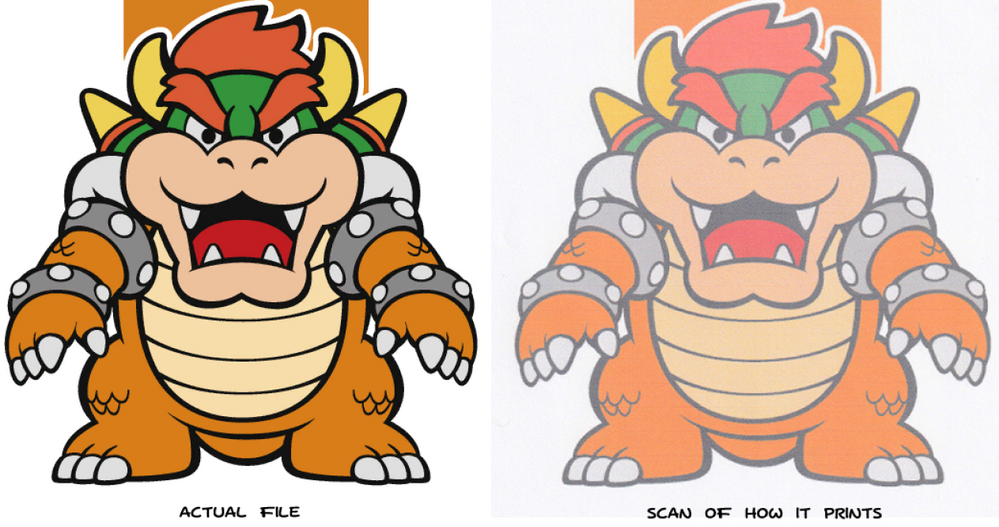
I recently received a Pixma TR4520 that was "unresponsive". After some effort, I fixed the issue (a piece of dog hair lodged in a roller) and now it prints. The problem is, when I print a file from my PC (windows 10), it comes out faded. I thought it might be based on the print speed, but after trying to print from my phone, the blacks come out only a bit better and the rest is still faded. brand new cartridges, drivers installed correctly, and there are no errors on the printer itself.
10/15/2025: New firmware updates are available.
Speedlite EL-5 - Version 1.2.0
Speedlite EL-1 - Version 1.1.0
Speedlite Transmitter ST-E10 - Version 1.2.0
07/24/2025: New firmware updates are available.
EOS R5 Mark II - Version 1.1.1
07/23/2025: New firmware updates are available.
7/17/2025: New firmware updates are available.
EOS R6 Mark II - Version 1.6.0
02/20/2025: New firmware updates are available.
RF70-200mm F2.8 L IS USM Z - Version 1.0.6
RF24-105mm F2.8 L IS USM Z - Version 1.0.9
RF100-300mm F2.8 L IS USM - Version 1.0.8
RF50mm F1.4 L VCM - Version 1.0.2
RF24mm F1.4 L VCM - Version 1.0.3
Canon U.S.A Inc. All Rights Reserved. Reproduction in whole or part without permission is prohibited.
